主要内容

Simulate and Generate Code for Depth Anything V2 PyTorch Model in Simulink

Since R2026a

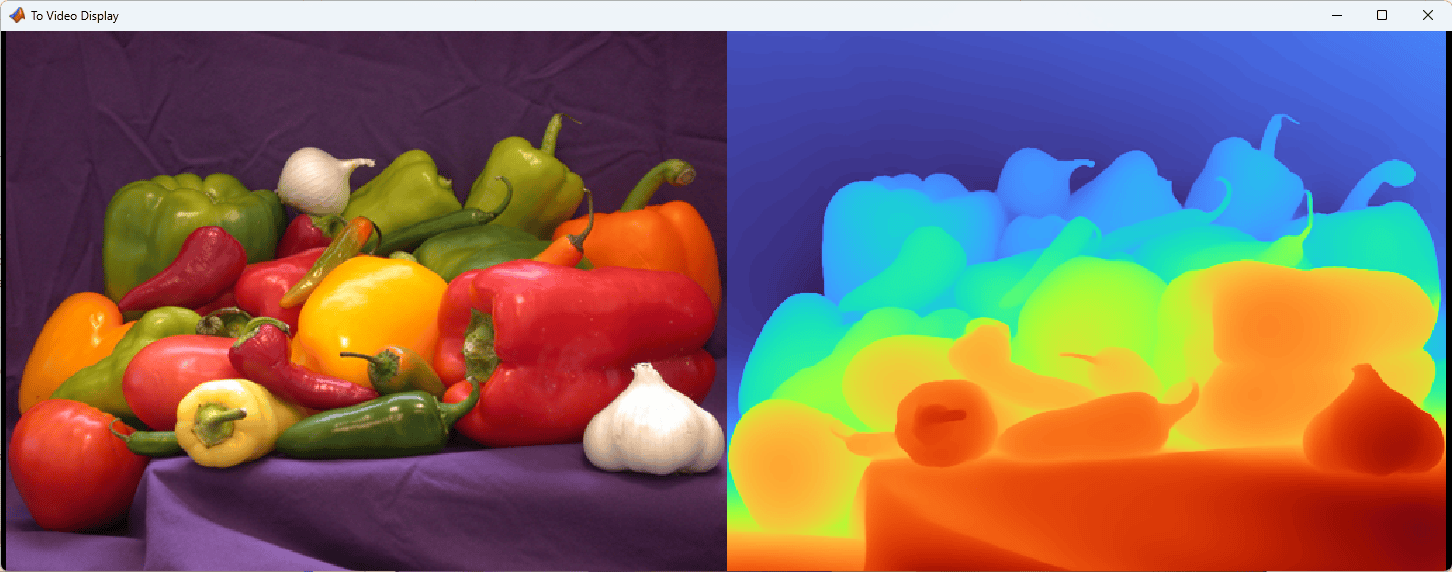
This example shows how to simulate and generate deployable code for the Depth Anything V2 [1] PyTorch ExportedProgram model. Depth Anything V2 is a monocular depth estimation (MDE) foundation model that provides both zero-shot relative and metric depth-estimation. Monocular depth estimation is useful in autonomous driving [2] and navigation [3] scenarios.

In this example, you load the ExportedProgram file named Depth-Anything-V2-Small-Exported-Program.pt2 into the PyTorch ExportedProgram block in Simulink. Then you simulate the model and generate deployable CUDA code.

Download Pretrained Model

Download the pretrained Depth-Anything-V2-Small.zip from the MathWorks website, then unzip the file. The file is approximately 100MB in size.

zipFile = matlab.internal.examples.downloadSupportFile("coder","Depth-Anything-V2-Small/v000/Depth-Anything-V2-Small.zip");
filepath = fileparts(zipFile);
unzip(zipFile,filepath);

Load the Simulink Model

Open the DepthAnythingV2Demo Simulink model.

modelName = "DepthAnythingV2Demo";
open_system(modelName);
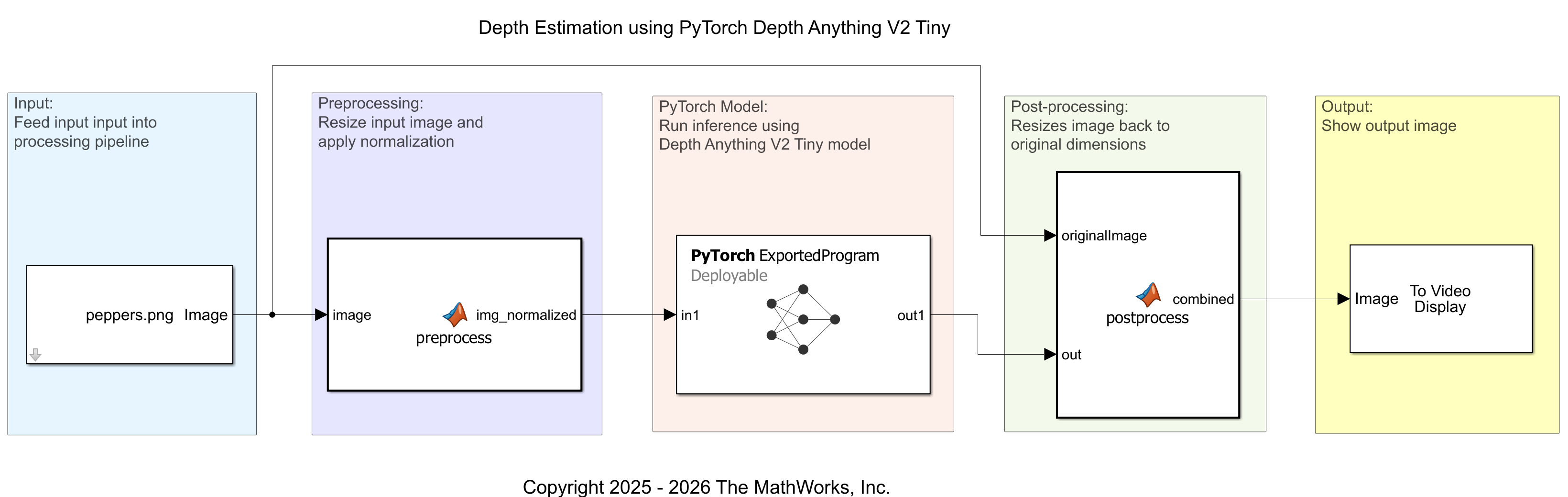
First, load an input image by using an Image From File block.

Next to prepare the input to the PyTorch ExportedProgram, the MATLAB Function preprocesses the data by performing these steps:

  1. Cast the input to single precision and rescale it to the range [0,1] because the original PyTorch model referenced in [1] expects the inputs to be of type single and in the range of [0,1].

  2. Resize the input to 518-by-784-by-3 to match the input size of the ExportedProgram object when it is converted from a PyTorch model.

  3. Apply zero-center normalization by using the ImageNet statistics for mean and standard deviation because the original PyTorch model expects zero-center normalized based on ImageNet's statistics.

The PyTorch ExportedProgram block then performs forward inference on the data and outputs it to a second MATLAB Function block, which performs these steps:

  1. Resize the size of data to 384-by-512-by-3.

  2. Rescale the value of data to [0, 255].

  3. Use the ind2rgb function to convert the indexed data to RGB format that uses turbo colormap.

  4. Concatenate the original image and depth map image together.

Configure the PyTorch ExportedProgram Block

Specify the file path in the PyTorch ExportedProgram block dialog box by setting ExportedProgram model file to the downloaded Depth-Anything-V2-Small-Exported-Program.pt2.
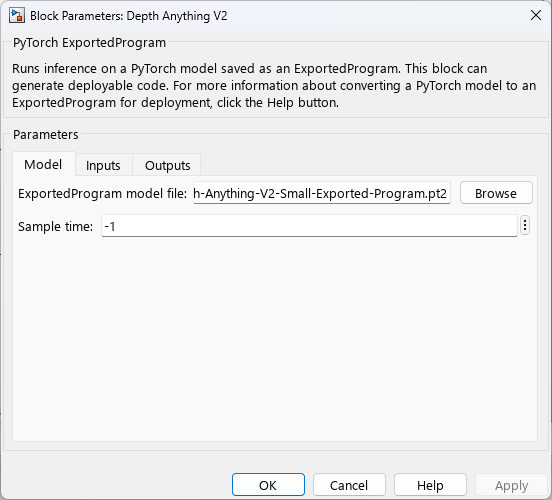
Alternatively, you can use this code to specify the path to the Depth-Anything-V2-Small-Exported-Program.pt2 file in the PyTorch ExportedProgram block.

blockName = "Depth Anything V2";
blockPath = modelName + "/" + blockName;
exportedProgramFileName = fullfile(filepath, "Depth-Anything-V2-Small-Exported-Program.pt2");
set_param(blockPath,'ModelFilePath', exportedProgramFileName);

Permute the Input and Output

By default, MATLAB stores input data in arrays, where the elements are in the order [Height, Width, Channel, Batch]. However, the PyTorch ExportedProgram block requires the elements of the input array to be in the order [Batch, Channel, Height, Width]. To ensure compatibility, in the block dialog box, in the Inputs tab, set the Permutation to apply column to [4 3 1 2].
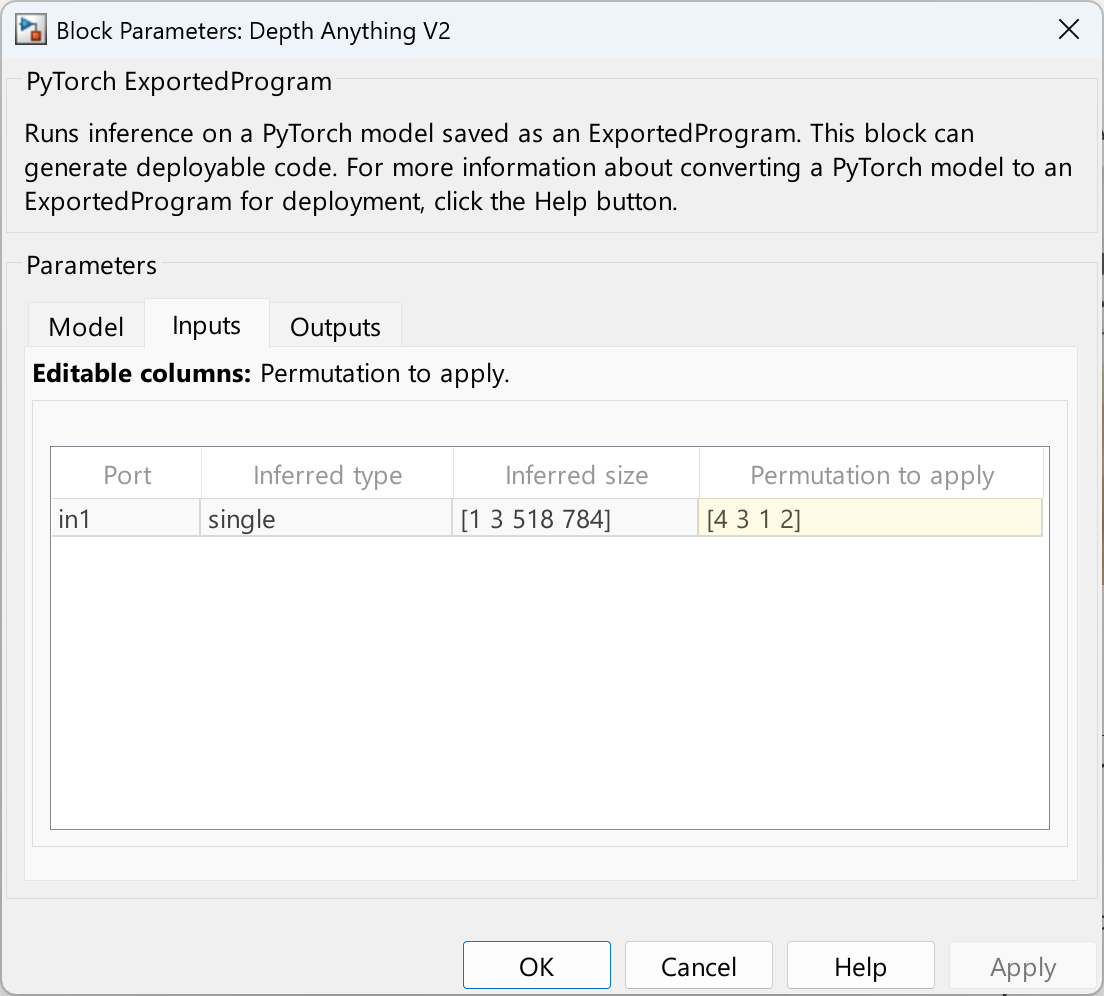
Alternatively, apply a permutation order of [4 3 1 2] to the input array elements by using this code.

set_param(blockPath, "InputsTable", ...
    "{'in1','single','[1 3 518 784]','[4 3 1 2]'}");

The PyTorch ExportedProgram block outputs an array where the elements are in the order [Channel, Height, Width]. However, the MATLAB Function block for post-processing expects the array elements in the order [Height, Width, Channel]. In the block dialog box, in the Outputs tab, set the Permutation to apply column to [2 3 1].
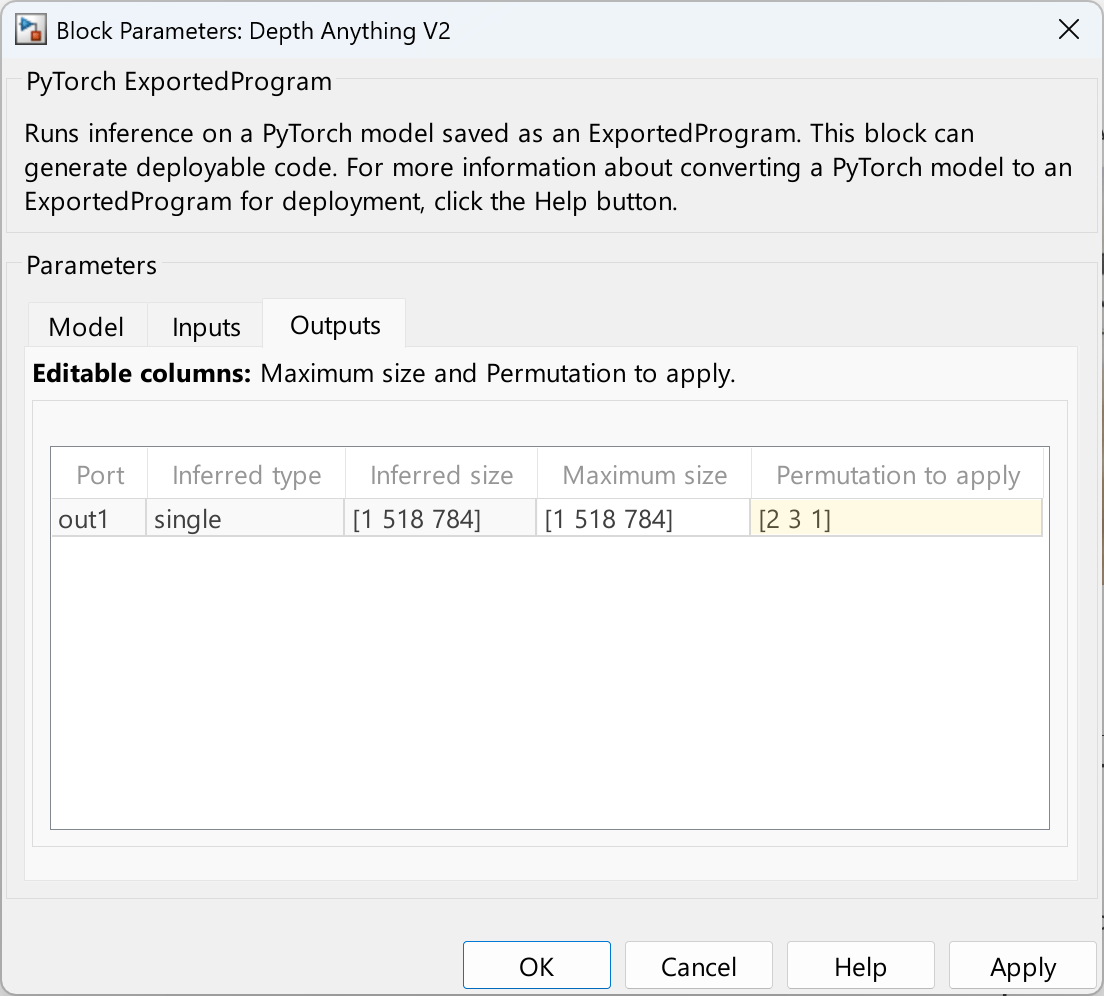
Alternatively, apply a permutation order of [2 3 1] on the output data by entering this code.

set_param(blockPath, "OutputsTable", ...
    "{'out1','single','[1 518 784]','[1 518 784]','[2 3 1]'}");

Configure the Model for GPU Acceleration

To speed up simulation, in Simulink Toolstrip, click Model Settings to open the Configuration Parameters dialog box. In the Simulation Target pane, select GPU Acceleration. Alternatively, enter this code:

set_param(modelName,'GPUAcceleration','on');

Simulate the Model

sim(modelName);

The model displays the original input image and the estimated depth map.
Generate Code

Configure the model and generate CUDA code by using this code.

set_param(modelName,'TargetLang','C++');
set_param(modelName,'GenerateGPUCode','CUDA');
slbuild(modelName);
### Unable to find Simulink cache file "DepthAnythingV2Demo.slxc".
### Searching for referenced models in model 'DepthAnythingV2Demo'.
### Total of 1 models to build.
### Starting build procedure for: DepthAnythingV2Demo
### Generating code and artifacts to 'Model specific' folder structure
### Generating code into build folder: C:\Users\user\OneDrive - MathWorks\Documents\MATLAB\ExampleManager\user.26aExamples\coder_ai-ex28313681\DepthAnythingV2Demo_ert_rtw
### Invoking Target Language Compiler on DepthAnythingV2Demo.rtw
### Using System Target File: Z:\35\user.Bdoc.j3086572\runnable\matlab\rtw\c\ert\ert.tlc
### Loading TLC function libraries
........
### Initial pass through model to cache user defined code
...
### Caching model source code
...............................................................................
...............................................................................
...............................................................................
...............................................................................
...............................................................................
...............................................................................
...............................................................................
...............................................................................
...............................................................................
...............................................................................
...............................................................................
...............................................................................
...............................................................................
...............................................................................
...............................................................................
...............................................................
### Writing header file DepthAnythingV2Demo_types.h
.
### Writing source file DepthAnythingV2Demo.cu
### Writing header file DepthAnythingV2Demo_private.h
### Writing header file DepthAnythingV2Demo.h
### Writing header file rtwtypes.h
.
### Writing source file DepthAnythingV2Demo_data.cu
### Writing source file ert_main.cu
### TLC code generation complete (took 16.05s).
### Saving binary information cache.
### Using toolchain: NVIDIA CUDA (w/Microsoft Visual C++ 2019) | nmake (64-bit Windows)
### Creating 'C:\Users\user\OneDrive - MathWorks\Documents\MATLAB\ExampleManager\user.26aExamples\coder_ai-ex28313681\DepthAnythingV2Demo_ert_rtw\DepthAnythingV2Demo.mk' ...
### Building 'DepthAnythingV2Demo': nmake  -f DepthAnythingV2Demo.mk all
 
C:\Users\user\OneDrive - MathWorks\Documents\MATLAB\ExampleManager\user.26aExamples\coder_ai-ex28313681\DepthAnythingV2Demo_ert_rtw>set "VSCMD_START_DIR=C:\Users\user\OneDrive - MathWorks\Documents\MATLAB\ExampleManager\user.26aExamples\coder_ai-ex28313681\DepthAnythingV2Demo_ert_rtw"  
 
C:\Users\user\OneDrive - MathWorks\Documents\MATLAB\ExampleManager\user.26aExamples\coder_ai-ex28313681\DepthAnythingV2Demo_ert_rtw>call "setup_msvc160.bat"  
 
C:\Users\user\OneDrive - MathWorks\Documents\MATLAB\ExampleManager\user.26aExamples\coder_ai-ex28313681\DepthAnythingV2Demo_ert_rtw>set "VS160COMNTOOLS=C:\Program Files (x86)\Microsoft Visual Studio\2019\Professional\Common7\Tools\"  
 
C:\Users\user\OneDrive - MathWorks\Documents\MATLAB\ExampleManager\user.26aExamples\coder_ai-ex28313681\DepthAnythingV2Demo_ert_rtw>call "C:\Program Files (x86)\Microsoft Visual Studio\2019\Professional\Common7\Tools\..\..\VC\Auxiliary\Build\VCVARSALL.BAT" AMD64  
********************************************************************** 
** Visual Studio 2019 Developer Command Prompt v16.7.7 
** Copyright (c) 2020 Microsoft Corporation 
********************************************************************** 
[vcvarsall.bat] Environment initialized for: 'x64' 
 
Microsoft (R) Program Maintenance Utility Version 14.27.29112.0 
Copyright (C) Microsoft Corporation.  All rights reserved. 
 
	nvcc -c  -Wno-deprecated-gpu-targets -Xcompiler "/wd 4819" -rdc=true -Xcudafe "--display_error_number --diag_suppress=unsigned_compare_with_zero" --use-local-env  -O3 -arch sm_50 -D MW_DL_DATA_PATH=C:/Users/user/ONEDRI~1/DOCUME~1/MATLAB/EXAMPL~1/YANGZH~2.26A/CODER_~2 -D MW_CUDA_ARCH=500 -D CLASSIC_INTERFACE=0 -D ALLOCATIONFCN=0 -D TERMFCN=1 -D ONESTEPFCN=1 -D MAT_FILE=0 -D MULTI_INSTANCE_CODE=1 -D INTEGER_CODE=0 -D MT=0  -D TID01EQ=0 -D MODEL=DepthAnythingV2Demo -D NUMST=1 -D NCSTATES=0 -D HAVESTDIO -D MODEL_HAS_DYNAMICALLY_LOADED_SFCNS=0 -o  "DAHostLib_rtw.obj" "Z:\35\Y7NM98~W\runnable\matlab\toolbox\shared\spc\src_ml\extern\src\DAHostLib_rtw.c" 
DAHostLib_rtw.c 
	nvcc -c  -Wno-deprecated-gpu-targets -Xcompiler "/wd 4819" -rdc=true -Xcudafe "--display_error_number --diag_suppress=unsigned_compare_with_zero" --use-local-env  -O3 -arch sm_50 -D MW_DL_DATA_PATH=C:/Users/user/ONEDRI~1/DOCUME~1/MATLAB/EXAMPL~1/YANGZH~2.26A/CODER_~2 -D MW_CUDA_ARCH=500 -D CLASSIC_INTERFACE=0 -D ALLOCATIONFCN=0 -D TERMFCN=1 -D ONESTEPFCN=1 -D MAT_FILE=0 -D MULTI_INSTANCE_CODE=1 -D INTEGER_CODE=0 -D MT=0  -D TID01EQ=0 -D MODEL=DepthAnythingV2Demo -D NUMST=1 -D NCSTATES=0 -D HAVESTDIO -D MODEL_HAS_DYNAMICALLY_LOADED_SFCNS=0 -o  "HostLib_Multimedia.obj" "Z:\35\Y7NM98~W\runnable\matlab\toolbox\shared\dsp\vision\matlab\include\HostLib_Multimedia.c" 
HostLib_Multimedia.c 
	nvcc -c  -Wno-deprecated-gpu-targets -Xcompiler "/wd 4819" -rdc=true -Xcudafe "--display_error_number --diag_suppress=unsigned_compare_with_zero" --use-local-env  -O3 -arch sm_50 -D MW_DL_DATA_PATH=C:/Users/user/ONEDRI~1/DOCUME~1/MATLAB/EXAMPL~1/YANGZH~2.26A/CODER_~2 -D MW_CUDA_ARCH=500 -D CLASSIC_INTERFACE=0 -D ALLOCATIONFCN=0 -D TERMFCN=1 -D ONESTEPFCN=1 -D MAT_FILE=0 -D MULTI_INSTANCE_CODE=1 -D INTEGER_CODE=0 -D MT=0  -D TID01EQ=0 -D MODEL=DepthAnythingV2Demo -D NUMST=1 -D NCSTATES=0 -D HAVESTDIO -D MODEL_HAS_DYNAMICALLY_LOADED_SFCNS=0 -o  "HostLib_Video.obj" "Z:\35\Y7NM98~W\runnable\matlab\toolbox\vision\include\HostLib_Video.c" 
HostLib_Video.c 
	nvcc -c  -Wno-deprecated-gpu-targets -Xcompiler "/wd 4819" -rdc=true -Xcudafe "--display_error_number --diag_suppress=unsigned_compare_with_zero" --use-local-env  -O3 -arch sm_50 -D MW_DL_DATA_PATH=C:/Users/user/ONEDRI~1/DOCUME~1/MATLAB/EXAMPL~1/YANGZH~2.26A/CODER_~2 -D MW_CUDA_ARCH=500 -D CLASSIC_INTERFACE=0 -D ALLOCATIONFCN=0 -D TERMFCN=1 -D ONESTEPFCN=1 -D MAT_FILE=0 -D MULTI_INSTANCE_CODE=1 -D INTEGER_CODE=0 -D MT=0  -D TID01EQ=0 -D MODEL=DepthAnythingV2Demo -D NUMST=1 -D NCSTATES=0 -D HAVESTDIO -D MODEL_HAS_DYNAMICALLY_LOADED_SFCNS=0 -o  "MWCUBLASUtils.obj" "C:\Users\user\ONEDRI~1\DOCUME~1\MATLAB\EXAMPL~1\YANGZH~2.26A\CODER_~2\DepthAnythingV2Demo_ert_rtw\MWCUBLASUtils.cpp" 
MWCUBLASUtils.cpp 
	nvcc -c  -Wno-deprecated-gpu-targets -Xcompiler "/wd 4819" -rdc=true -Xcudafe "--display_error_number --diag_suppress=unsigned_compare_with_zero" --use-local-env  -O3 -arch sm_50 -D MW_DL_DATA_PATH=C:/Users/user/ONEDRI~1/DOCUME~1/MATLAB/EXAMPL~1/YANGZH~2.26A/CODER_~2 -D MW_CUDA_ARCH=500 -D CLASSIC_INTERFACE=0 -D ALLOCATIONFCN=0 -D TERMFCN=1 -D ONESTEPFCN=1 -D MAT_FILE=0 -D MULTI_INSTANCE_CODE=1 -D INTEGER_CODE=0 -D MT=0  -D TID01EQ=0 -D MODEL=DepthAnythingV2Demo -D NUMST=1 -D NCSTATES=0 -D HAVESTDIO -D MODEL_HAS_DYNAMICALLY_LOADED_SFCNS=0 -o  "DepthAnythingV2Demo.obj" "C:\Users\user\ONEDRI~1\DOCUME~1\MATLAB\EXAMPL~1\YANGZH~2.26A\CODER_~2\DepthAnythingV2Demo_ert_rtw\DepthAnythingV2Demo.cu" 
DepthAnythingV2Demo.cu 
tmpxft_00005674_00000000-7_DepthAnythingV2Demo.cudafe1.cpp 
	nvcc -c  -Wno-deprecated-gpu-targets -Xcompiler "/wd 4819" -rdc=true -Xcudafe "--display_error_number --diag_suppress=unsigned_compare_with_zero" --use-local-env  -O3 -arch sm_50 -D MW_DL_DATA_PATH=C:/Users/user/ONEDRI~1/DOCUME~1/MATLAB/EXAMPL~1/YANGZH~2.26A/CODER_~2 -D MW_CUDA_ARCH=500 -D CLASSIC_INTERFACE=0 -D ALLOCATIONFCN=0 -D TERMFCN=1 -D ONESTEPFCN=1 -D MAT_FILE=0 -D MULTI_INSTANCE_CODE=1 -D INTEGER_CODE=0 -D MT=0  -D TID01EQ=0 -D MODEL=DepthAnythingV2Demo -D NUMST=1 -D NCSTATES=0 -D HAVESTDIO -D MODEL_HAS_DYNAMICALLY_LOADED_SFCNS=0 -o  "DepthAnythingV2Demo_data.obj" "C:\Users\user\ONEDRI~1\DOCUME~1\MATLAB\EXAMPL~1\YANGZH~2.26A\CODER_~2\DepthAnythingV2Demo_ert_rtw\DepthAnythingV2Demo_data.cu" 
DepthAnythingV2Demo_data.cu 
tmpxft_0000809c_00000000-7_DepthAnythingV2Demo_data.cudafe1.cpp 
	nvcc -c  -Wno-deprecated-gpu-targets -Xcompiler "/wd 4819" -rdc=true -Xcudafe "--display_error_number --diag_suppress=unsigned_compare_with_zero" --use-local-env  -O3 -arch sm_50 -D MW_DL_DATA_PATH=C:/Users/user/ONEDRI~1/DOCUME~1/MATLAB/EXAMPL~1/YANGZH~2.26A/CODER_~2 -D MW_CUDA_ARCH=500 -D CLASSIC_INTERFACE=0 -D ALLOCATIONFCN=0 -D TERMFCN=1 -D ONESTEPFCN=1 -D MAT_FILE=0 -D MULTI_INSTANCE_CODE=1 -D INTEGER_CODE=0 -D MT=0  -D TID01EQ=0 -D MODEL=DepthAnythingV2Demo -D NUMST=1 -D NCSTATES=0 -D HAVESTDIO -D MODEL_HAS_DYNAMICALLY_LOADED_SFCNS=0 -o  "ert_main.obj" "C:\Users\user\ONEDRI~1\DOCUME~1\MATLAB\EXAMPL~1\YANGZH~2.26A\CODER_~2\DepthAnythingV2Demo_ert_rtw\ert_main.cu" 
ert_main.cu 
tmpxft_000022a4_00000000-7_ert_main.cudafe1.cpp 
### Creating standalone executable "..\DepthAnythingV2Demo.exe" ... 
	nvcc -Xnvlink -w -Xarchive "/IGNORE:4006" -Xarchive "/IGNORE:4221" kernel32.lib ws2_32.lib mswsock.lib advapi32.lib cudart.lib -Wno-deprecated-gpu-targets --use-local-env -arch sm_50 -lcublas -lcusolver -lcufft -lcurand -lcusparse -o ..\DepthAnythingV2Demo.exe DAHostLib_rtw.obj HostLib_Multimedia.obj HostLib_Video.obj MWCUBLASUtils.obj DepthAnythingV2Demo.obj DepthAnythingV2Demo_data.obj ert_main.obj   
kernel32.lib 
ws2_32.lib 
mswsock.lib 
advapi32.lib 
cudart.lib 
DAHostLib_rtw.obj 
HostLib_Multimedia.obj 
HostLib_Video.obj 
MWCUBLASUtils.obj 
DepthAnythingV2Demo.obj 
DepthAnythingV2Demo_data.obj 
ert_main.obj 
   Creating library ..\DepthAnythingV2Demo.lib and object ..\DepthAnythingV2Demo.exp 
### Created: ..\DepthAnythingV2Demo.exe 
### Successfully generated all binary outputs. 
### Successful completion of build procedure for: DepthAnythingV2Demo
### Simulink cache artifacts for 'DepthAnythingV2Demo' were created in 'C:\Users\user\OneDrive - MathWorks\Documents\MATLAB\ExampleManager\user.26aExamples\coder_ai-ex28313681\DepthAnythingV2Demo.slxc'.

Build Summary

Top model targets:

Model                Build Reason                                         Status                        Build Duration
======================================================================================================================
DepthAnythingV2Demo  Information cache folder or artifacts were missing.  Code generated and compiled.  0h 9m 9.826s

1 of 1 models built (0 models already up to date)
Build duration: 0h 9m 19.166s

References

[1] Yang, Lihe, Bingyi Kang, Zilong Huang, Zhen Zhao, Xiaogang Xu, Jiashi Feng, and Hengshuang Zhao. “Depth Anything V2.” arXiv, October 20, 2024. https://doi.org/10.48550/arXiv.2406.09414.

[2] Wang, Yan, Wei-Lun Chao, Divyansh Garg, Bharath Hariharan, Mark Campbell, and Kilian Q. Weinberger. “Pseudo-LiDAR from Visual Depth Estimation: Bridging the Gap in 3D Object Detection for Autonomous Driving.” arXiv, February 22, 2020. https://doi.org/10.48550/arXiv.1812.07179.

[3] Wofk, Diana, Fangchang Ma, Tien-Ju Yang, Sertac Karaman, and Vivienne Sze. “FastDepth: Fast Monocular Depth Estimation on Embedded Systems.” arXiv, March 8, 2019. https://doi.org/10.48550/arXiv.1903.03273.

See Also

Blocks

Objects

Topics