主要内容

comm.SOQPSKModulator

Modulate signal using SOQPSK method

Since R2026a

Description

The comm.SOQPSKModulator System object™ modulates an input signal by using the shaped-offset quadrature phase shift keying (SOQPSK) method. The output is a baseband representation of the modulated signal. For more information about the modulation and filtering applied, see Algorithms.

To modulate a signal using the SOQPSK method:

  1. Create the comm.SOQPSKModulator object and set its properties.

  2. Call the object with arguments, as if it were a function.

To learn more about how System objects work, see What Are System Objects?

Creation

Description

soqpskmod = comm.SOQPSKModulator creates a modulator System object to modulate input signals using the SOQPSK method.

example

soqpskmod = comm.SOQPSKModulator(Name=Value) sets properties using one or more name-value arguments. For example, comm.SOQPSKModulator(FrequencyPulse='A') specifies type 'A' frequency pulse shaping.

example

Properties

expand all

Unless otherwise indicated, properties are nontunable, which means you cannot change their values after calling the object. Objects lock when you call them, and the release function unlocks them.

If a property is tunable, you can change its value at any time.

For more information on changing property values, see System Design in MATLAB Using System Objects.

Type of frequency pulse shaping used by the modulator to smooth the phase transitions of the modulated signal, specified as 'TG', 'A', or 'B'. For more information, see Pulse Shape Filtering.

Precoder initial input, specified as a binary-valued scalar or a two-element row vector. When provided as a scalar, the same value applies to both elements.

This property defines the first data symbol used by the modulator before the first call of the object, in reverse chronological order.

Initial phase offset in radians, specified as a scalar. This parameter value is the initial phase offset of the modulated waveform.

Symbol sampling rate, specified as a positive even integer. This property specifies the output symbol upsampling factor for each input sample.

Data type of the output, specified as 'double' or 'single'.

Usage

Description

Y = soqpskmod(X) applies the SOQPSK method to the input signal and returns the modulated SOQPSK baseband signal.

example

Input Arguments

expand all

Binary-valued data, specified as a column vector with an even number of elements.

This object accepts variable-size inputs. After the object is locked, you can change the frame size (number of rows) of the signal during simulation. For more information, see Variable-Size Signals in Code.

Data Types: single | double | int8

Output Arguments

expand all

SOQPSK-modulated baseband output, returned as a column vector with (length (X)/2)*NSPS. The number of samples per symbol, NSPS, is specified by the SamplesPerSymbol property. Use the OutputDataType property to specify the output data type.

Data Types: double | single
Complex Number Support: Yes

Object Functions

To use an object function, specify the System object as the first input argument. For example, to release system resources of a System object named obj, use this syntax:

release(obj)

expand all

stepRun System object algorithm
releaseRelease resources and allow changes to System object property values and input characteristics
resetReset internal states of System object

Examples

collapse all

Generate an SOQPSK-TG signal that conforms to the IRIG-106 standard for telemetry.

Create an SOQPSK modulator object configured to apply type TG frequency pulse shaping.

txmod = comm.SOQPSKModulator;

Differentially encode random binary data according to IRIG-106, Chapter 2.

data = randi([0 1],200,1);
iData = data(1:2:end);
qData = data(2:2:end);
qBit = 0;
for n = 1:length(iData)
    iData(n) = xor(data((n-1)*2+1),~qBit);
    qData(n) = xor(data((n-1)*2+2),iData(n));
    qBit = qData(n);
end
preInp = zeros(2*length(iData),1);
preInp(1:2:end) = iData;
preInp(2:2:end) = qData;

Modulate the differentially encoded data.

txOut = txmod(preInp);
eyediagram(txOut,16)
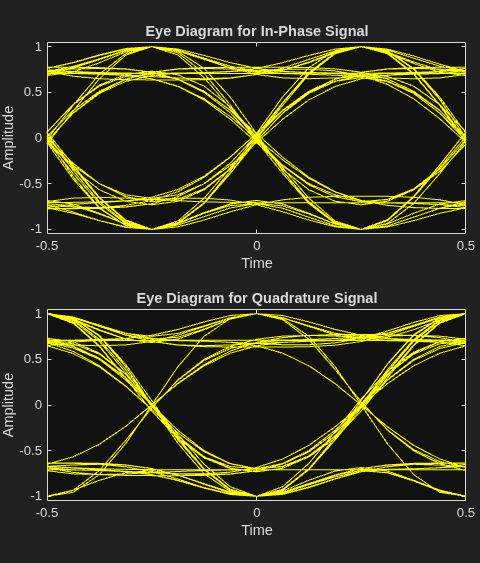
Figure Eye Diagram contains 2 axes objects. Axes object 1 with title Eye Diagram for In-Phase Signal, xlabel Time, ylabel Amplitude contains an object of type line. This object represents In-phase. Axes object 2 with title Eye Diagram for Quadrature Signal, xlabel Time, ylabel Amplitude contains an object of type line. This object represents Quadrature.

Create an SOQPSK System object configured for SOQPSK-TG pulse shaping. Modulate a frame of random data using the SOQPSK-TG modulator object.

soqpskMod = comm.SOQPSKModulator(FrequencyPulse="TG");
data = randi([0 1],1e4,1);
sigtg = soqpskMod(data);

Release and reconfigure the object to SOQPSK-A-modulate the frame of data. Modulate the frame of random data using the SOQPSK-A modulator object.

release(soqpskMod)
soqpskMod.FrequencyPulse='A';
siga = soqpskMod(data);

Release and reconfigure the object to SOQPSK-B-modulate the frame of data. Modulate the frame of random data using the SOQPSK-B modulator object.

release(soqpskMod)
soqpskMod.FrequencyPulse='B';
sigb = soqpskMod(data);

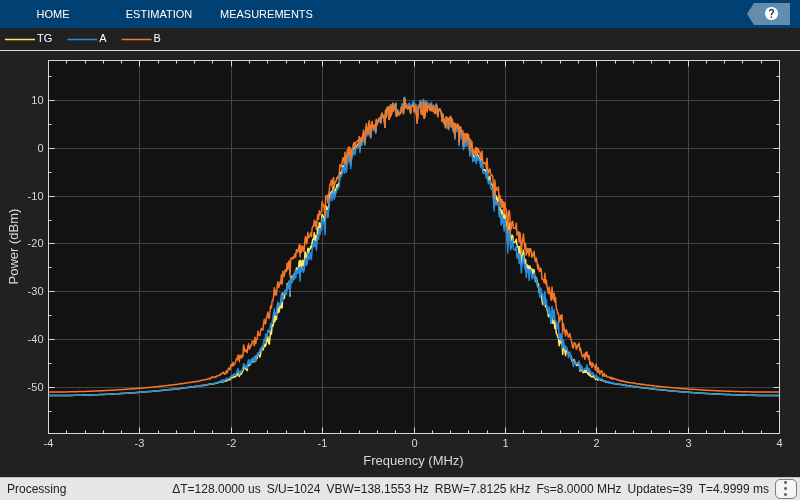
Plot the spectral response for each modulated signal.

scope = spectrumAnalyzer( ...
    SampleRate=8e6, ...
    ChannelNames={'TG','A','B'});
scope([sigtg,siga,sigb])
Plot an eye diagram for the SOQPSK-TG-modulated signal.

eyediagram(sigtg,16)
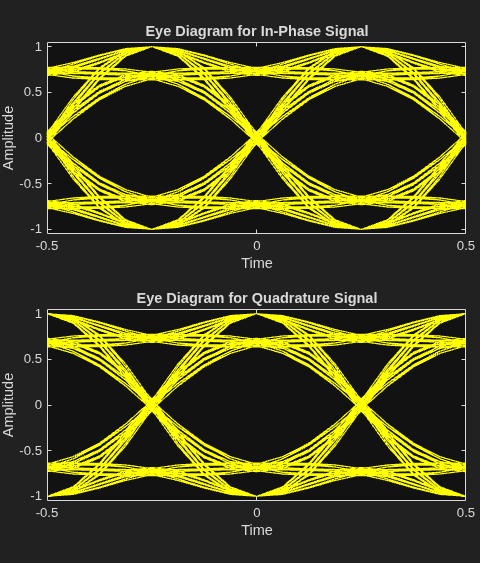
Figure Eye Diagram contains 2 axes objects. Axes object 1 with title Eye Diagram for In-Phase Signal, xlabel Time, ylabel Amplitude contains an object of type line. This object represents In-phase. Axes object 2 with title Eye Diagram for Quadrature Signal, xlabel Time, ylabel Amplitude contains an object of type line. This object represents Quadrature.

Plot an eye diagram for the SOQPSK-A-modulated signal.

eyediagram(siga,16)
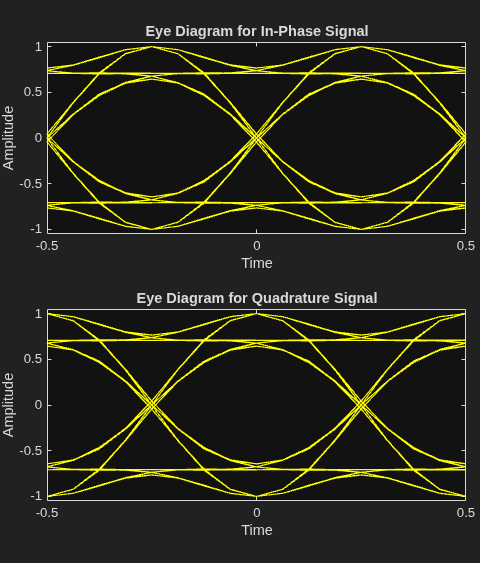
Figure Eye Diagram contains 2 axes objects. Axes object 1 with title Eye Diagram for In-Phase Signal, xlabel Time, ylabel Amplitude contains an object of type line. This object represents In-phase. Axes object 2 with title Eye Diagram for Quadrature Signal, xlabel Time, ylabel Amplitude contains an object of type line. This object represents Quadrature.

Plot an eye diagram for the SOQPSK-B-modulated signal.

eyediagram(sigb,16)
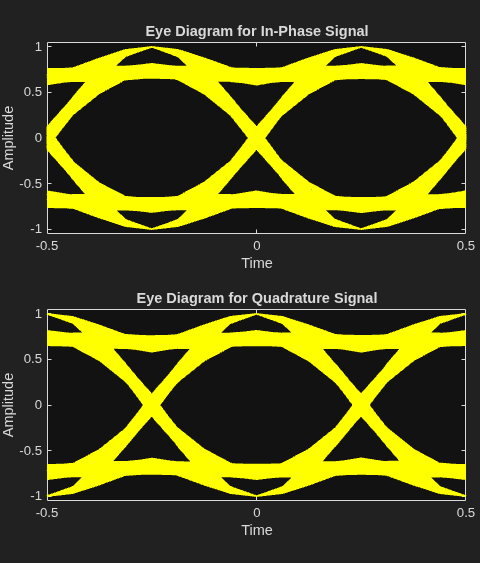
Figure Eye Diagram contains 2 axes objects. Axes object 1 with title Eye Diagram for In-Phase Signal, xlabel Time, ylabel Amplitude contains an object of type line. This object represents In-phase. Axes object 2 with title Eye Diagram for Quadrature Signal, xlabel Time, ylabel Amplitude contains an object of type line. This object represents Quadrature.

Show similarity between OQPSK and SOQPSK modulation schemes.

Generate OQPSK-modulated and SOQPSK-modulated data by using the comm.OQPSKModulator and comm.OQPSKDemodulator System objects. Plot different signal characteristics to showcase the similarities between the two modulation schemes.

Create SOQPSK and OQPSK modulator objects. The bit-to-symbol mapping in SOQPSK follows this pattern:

α=(-1)i+1ai-1(ai-ai-2)2

To match the SOQPSK bit-to-symbol pattern, use custom symbol mapping in the OQPSK modulator object.

sps = 8;
soqpskmod = comm.SOQPSKModulator(SamplesPerSymbol=sps);
oqpskmod = comm.OQPSKModulator(BitInput=true, ...
    SamplesPerSymbol=sps,SymbolMapping=[3 1 0 2]);

Generate random transmission data and modulate the data using the SOQPSK and OQPSK schemes.

data = randi([0 1],80,1);
y1 = oqpskmod(data);
y2 = soqpskmod(data);

Show the modulated OQPSK and SOQPSK IQ-signal samples by using an XY plot.

figure(1)
subplot(2,1,1)
plot(real(y1));
hold on
if soqpskmod.FrequencyPulse == "B"
    filtdelay = sps*8/2;   
else
    filtdelay = sps*4/2; 
end
plot(real(y2(filtdelay+1:end)))
title('In-Phase Signal Data')
legend('OQPSK','SOQPSK')
xlabel('Samples')
ylabel('Amplitude')
subplot(2,1,2)
plot(imag(y1));
hold on
plot(imag(y2(filtdelay+1:end)))
title('Quadrature Signal Data')
legend('oqpsk','soqpsk')
xlabel('Samples')
ylabel('Amplitude')
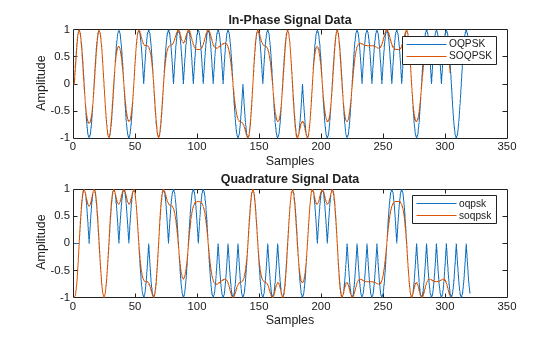
Figure contains 2 axes objects. Axes object 1 with title In-Phase Signal Data, xlabel Samples, ylabel Amplitude contains 2 objects of type line. These objects represent OQPSK, SOQPSK. Axes object 2 with title Quadrature Signal Data, xlabel Samples, ylabel Amplitude contains 2 objects of type line. These objects represent oqpsk, soqpsk.

Show the OQPSK signal traces in an eye diagram.

eyediagram(y1,2*oqpskmod.SamplesPerSymbol)
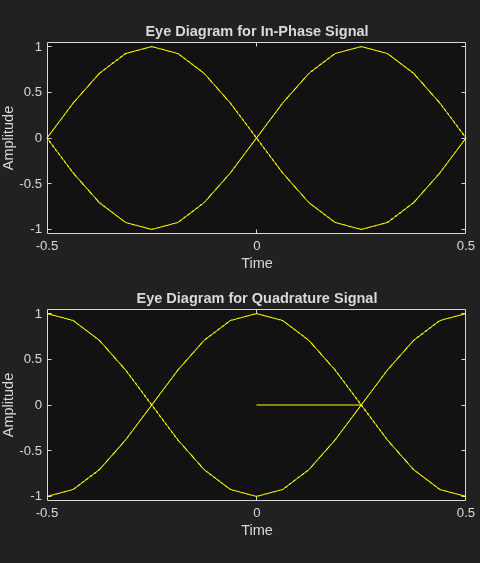
Figure Eye Diagram contains 2 axes objects. Axes object 1 with title Eye Diagram for In-Phase Signal, xlabel Time, ylabel Amplitude contains an object of type line. This object represents In-phase. Axes object 2 with title Eye Diagram for Quadrature Signal, xlabel Time, ylabel Amplitude contains an object of type line. This object represents Quadrature.

Show the SOQPSK signal traces in an eye diagram.

eyediagram(y2,2*soqpskmod.SamplesPerSymbol)
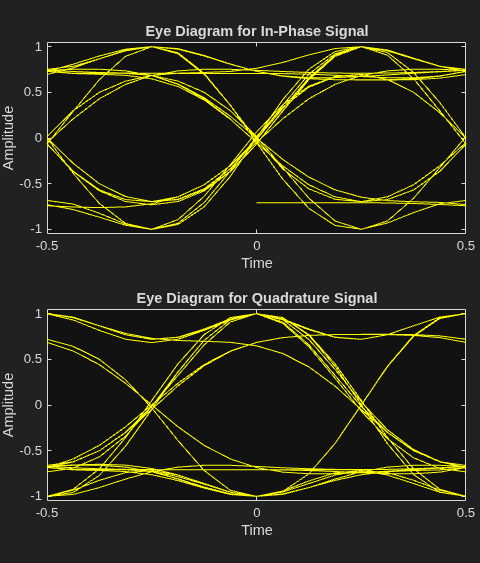
Figure Eye Diagram contains 2 axes objects. Axes object 1 with title Eye Diagram for In-Phase Signal, xlabel Time, ylabel Amplitude contains an object of type line. This object represents In-phase. Axes object 2 with title Eye Diagram for Quadrature Signal, xlabel Time, ylabel Amplitude contains an object of type line. This object represents Quadrature.

Algorithms

expand all

This implementation of the SOQPSK method conforms to the specification in IRIG Standard 106-17, Chapter 2 [1], and includes support for SOQPSK-TG, SOQPSK-A, and SOQPSK-B frequency pulse-shapes.

References

[1] Inter-Range Instrumentation Group (IRIG) Telemetry Standards, IRIG Standard 106-17, Chapter 2, July 2017.

Extended Capabilities

expand all

Version History

Introduced in R2026a