使用 C++ 共享库编译器,通过 mwArray API 调用 MATLAB 函数。
R2026b支持的平台:Windows®、Linux®、Mac
此示例演示了如何使用 C++ 共享库编译器将 MATLAB® 函数打包到 C++ 共享库中。提供的 C++ 应用程序演示了如何通过 mwArray API 在 MATLAB 函数与 C++ 应用程序之间传递矩阵。
在 R2025a 之前的版本中: 使用库编译器创建一个 C++ 共享库,具体操作请参阅生成 C++ mwArray API 共享库并构建 C++ 应用程序 (R2024b)。
前提条件
请确认您已安装与 MATLAB Compiler SDK™ 兼容的 C++ 编译器。有关详细信息,请参阅MATLAB Compiler SDK C++ 目标要求。
最终用户必须安装 MATLAB Runtime 才能运行应用程序。有关详细信息,请参阅下载并安装 MATLAB Runtime。
出于测试目的,您可以使用安装的 MATLAB 来代替 MATLAB Runtime。
创建 MATLAB 函数
编写您要打包的 MATLAB 代码。此示例使用 \extern\examples\compilersdk\c_cpp\matrixmatlabroot
| MATLAB 函数 | addmatrix.m eigmatrix.m multiplymatrix.m |
C++ mwArray API 应用程序代码 | matrix_mwarray.cpp |
在 MATLAB 命令提示符下,将随 MATLAB 一起提供的 matrix 文件夹中的所有内容复制到一个新文件夹,并将其命名为 MatrixProject。
copyfile(fullfile(matlabroot,'extern','examples', ...
    'compilersdk','c_cpp','matrix'),"MatrixProject")
检查并测试 addmatrix.m、multiplymatrix.m 和 eigmatrix.m。
function a = addmatrix(a1, a2)
%ADDMATRIX Add two matrices
%    This function adds the two matrices passed as input. This function is
%    used to demonstrate the functionality of MATLAB Compiler SDK.

a = a1 + a2;
function e = eigmatrix(a1)
%EIGMATRIX Returns the eigenvalues of the given matrix
%    This function returns the eigenvalues of the input matrix. This
%    function is used to demonstrate the functionality of MATLAB Compiler SDK.

    try
        %Tries to calculate the eigenvalues and return them.
        e = eig(a1);
    catch
        %Returns a -1 on error.
        e = -1;
end
function m = multiplymatrix(a1, a2)
%MULTIPLYMATRIX Multiplies two matrices
%    This function multiplies the two matrices passed as input. This
%    function is used to demonstrate the functionality of MATLAB Compiler SDK.

m =  a1*a2;
创建工程和编译器任务
使用 C++ 共享库编译器为您的 C++ 共享库创建编译任务。编译器任务允许您针对特定部署目标编译工程中的文件。
要打开该 App,请在 App 选项卡上展开 App 库。在应用程序部署部分,点击 C++ 共享库编译器。

您还可以在 MATLAB 命令行窗口中使用 cppSharedLibraryCompiler 函数打开该 App。
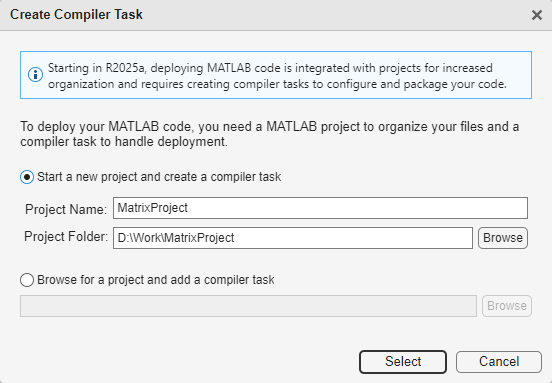
打开 App 后,“创建编译器任务”对话框会提示您将任务添加到新的或现有 MATLAB 工程中。在此示例中,选择启动新工程并创建编译器任务,并在 MatrixProject 文件夹中创建一个名为 MatrixProject 的新工程。有关创建和使用 MATLAB 工程的详细信息,请参阅创建工程。
编辑器中打开了一个名为 CppSharedLib1 的新编译任务。您可以通过打开编译器任务管理器或转到管理任务选项卡并创建一个新的编译器任务来编译其他部署目标的代码。
指定编译选项
在打包之前,您可以为 C++ 共享库及其安装程序指定选项,以自定义构建和打包过程。例如,您可以混淆处理 MATLAB 代码,或指定在生成的安装程序中包含 MATLAB Runtime 的方法。
将 MATLAB 函数添加到 C++ 共享库中。所有文件必须位于工程根文件夹中才能添加到工程中。在此示例中,在编译器任务的导出的函数部分,点击添加文件,然后选择 addmatrix.m、multiplymatrix.m 和 eigmatrix.m。在“工程”面板中,文件现在带有标签 Design 和 Exported Function File。

在包信息部分,将字符串 My C++ Package 替换为您的 C++ 共享库的名称,即 libmatrix。
在 C++ API 选择部分,选择用于在 C++ 应用程序与 MATLAB 函数之间交换数据的 API。在此示例中,请选择 mwArray API。有关详细信息,请参阅选择 C++ 部署选项。

查看代码和包 C++ 共享库
要查看包含有关构建和打包组件的说明的代码,请点击导出编译脚本旁边的箭头,然后选择显示代码。在右侧,一个窗口显示了一个部署脚本,其中包含与您的构建选项相对应的 compiler.build.cppSharedLibrary 和 compiler.package.installer 函数。您可以通过点击导出编译脚本按钮将此代码转换为 MATLAB 脚本文件。运行生成的编译脚本等效于点击编译和打包按钮。

要创建 C++ 共享库和安装程序,请点击编译和打包。要仅创建 C++ 共享库,请点击编译和打包旁边的箭头,然后选择编译。
编译器将在您的工程文件夹中的 <compiler_task_name>/outputbuild 子文件夹包含共享库,而 package 子文件夹包含您的共享库的安装程序以及 MATLAB 运行时。要为生成的文件选择不同的输出位置,请在输出位置部分更新相应路径。
如果您创建了一个安装程序,package 子文件夹中包含您的共享库文件的安装程序以及 MATLAB 运行时。
小心
生成的安装程序不包含 C++ 应用程序可执行文件。您必须在打包后使用 mbuild 编译并链接您的 C++ 应用程序。然后,手动分发应用程序文件以及 MATLAB Runtime,或者使用 compiler.package.installer 的 AdditionalFiles 选项将可执行文件包含在安装程序中。有关详细信息,请参阅将 MATLAB Compiler SDK 文件分发给应用程序开发人员。
将 C++ 共享库集成到 C++ 应用程序中
创建 C++ 共享库后,在您首选的 C++ 开发环境中编写 C++ 应用程序的源代码。有关详细信息,请参阅设置 C++开发环境。
本示例中包含两个 C++ 应用程序:matrix_mda.cpp,该应用程序使用 MATLAB 数据 API,以及 matrix_mwarray.cpp,该应用程序使用 mwArray API。对于此示例,使用文件 matrix_mwarray.cpp。
矩阵应用程序执行这些操作。
包含 C++ 头文件。
初始化矩阵库
libmatrix。使用
mwArrayAPI 创建输入数据。调用
addmatrix、multiplymatrix和eigmatrix方法,并在方法中添加打印语句以返回结果。使用
try-catch模块处理异常。
有关使用 mwArray API 的更多详细信息,请参阅将 C++ 共享库与 mwArray 集成。
将生成的 C++ 库文件 libmatrix.lib 复制并粘贴到包含您的 C++ 应用程序文件的文件夹中,该文件夹名为 matrix_mwarray.cpp。
注意
.lib 是 Windows 中使用的扩展名。在 macOS 上,文件扩展名为 .dylib,在 Linux 上为 .so。
在 MATLAB 提示符或系统命令提示符下使用 mbuild 编译并链接应用程序。
mbuild matrix_mwarray.cpp
从系统命令提示符运行应用程序。要在部署前在 MATLAB 中测试应用程序,请使用感叹号 (!) 运算符运行可执行文件。
matrix_mwarray.exe该应用程序使用封装的 MATLAB 函数返回矩阵计算的结果。
The original matrix is:
1 4 7
2 5 8
3 6 9

The sum of the matrix with itself is:
2 8 14
4 10 16
6 12 18

The product of the matrix with itself is:
30 66 102
36 81 126
42 96 150

The eigenvalues of the original matrix are:
16.1168
-1.11684
-1.57673e-16

The original contents of the column-major matrix are:
100 102 104
101 103 105

The sum of the column-major matrix with itself is:
200 204 208
202 206 210

The original contents of the row-major matrix are:
100 101
102 103
104 105

The sum of the row-major matrix with itself is:
200 202
204 206
208 210
要在 MATLAB 外部运行 C++应用程序,您必须安装 MATLAB 运行时。有关详细信息,请参阅关于 MATLAB Runtime。如果您使用编译和打包创建安装程序,该安装程序将包含与用于编译 C++ 共享库的 MATLAB 版本相匹配的 MATLAB 运行时版本。
要部署 C++ 应用程序,请将代码存档、可执行文件 .exe 和 MATLAB Runtime 分发给最终用户。
另请参阅
C++ 共享库编译器 | compiler.build.cppSharedLibrary | compiler.package.installer | mbuild

