主要内容

本页采用了机器翻译。点击此处可查看英文原文。

使用 C++ 共享库编译器,通过 MATLAB 数据 API 调用 MATLAB 函数。

R2026b

支持的平台:Windows®、Linux®、Mac

此示例演示了如何使用 C++ 共享库编译器将 MATLAB® 函数打包到 C++ 共享库中。提供的 C++ 应用程序演示了如何通过 MATLAB 函数与 C++ 应用程序之间传递矩阵,使用 MATLAB 数据 API 实现。

在 R2025a 之前的版本中: 请参阅生成 C++ MATLAB 数据 API 共享库并构建 C++ 应用程序 (R2024b)。

前提条件

  • 请确认您已安装与 MATLAB Compiler SDK™ 兼容的 C++ 编译器。有关详细信息,请参阅MATLAB Compiler SDK C++ 目标要求。

  • 最终用户必须安装 MATLAB Runtime 才能运行应用程序。有关详细信息,请参阅下载并安装 MATLAB Runtime。

    出于测试目的,您可以使用安装的 MATLAB 来代替 MATLAB Runtime。

创建 MATLAB 函数

编写您要打包的 MATLAB 代码。此示例使用 matlabroot\extern\examples\compilersdk\c_cpp\matrix 目录中的这些文件:

MATLAB 函数addmatrix.m
eigmatrix.m
multiplymatrix.m
C++ MATLAB 数据 API 应用程序代码 matrix_mda.cpp

在 MATLAB 命令提示符下,将随 MATLAB 一起提供的 matrix 文件夹中的所有内容复制到一个新文件夹,并将其命名为 MatrixProject。

copyfile(fullfile(matlabroot,'extern','examples', ...
    'compilersdk','c_cpp','matrix'),"MatrixProject")

检查并测试 addmatrix.m、multiplymatrix.m 和 eigmatrix.m。

function a = addmatrix(a1, a2)
%ADDMATRIX Add two matrices
%    This function adds the two matrices passed as input. This function is
%    used to demonstrate the functionality of MATLAB Compiler SDK.

a = a1 + a2;
function e = eigmatrix(a1)
%EIGMATRIX Returns the eigenvalues of the given matrix
%    This function returns the eigenvalues of the input matrix. This
%    function is used to demonstrate the functionality of MATLAB Compiler SDK.

    try
        %Tries to calculate the eigenvalues and return them.
        e = eig(a1);
    catch
        %Returns a -1 on error.
        e = -1;
end
function m = multiplymatrix(a1, a2)
%MULTIPLYMATRIX Multiplies two matrices
%    This function multiplies the two matrices passed as input. This
%    function is used to demonstrate the functionality of MATLAB Compiler SDK.

m =  a1*a2;

创建工程和编译器任务

使用 C++ 共享库编译器创建 C++ 共享库的编译任务。编译器任务允许您针对特定部署目标编译工程中的文件。

要打开该 App,请在 App 选项卡上展开 App 库。在应用程序部署部分,点击 C++ 共享库编译器。

Application Deployment section of the Apps gallery

您还可以在 MATLAB 命令行窗口中使用 cppSharedLibraryCompiler 函数打开该 App。
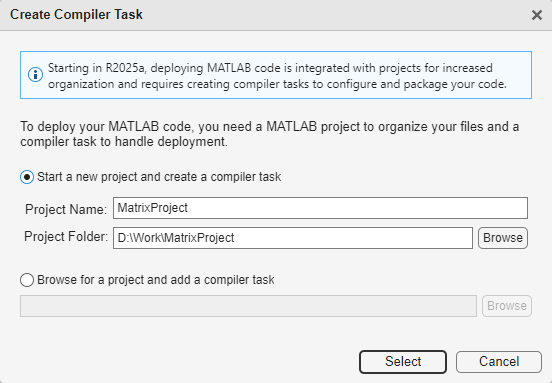
Create compiler task dialog box with the text 'To deploy your MATLAB code, you need a MATLAB project to organize code and a compiler task to handle deployment.' The option 'Start a new project and create a compiler task' is selected.

打开 App 后,“创建编译器任务”对话框会提示您将任务添加到新的或现有 MATLAB 工程中。在此示例中,选择启动新工程并创建编译器任务,并在 MatrixProject 文件夹中创建一个名为 MatrixProject 的新工程。有关创建和使用 MATLAB 工程的详细信息,请参阅创建工程。

编辑器中打开了一个名为 CppSharedLib1 的新编译任务。

您可以通过打开编译器任务管理器或转到管理任务选项卡并创建一个新的编译器任务来创建更多 C++ 编译器任务或为其他部署目标打包代码。

指定编译选项

在打包之前,您可以为 C++ 共享库及其安装程序指定选项,以自定义构建和打包过程。例如,您可以混淆处理 MATLAB 代码,或指定在生成的安装程序中包含 MATLAB Runtime 的方法。

将 MATLAB 函数添加到 C++ 共享库中。所有文件必须位于工程根文件夹中才能添加到工程中。在此示例中,在编译器任务的导出的函数部分,点击添加文件,然后选择 addmatrix.m、multiplymatrix.m 和 eigmatrix.m。在“工程”面板中,文件现在带有标签 Design 和 Exported Function File。

Exported file section of the compiler task with no file selected and a button labeled Add Exported Function

在包信息部分,将字符串 My C++ Package 替换为您的 C++ 共享库的名称,即 libmatrix。

要为生成的文件选择不同的输出位置,请在输出位置部分更新相应路径。

在 C++ API 选择部分,选择用于在 C++ 应用程序与 MATLAB 函数之间交换数据的 API。对于此示例,请选择 MATLAB Data API。有关详细信息,请参阅选择 C++ 部署选项。
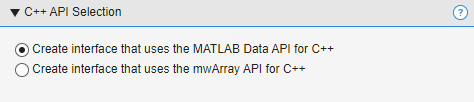
C++ API Selection section with the option 'Create interface that uses the MATLAB Data API for C++' selected

查看代码和包 C++ 共享库

要查看包含有关构建和打包组件的说明的代码,请点击导出编译脚本旁边的箭头,然后选择显示代码。在右侧,一个窗口显示了一个部署脚本,其中包含与您的构建选项相对应的 compiler.build.cppSharedLibrary 和 compiler.package.installer 函数。您可以通过点击导出编译脚本按钮将此代码转换为 MATLAB 脚本文件。运行生成的编译脚本等效于点击编译和打包按钮。

Two buttons labeled Export Build Script and Build and Package

要创建 C++ 共享库和安装程序,请点击编译和打包。要仅创建 C++ 共享库,请点击编译和打包旁边的箭头,然后选择编译。

编译器将在您的工程文件夹中的 <compiler_task_name>/output 文件夹中生成文件。整合过程中使用的关键文件是包含 MATLAB 代码和相应头文件(.hpp 文件)的代码存档(.ctf 文件)。有关其他文件的信息,请参阅打包 MATLAB 函数后生成的文件。

如果您创建了安装程序,package 子文件夹中包含您的共享库文件的安装程序以及 MATLAB 运行时。

小心

生成的安装程序不包含 C++ 应用程序可执行文件。您必须在打包后使用 mbuild 编译并链接您的 C++ 应用程序。然后,手动分发应用程序文件以及 MATLAB Runtime,或者使用 compiler.package.installer 的 AdditionalFiles 选项将可执行文件包含在安装程序中。有关详细信息,请参阅将 MATLAB Compiler SDK 文件分发给应用程序开发人员。

将 MATLAB 代码存档集成到 C++ 应用程序中

创建 C++ 共享库后,在您首选的 C++ 开发环境中编写 C++ 应用程序的源代码。有关详细信息,请参阅设置 C++开发环境。

要将生成的 MATLAB 代码存档(.ctf 文件)和头文件(.hpp 文件)集成到 C++ 应用程序中,请遵循以下准则:

  • 使用 #include 指令将生成的头文件(.hpp 文件)合并到您的 C++ 应用程序代码中。

  • 确保代码存档(.ctf 文件)位于 C++ 可执行文件可以访问的位置。

本示例中包含两个 C++ 应用程序:matrix_mda.cpp,该应用程序使用 MATLAB 数据 API,以及 matrix_mwarray.cpp,该应用程序使用 mwArray API。对于此示例,使用文件 matrix_mda.cpp。

/*==============================================================
 *
 * MATRIX_MDA.CPP
 * Sample driver code that uses the MATLAB Data API interface 
 * (introduced in R2018a) and MATLAB Data API to call a C++ 
 * shared library created using the MATLAB Compiler SDK.
 * Demonstrates passing matrices via the MATLAB Data API.
 * Refer to the MATLAB Compiler SDK documentation for more 
 * information.
 *
 * Copyright 2017-2023 The MathWorks, Inc.
 *
 *============================================================*/

// Include the header file required to use the MATLAB Data API
// interface for the C++ shared library generated by the
// MATLAB Compiler SDK.
#include "MatlabCppSharedLib.hpp"
#include <iostream>
#include <numeric> // for iota

namespace mc = matlab::cpplib;
namespace md = matlab::data;

std::u16string convertAsciiToUtf16(const std::string & asciiStr);

template <typename T>
void writeMatrix(std::ostream & ostr, const md::TypedArray<T> & matrix, 
    md::MemoryLayout layoutOfArray = md::MemoryLayout::ROW_MAJOR);

int mainFunc(std::shared_ptr<mc::MATLABApplication> app,
    const int argc, const char * argv[]);

// The main routine. On the Mac, the main thread runs the system code, and
// user code must be processed by a secondary thread. On other platforms, 
// the main thread runs both the system code and the user code.
int main(const int argc, const char * argv[])
{
    int ret = 0;
    try {
        auto mode = mc::MATLABApplicationMode::IN_PROCESS;
        std::vector<std::u16string> options = {u"-nojvm"};
        auto matlabApplication = mc::initMATLABApplication(mode, options);
        ret = mc::runMain(mainFunc, std::move(matlabApplication),  argc, argv);
        // Calling reset() on matlabApplication allows the user to control
        // when it is destroyed, which automatically cleans up its resources.
        // Here, the object would go out of scope and be destroyed at the end 
        // of the block anyway, even if reset() were not called.
        // Whether the matlabApplication object is explicitly or implicitly
        // destroyed, initMATLABApplication() cannot be called again within
        // the same process.
        matlabApplication.reset();
    } catch(const std::exception & exc) {
        std::cerr << exc.what() << std::endl;
        return -1;
    }
    return ret;
}

int mainFunc(std::shared_ptr<mc::MATLABApplication> app,
    const int argc, const char * argv[])
{
    try {
        const std::u16string U16STR_CTF_NAME = u"libmatrix.ctf";
        
        // The path to the CTF (library archive file) passed to 
        // initMATLABLibrary or initMATLABLibraryAsync may be either absolute
        // or relative. If it is relative, the following will be prepended
        // to it, in turn, in order to find the CTF:
        // - the directory named by the environment variable 
        // CPPSHARED_BASE_CTF_PATH, if defined
        // - the working directory
        // - the directory where the executable is located
        // - on Mac, the directory three levels above the directory
        // where the executable is located
        
        // If the CTF is not in one of these locations, do one of the following:
        // - copy the CTF
        // - move the CTF
        // - change the working directory ("cd") to the location of the CTF
        // - set the environment variable to the location of the CTF
        // - edit the code to change the path
        auto lib = mc::initMATLABLibrary(app, U16STR_CTF_NAME);
        md::ArrayFactory factory;
        const size_t NUM_ROWS = 3;
        const size_t NUM_COLS = 3;
        md::TypedArray<double> doubles = factory.createArray<double>({NUM_ROWS, NUM_COLS}, 
            {1.0, 2.0, 3.0,
             4.0, 5.0, 6.0,
             7.0, 8.0, 9.0}); 
             
        // Note that the matrix is interpreted as being in column-major order 
        // (the MATLAB convention) rather than row-major order (the C++ 
        // convention). Thus, the output from the next two lines of code will 
        // look like this:
        //     The original matrix is:
        //     1 4 7
        //     2 5 8
        //     3 6 9
        // If you want to work with a matrix that looks like this:
        //   1 2 3
        //   4 5 6
        //   7 8 9
        // you can either store the data as follows:
        //   md::TypedArray<double> doubles = 
        //     factory.createArray<double>({NUM_ROWS, NUM_COLS},
        //       {1.0, 4.0, 7.0,
        //        2.0, 5.0, 8.0,
        //        3.0, 6.0, 9.0}); 
        // or apply the MATLAB transpose function to the original matrix.
        std::cout << "The original matrix is: " << std::endl;
        writeMatrix<double>(std::cout, doubles);
        
        std::vector<md::Array> matrices{doubles, doubles};
        std::cout << "The sum of the matrix with itself is: " << std::endl;
        auto sum = lib->feval("addmatrix", 1, matrices);
        // The feval call returns a vector (of length 1) of md::Array objects.
        writeMatrix<double>(std::cout, sum[0]);

        std::cout << "The product of the matrix with itself is: " << std::endl;
        auto product = lib->feval("multiplymatrix", 1, matrices);
        writeMatrix<double>(std::cout, product[0]);

        std::cout << "The eigenvalues of the original matrix are: " << std::endl;
        std::vector<md::Array>single_matrix{doubles};
        auto eigenvalues = lib->feval("eigmatrix", 1, single_matrix);
        writeMatrix<double>(std::cout, eigenvalues[0]);

        // This part of the code shows how createBuffer and createArrayFromBuffer
        // can be used to convert from row-major to column-major order.
        auto colMajorMatrixBuffer = factory.createBuffer<int>(6);
        // The following call writes the values 100, 101, 102, 103, 104, 105
        // into colMajorMatrixBuffer.
        std::iota(colMajorMatrixBuffer.get(), colMajorMatrixBuffer.get() + 6, 100);
        auto colMajorMatrixArray = factory.createArrayFromBuffer({2, 3},
            std::move(colMajorMatrixBuffer), md::MemoryLayout::COLUMN_MAJOR);
        // OUTPUT:
        // The original contents of the column-major matrix are:
        //      100 102 104
        //      101 103 105
        std::cout << "The original contents of the column-major matrix are: " << std::endl;
        writeMatrix<int>(std::cout, colMajorMatrixArray);
        std::vector<md::Array> colMajorMatrixArrays{colMajorMatrixArray,
            colMajorMatrixArray};
        
        // OUTPUT:
        // The sum of the column-major matrix with itself is:
        // 200 204 208
        // 202 206 210
        std::cout << "The sum of the column-major matrix with itself is: " << std::endl;
        auto sumOfColMajorMatrixArrays = lib->feval("addmatrix", 1, colMajorMatrixArrays);
        // The feval call returns a vector (of length 1) of md::Array objects.
        writeMatrix<int>(std::cout, sumOfColMajorMatrixArrays[0]);
        
        auto rowMajorMatrixBuffer = factory.createBuffer<int>(6);
        std::iota(rowMajorMatrixBuffer.get(), rowMajorMatrixBuffer.get() + 6, 100);
        auto rowMajorMatrixArray = factory.createArrayFromBuffer({3, 2},
            std::move(rowMajorMatrixBuffer), md::MemoryLayout::ROW_MAJOR);
        // OUTPUT:
        // The original contents of the row-major matrix are:
        // 100 101
        // 102 103
        // 104 105
        std::cout << "The original contents of the row-major matrix are: " << std::endl;
        writeMatrix<int>(std::cout, rowMajorMatrixArray);
        std::vector<md::Array> rowMajorMatrixArrays{rowMajorMatrixArray, rowMajorMatrixArray};
        
        // OUTPUT:
        // The sum of the row-major matrix with itself is:
        // 200 202
        // 204 206
        // 208 210
        std::cout << "The sum of the row-major matrix with itself is: " << std::endl;
        auto sumOfRowMajorMatrixArrays = lib->feval("addmatrix", 1, rowMajorMatrixArrays);
        // The feval call returns a vector (of length 1) of md::Array objects.
        writeMatrix<int>(std::cout, sumOfRowMajorMatrixArrays[0]);
    } catch(const std::exception & exc) {
        std::cerr << exc.what() << std::endl;
        return -1;
    }
    return 0;
}

std::u16string convertAsciiToUtf16(const std::string & asciiStr)
{
    return std::u16string(asciiStr.cbegin(), asciiStr.cend());
}

template <typename T>
void writeMatrix(std::ostream & ostr, const md::TypedArray<T> & matrix, 
    md::MemoryLayout layoutOfArray /*= md::MemoryLayout::ROW_MAJOR*/)
{
    md::ArrayDimensions dims = matrix.getDimensions();
    if (dims.size() != 2)
    {
        std::ostringstream ostrstrm;
        ostrstrm << "Number of dimensions must be 2; actual number: " << dims.size();
        throw std::runtime_error(ostrstrm.str());
    }

    switch(layoutOfArray)
    {
        case md::MemoryLayout::ROW_MAJOR:
            for (size_t row = 0; row < dims[0]; ++row)
            {
                for (size_t col = 0; col < dims[1]; ++col)
                {
                    std::cout << matrix[row][col] << " ";
                }
                std::cout << std::endl;
            }
            break;

        case md::MemoryLayout::COLUMN_MAJOR:
            for (size_t col = 0; col < dims[1]; ++col)
            {
                for (size_t row = 0; row < dims[0]; ++row)
                {
                    std::cout << matrix[row][col] << " ";
                }
                std::cout << std::endl;
            }
            break;

        default:
            std::cout << "WARNING: invalid layout passed to writeMatrix." << std::endl;
            break;
    }
    std::cout << std::endl;
}

矩阵应用程序执行这些操作。

  • 包含 C++ 头文件。

  • 初始化矩阵库 libmatrix。

  • 使用 MATLAB 数据 API 创建输入数据。

  • 调用 addmatrix、multiplymatrix 和 eigmatrix 方法,并在方法中添加打印语句以返回结果。

  • 使用 try-catch 模块处理异常。

将生成的代码存档 libmatrix.ctf 从 v2\generic_interface 文件夹复制并粘贴到包含 C++ 应用程序的工程文件夹中。

在系统命令提示符下使用 mbuild 编译并链接应用程序。

mbuild matrix_mda.cpp
编译器为您的 C++ 应用程序生成一个名为 matrix_mda 的可执行文件。

从系统命令提示符运行应用程序。要在部署前在 MATLAB 中测试应用程序,请使用感叹号 (!) 运算符运行可执行文件。

matrix_mda.exe

该应用程序使用封装的 MATLAB 函数输出矩阵计算的结果。

The original matrix is:  
1 4 7  
2 5 8  
3 6 9  
 
The sum of the matrix with itself is:  
2 8 14  
4 10 16  
6 12 18  
 
The product of the matrix with itself is:  
30 66 102  
36 81 126  
42 96 150  
 
The eigenvalues of the original matrix are:  
16.1168  
-1.11684  
-1.57673e-16  
 
The original contents of the column-major matrix are:  
100 102 104  
101 103 105  
 
The sum of the column-major matrix with itself is:  
200 204 208  
202 206 210  
 
The original contents of the row-major matrix are:  
100 101  
102 103  
104 105  
 
The sum of the row-major matrix with itself is:  
200 202  
204 206  
208 210

要在 MATLAB 外部运行 C++应用程序,您必须安装 MATLAB 运行时。有关详细信息,请参阅下载并安装 MATLAB Runtime。如果您使用编译和打包创建安装程序,该安装程序将包含与用于编译 C++ 共享库的 MATLAB 版本相匹配的 MATLAB 运行时版本。

要部署 C++ 应用程序,请将可执行文件和 MATLAB 运行时分发给最终用户。

另请参阅

| | |

主题