dsp.PhaseExtractor
R2026bExtract the unwrapped phase of a complex input
Description
The dsp.PhaseExtractor
System object™ extracts the unwrapped phase of a real or a complex input.
To extract the unwrapped phase of a signal input:
Create the
dsp.PhaseExtractorobject and set its properties.Call the object with arguments, as if it were a function.
To learn more about how System objects work, see What Are System Objects?
Creation
Description
phase = dsp.PhaseExtractor
phase = dsp.PhaseExtractor(PropertyName=Value)TreatFramesIndependently to
false.
Properties
Usage
Syntax
Description
Input Arguments
Output Arguments
Object Functions
To use an object function, specify the
System object as the first input argument. For
example, to release system resources of a System object named obj, use
this syntax:
release(obj)
Examples
Create a dsp.SineWave System object™. Specify that the object generates an exponential output with a complex exponent.
sine = dsp.SineWave(Frequency=10,...
    ComplexOutput=true,SamplesPerFrame=128);
Create a dsp.PhaseExtractor System object?. Specify that the object ignores frame boundaries when returning the unwrapped phase.
phase = dsp.PhaseExtractor(TreatFramesIndependently=false);
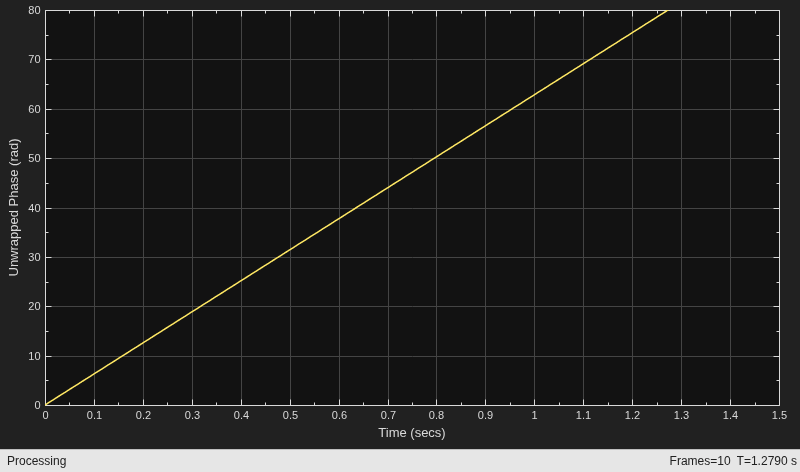
Extract the unwrapped phase of a sine wave. Plot the phase versus time using a timescope System object.
timeplot = timescope(PlotType="Line",SampleRate=1000,...
    TimeSpanSource="Property",TimeSpan=1.5,YLimits=[0 80],...
    ShowGrid=true,...
    YLabel="Unwrapped Phase (rad)");
for ii = 1:10
    sineOutput = sine();
    phaseOutput = phase(sineOutput);
    timeplot(phaseOutput)
end
Create a dsp.TransferFunctionEstimator System object™.
tfe = dsp.TransferFunctionEstimator(FrequencyRange="centered");
Create a dsp.PhaseExtractor System object™. Specify that the object must treat each frame of data independently.
phase = dsp.PhaseExtractor(TreatFramesIndependently=true);
Create a dsp.IIRFilter System object™. Compute the transfer function of a third-order IIR filter. Use the butter function to generate coefficients for the filter.
[b,a] = butter(3,.3);
iir = dsp.IIRFilter(Numerator=b,Denominator=a);
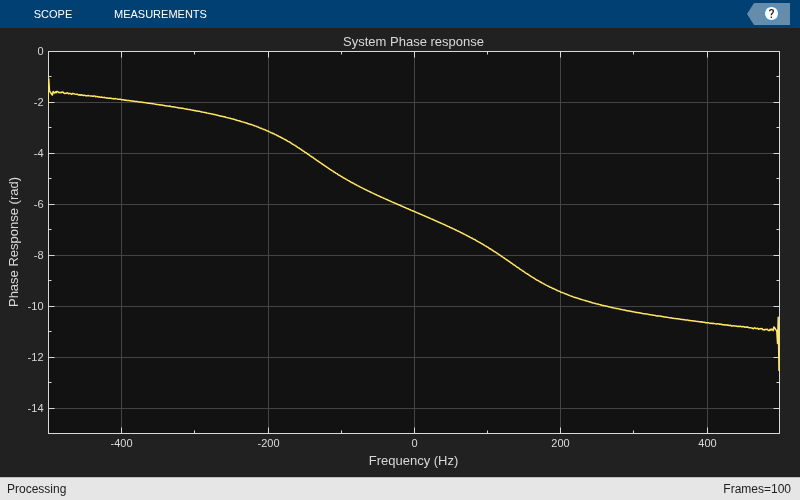
Extract the phase response of the transfer function. Plot using a dsp.ArrayPlot System object™.
sampleRate = 1e3;
phaseplot = dsp.ArrayPlot(PlotType="Line",XOffset=-sampleRate/2,...
    YLimits=[-15 0],...
    YLabel="Phase Response (rad)",...
    XLabel="Frequency (Hz)",...
    Title="System Phase response");
for ii = 1:100
    % Generate input
    input = 0.05*randn(1000,1);
    % Pass through IIR filter
    filterOutput = iir(input);
    % Estimate transfer function
    transferFunction = tfe(input,filterOutput);
    % Plot transfer function phase
    phaseOutput = phase(transferFunction);
    phaseplot(phaseOutput);
end
Algorithms
Consider an input frame of length N:
The object acts on this frame and produces this output:
where:
Here, i runs from 1 to N. The angle function returns the phase angle in radians.
If the input signal consists of multiple frames:
If you set
TreatFramesIndependentlytotrue, the object treats each frame independently. Therefore, in each frame, the object calculates the phase using the preceding formula where:is 0.
is 1.
If you set
TreatFramesIndependentlytofalse, the object ignores boundaries between frames. Therefore, in each frame, thestepmethod calculates the phase using the preceding formula where:is the last unwrapped phase from the previous frame.
is the last sample from the previous frame.
Extended Capabilities
Version History
Introduced in R2014b

