get
R2026b描述
示例
此示例描述如何通过添加、修改和删除计算方法、特征、测量和查找表参数,以编程方式自定义 ASAP2 文件中的 ECU 描述。
使用函数从已构建的模型创建一个 ECU 描述对象,查找并过滤其内容,然后导出自定义 ASAP2 文件。
在此示例中,您执行下列操作:
构建模型并创建一个 ECU 描述对象
按属性查找和过滤计算方法
添加并修改自定义计算方法
添加并修改自定义特征和测量
添加带轴信息的查找表参数
导出自定义 ASAP2 文件
打开并构建模型
打开示例模型 ASAP2Demo 并从其生成代码。构建模型是创建 ECU 描述对象的一项前提条件。
open_system("ASAP2Demo");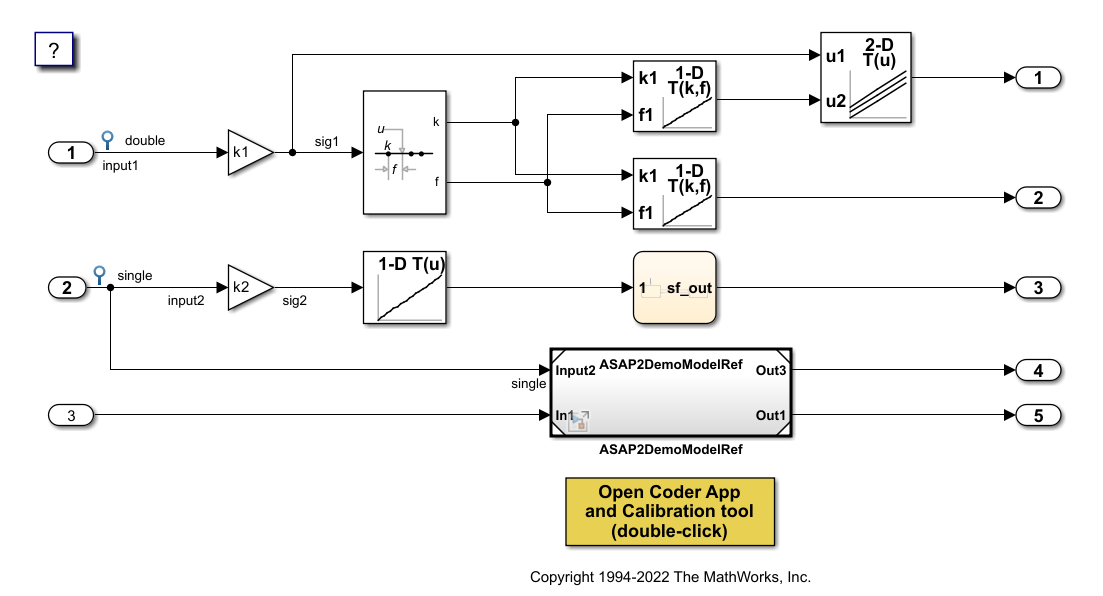
slbuild("ASAP2Demo");### Searching for referenced models in model 'ASAP2Demo'. ### Total of 2 models to build. ### Starting serial code generation build. ### Starting model reference code generation target build for: ASAP2DemoModelRef ### Successfully updated the model reference code generation target for: ASAP2DemoModelRef ### Starting top model code generation target build for: ASAP2Demo ### Successful completion of build procedure for: ASAP2Demo Build Summary Model reference code generation targets: Model Build Reason Status Build Duration ============================================================================================================ ASAP2DemoModelRef Target (ASAP2DemoModelRef.c) did not exist. Code generated and compiled. 0h 0m 8.5322s Top model targets: Model Build Reason Status Build Duration ============================================================================================ ASAP2Demo Target (ASAP2Demo.c) did not exist. Code generated and compiled. 0h 0m 16.383s 2 of 2 models built (0 models already up to date) Build duration: 0h 0m 27.316s
创建并浏览 ECU 描述
为构建的模型创建 ECU 描述对象。使用 find 函数列出可用的计算方法。
descObj = coder.asap2.getEcuDescriptions("ASAP2Demo");Export duration: 0h 0m 0s 227ms
find(descObj, "CompuMethod")ans = 1×9 string
"CM_double" "CM_double_m_per_U0028_s_U005E_2_U0029" "CM_double_rpm" "CM_int16_rpm" "CM_int32" "CM_single" "CM_single_m_per_U0028_s_U005E_2_U0029" "CM_single_rpm" "CM_uint8"
过滤计算方法,仅获取使用 rpm 作为单位的计算方法。
find(descObj, "CompuMethod", Units="rpm")
ans = 1×3 string
    "CM_double_rpm"    "CM_int16_rpm"    "CM_single_rpm"
添加自定义计算方法
创建一个具有线性转换类型的计算方法,并将其添加到 ECU 描述对象。
CompuMethod_1 = coder.asap2.CompuMethod;
CompuMethod_1.Name = 'CompuMethod_1';
CompuMethod_1.ConversionType = "LINEAR";
CompuMethod_1.Coefficients = [2 3];
CompuMethod_1.LongIdentifier = "longIdentifierTest";
CompuMethod_1.Format = "%2.3";
CompuMethod_1.Units = "s";
add(descObj, CompuMethod_1);
验证新添加的计算方法的属性。
get(descObj, "CompuMethod", "CompuMethod_1")
ans =
  CompuMethod with properties:

               Name: 'CompuMethod_1'
     LongIdentifier: "longIdentifierTest"
             Format: "%2.3"
              Units: "s"
       Coefficients: [2 3]
     ConversionType: "LINEAR"
    CompuVTabValues: [1×1 struct]
         CustomData: ""
将转换类型更新为 TAB_VERB 并定义对应的 CompuVTabValues。使用 set 函数修改现有描述的属性。
set(descObj, "CompuMethod", "CompuMethod_1", ConversionType="TAB_VERB");
set(descObj, "CompuMethod", "CompuMethod_1", CompuVTabValues=struct("Literals", ["false" "true"], "Values", [0 1]));
验证修改后的字段。
modifiedProp = get(descObj, "CompuMethod", "CompuMethod_1")
modifiedProp =
  CompuMethod with properties:

               Name: 'CompuMethod_1'
     LongIdentifier: "longIdentifierTest"
             Format: "%2.3"
              Units: "s"
       Coefficients: [2 3]
     ConversionType: "TAB_VERB"
    CompuVTabValues: [1×1 struct]
         CustomData: ""
modifiedProp.CompuVTabValues
ans = struct with fields:
    Literals: ["false"    "true"]
      Values: [0 1]
添加自定义特征
创建一个表示标定参数的特征,并将其添加到 ECU 描述对象。然后更新其 UpperLimit 属性。
param1 = coder.asap2.Characteristic;
param1.Name = "Custom_parameter1";
param1.LongIdentifier = "longIdentifierParam";
param1.UpperLimit = 255;
param1.LowerLimit = 0;
add(descObj, param1);
get(descObj, "Characteristic", "Custom_parameter1")
ans =
  Characteristic with properties:

                   Name: "Custom_parameter1"
         LongIdentifier: "longIdentifierParam"
                   Type: 'VALUE'
             EcuAddress: '0x0000'
        CompuMethodName: 'NO_COMPU_METHOD'
             LowerLimit: 0
             UpperLimit: 255
      EcuAddressComment: ""
    EcuAddressExtension: []
      CalibrationAccess: 'Calibration'
      DisplayIdentifier: ""
                 Format: ""
                BitMask: []
               AxisInfo: []
           RecordLayout: ""
             Dimensions: []
                 Export: 1
             MaxRefresh: [1×1 struct]
             SymbolLink: [1×1 struct]
             CustomData: ""
set(descObj, "Characteristic", "Custom_parameter1", UpperLimit=128)
添加自定义测量
创建一个表示信号的测量,并将其添加到 ECU 描述对象。然后更新其 CalibrationAccess 属性。
signal1 = coder.asap2.Measurement;
signal1.Name = "Custom_signal1";
signal1.LongIdentifier = "longIdentifierSignal";
signal1.UpperLimit = 255;
signal1.LowerLimit = 0;
add(descObj, signal1);
get(descObj, "Measurement", "Custom_signal1")
ans =
  Measurement with properties:

                   Name: "Custom_signal1"
         LongIdentifier: "longIdentifierSignal"
               DataType: 'UBYTE'
             EcuAddress: '0x0000'
        CompuMethodName: ""
             LowerLimit: 0
             UpperLimit: 255
                 Raster: [1×1 struct]
      EcuAddressComment: ""
    EcuAddressExtension: []
      CalibrationAccess: 'NoCalibration'
      DisplayIdentifier: ""
                 Format: ""
                BitMask: []
             Dimensions: []
                 Export: 1
               MaskData: [1×1 struct]
             MaxRefresh: [1×1 struct]
             SymbolLink: [1×1 struct]
             CustomData: ""
set(descObj, "Measurement", "Custom_signal1", CalibrationAccess="Calibration")
添加查找表参数
创建一个类型为 MAP 且具有两个坐标轴的查找表参数。每个轴都需要名称、计算方法、最大轴点数以及轴类型。
lutParam = coder.asap2.Characteristic;
lutParam.Name = "custom_lookup_table";
lutParam.Type = "MAP";
axisData = coder.asap2.AxisInfo;
axisData(1).Name = "BP3";
axisData(2).Name = "Bp4";
axisData(1).CompuMethodName = "ASAP2Demo_CM_double";
axisData(2).CompuMethodName = "ASAP2Demo_CM_double";
axisData(1).MaxAxisPoints = "3";
axisData(2).MaxAxisPoints = "3";
axisData(1).AxisType = "STD_AXIS";
axisData(2).AxisType = "STD_AXIS";
lutParam.AxisInfo = axisData;
add(descObj, lutParam)
导出自定义 ASAP2 文件
使用更新后的 ECU 描述对象导出 ASAP2 文件。验证生成的文件包含自定义计算方法、特征、测量和查找表参数。
coder.asap2.export("ASAP2Demo", CustomEcuDescriptions=descObj);删除自定义描述
从 ECU 描述对象中删除自定义描述。
delete(descObj, "CompuMethod", "CompuMethod_1");
delete(descObj, "Characteristic", "Custom_parameter1");
delete(descObj, "Measurement", "Custom_signal1");
输入参数
版本历史记录
在 R2022b 中推出
另请参阅
add | set | find | delete | coder.asap2.getEcuDescriptions

