Configure C++ Entry-Point Function Interfaces for Simulink Function and Function Caller Blocks
R2026bWith Embedded Coder®, you can customize the generated C++ function interfaces for Simulink Function and Function Caller blocks. Function code interface configuration supports easier integration of generated code with functions or function calls in external code. It also supports customizations for coding standards or design requirements.
By opening a dialog box from a Simulink Function or Function Caller block, you can customize the function prototype for that block. Your changes for the block also update other corresponding Simulink Function and Function Caller blocks in the model. The function visibility, global or scoped, set in the function Trigger Port block determines which function attributes you can modify:
For a global function, you can change the function name, and the names, type qualifiers, and order of function arguments.
For an exported scoped function, you can change the argument type qualifiers and the order of arguments. You cannot change the function and argument names.
For more information, see Scoped, Global, and Port-Scoped Simulink Function Blocks Overview.
You can customize generated C++ function interfaces for exported scoped Simulink® functions. However, you cannot customize the generated function interface for a scoped Simulink Function block that is not located at the root level of a model.
Your changes do not graphically alter the model and do not affect the Simulink function prototype defined in the block.
Embedded Coder supports Simulink function code interface configuration for models configured with ERT-based system target files, except for AUTOSAR system target files.
Configure Generated C++ Function Interface for Exported Scoped Simulink Function Block
This example shows how to customize the C++ function interface that the code generator produces for an exported, scoped Simulink Function block.
For an exported, scoped function, you can modify the generated return argument, the argument type qualifiers, and the order of arguments. You cannot change the generated function name and argument names.
Open Example Model
Open example model SimulinkFunctions. Save a copy of the model to a writable location.
model = 'SimulinkFunctions';
open_system(model);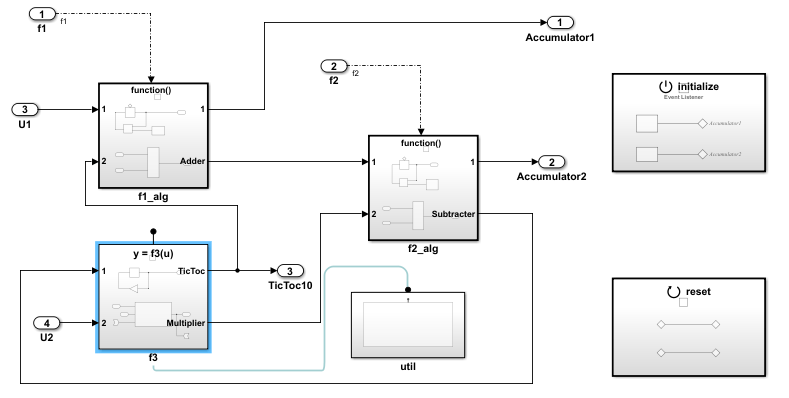
Change Language Setting for Code Generation
Set the model configuration parameter Language to C++.
set_param(model,'TargetLang','C++');
Change Visibility of Simulink Function
Change the visibility of the global function f3 from global to scoped. Open the Simulink Function block f3. Inside the function block, double-click the Trigger Port block f3. In the block parameters dialog box, set Function visibility to scoped. Click Apply and OK.
set_param('SimulinkFunctions/f3/f3','FunctionVisibility','scoped'); pause(1);
Open Configure C/C++ Function Interface Dialog Box
Open the Embedded Coder app. In the Code Mappings editor, click the Functions tab.
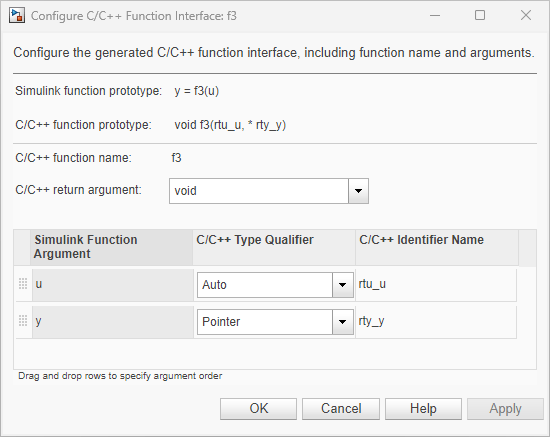
In the row for Simulink Function:f3, click the method preview hyperlink. The Configure C/C++ Function Interface dialog box shows Simulink function prototype as y = f3(u) and C/C++ function prototype as void f3(rtu_u, * rty_y).
Configure Simulink Function Prototype
Configure the function arguments. For this example, set C/C++ type Qualifier for the u argument to Const Reference and the y argument to Reference. Then click Apply.
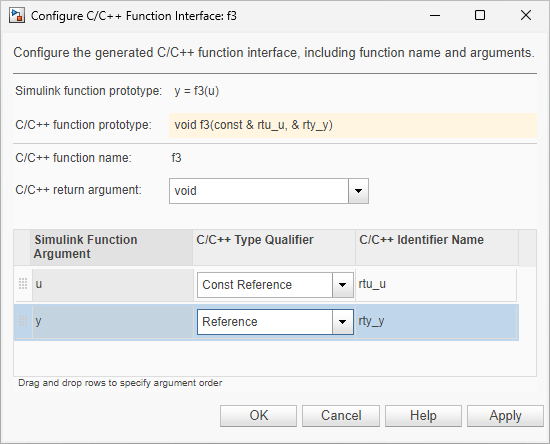
Alternatively, call the setFunction function with the desired function prototype.
coderMapObj = coder.mapping.utils.create(model);
fcnPrototype = '(const &u, &y)';
setFunction(coderMapObj,'SimulinkFunction:f3','Arguments',fcnPrototype);
In the Code Mappings editor, verify your change by checking the method preview. Your modifications, whether made to a Simulink Function block or a Function Caller block, affect code generation for the Simulink Function block and corresponding Function Caller blocks in the model.
Save your changes by clicking OK.
Generate code for the model.
evalc('slbuild(model)');In the Code view, open the generated file SimulinkFunctions.cpp and search for function f3. The generated function code reflects the changes to the generated C++ function prototype.
file = fullfile('SimulinkFunctions_ert_rtw','SimulinkFunctions.cpp');
coder.example.extractLines(file,"void SimulinkFunctions::f3",...
    "// Model initialize function",1,0);
void SimulinkFunctions::f3(const real_T &rtu_u, real_T &rty_y)
{
  int8_T rtb_Gain;

  // Outputs for Function Call SubSystem: '<Root>/f3'
  // Outport: '<Root>/TicToc10' incorporates:
  //   UnitDelay: '<S5>/Delay'

  rtY.TicToc10 = rtDWork.Delay_DSTATE;

  // Gain: '<S5>/Gain' incorporates:
  //   Outport: '<Root>/TicToc10'

  rtb_Gain = static_cast<int8_T>(-rtY.TicToc10);

  // FunctionCaller: '<S5>/Function Caller' incorporates:
  //   Inport: '<Root>/U2'
  //   SignalConversion generated from: '<S5>/In1'
  //   SignalConversion generated from: '<S5>/u'

  adder(rtB.Subtract, rtU.U2, rtu_u, &rtB.FunctionCaller);

  // SignalConversion generated from: '<S5>/y'
  rty_y = rtB.FunctionCaller;

  // Update for UnitDelay: '<S5>/Delay'
  rtDWork.Delay_DSTATE = rtb_Gain;

  // End of Outputs for SubSystem: '<Root>/f3'
}
Simulink Function C++ Code Interface Limitations
Global Simulink functions are incompatible with C++ class interfaces for model entry-point functions.
Simulink functions and function callers in Stateflow® are not supported for C++ function code interface configuration.
The Argument Outport block cannot be a return argument for a Simulink function when its data type is set to one of the following types:
Complex types
Bus types
Image types
Nonscalar types
Multiword types
If your model contains a Function Caller block without a Simulink Function block, and you modify only the C/C++ Identifier Name setting of the function prototype of the caller block, regenerating code does not update the function prototype in the generated code. To update the function prototype, follow these steps:
Modify the function prototype in the Configure C/C++ Function interface dialog box.
Delete the
simulinkfunction.hcodeGenFolder/slprj/folder.target/_sharedutilsRegenerate code.
See Also
Topics
- Simulink Functions Overview
- Scoped Simulink Function Blocks in Models
- Simulink Function Blocks in Referenced Models
- Generate Reentrant Code from Simulink Function Blocks
- Configure C Entry-Point Function Interfaces for Simulink Function and Function Caller Blocks
- Interactively Configure C++ Interface
- Programmatically Configure C++ Interface

