在生成的代码中实现数组大小的符号维度
R2025a符号维度允许在模型开发过程中使用符号代替固定的值来表示维度。无论何时需要在模型中指定信号维度,都可以使用符号维度而不是实际数字,这为更改维度提供了灵活性。有关详细信息,请参阅Create a Model with Symbolic Dimensions。
此示例展示如何在具有涉及向量和矩阵的四种建模模式的模型 DimensionVariants, 中实现符号维度,以及如何生成具有 CompilerFlag 和 ImportedDefine 存储类的代码。
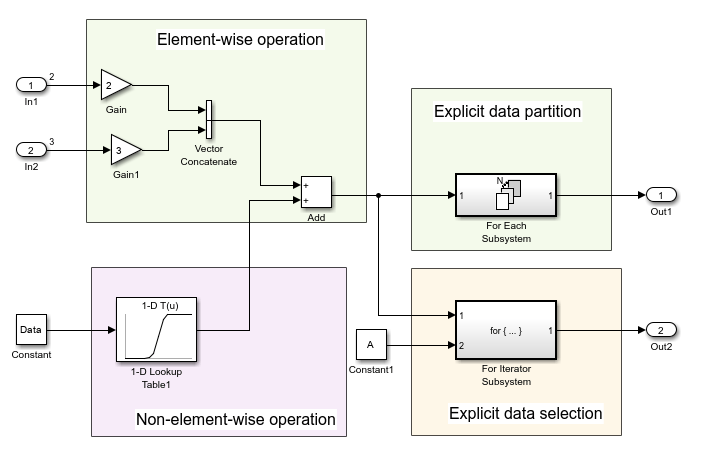
要查看模块名称,请在调试选项卡中选择信息覆盖并清除隐藏自动模块名称。
打开 Embedded Coder。在 C 代码选项卡中,选择代码接口 > 单个元素代码映射。在代码映射编辑器中的参数选项卡下,点击刷新。出现七个 Simulink.Parameter 对象,其中四个指定符号维度:A、B、C 和 D。这些参数的存储类为 CompilerFlag。
指定模块和数据对象的符号维度
在 Simulink 工具条的建模选项卡上,从设计库中选择属性检查器。
点击 Inport 模块
In1。在属性检查器中,Port Dimensions 属性设置为Simulink.Parameter对象A。点击 Inport 模块
In2。Port Dimensions 属性设置为Simulink.Parameter对象B。点击 Constant 模块。常值属性设置为
Simulink.Parameter对象Data。在代码映射编辑器中,在参数选项卡上,点击
Simulink.Parameter对象Data。Dimension 字段具有字符向量'[1,C]',它等同于'[1,5]',因为C的值5。 值属性包含一个 1×5 的数组,与其维度一致。数据对象的维度必须与Simulink.Parameter对象的 Dimensions 字段值一致。Data的 Storage class 为ImportedExtern。打开
1-D Lookup Table1模块参数对话框。表格数据参数设置为Simulink.ParameterPT。断点 1 字段包含Simulink.ParameterPB。在代码映射编辑器中,点击
PB和PT并查看它们的属性。这些参数的 Dimensions 属性设置为'[1,D]',并且是 1×15 的数组,与D的值15一致。
仿真模型。Simulink 在图中以符号形式传播维度。
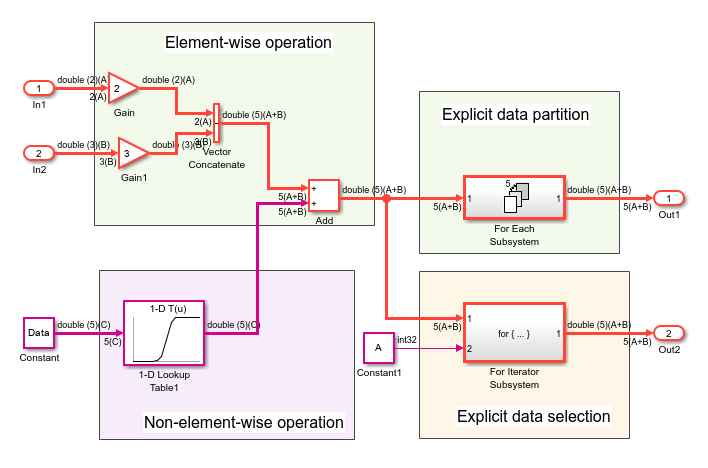
生成代码
通过模型仿真验证维度规格后,生成 DimensionVariants 的代码。
编译模型。
model = "DimensionVariants";
slbuild(model);
### Searching for referenced models in model 'DimensionVariants'. ### Total of 1 models to build. ### Starting build procedure for: DimensionVariants ### Successful completion of build procedure for: DimensionVariants Build Summary Top model targets: Model Build Reason Status Build Duration ==================================================================================================================== DimensionVariants Information cache folder or artifacts were missing. Code generated and compiled. 0h 0m 52.734s 1 of 1 models built (0 models already up to date) Build duration: 0h 0m 56.142s
查看生成的代码。在 DimensionVariants.h 文件中,符号维度位于数据声明中。
hfile = fullfile('DimensionVariants_ert_rtw',...
    'DimensionVariants.h');
coder.example.extractLines(hfile,'/* External inputs', '/* Real-time', 1, 0);
/* External inputs (root inport signals with default storage) */
typedef struct {
  real_T In1[A];                       /* '<Root>/In1' */
  real_T In2[B];                       /* '<Root>/In2' */
} ExtU;

/* External outputs (root outports fed by signals with default storage) */
typedef struct {
  real_T Out1[(A + B)];                /* '<Root>/Out1' */
  real_T Out2[(A + B)];                /* '<Root>/Out2' */
} ExtY;
符号维度在头文件中定义为宏。
hfile = fullfile('DimensionVariants_ert_rtw',...
    'DimensionVariants.h');
coder.example.extractLines(hfile,'#ifndef A', '* Constraints for division operations', 1, 0);
#ifndef A
#error The value of parameter "A" is not defined
#endif

#ifndef B
#error The value of parameter "B" is not defined
#endif

#ifndef C
#error The value of parameter "C" is not defined
#endif

#ifndef D
#error The value of parameter "D" is not defined
#endif

/*
DimensionVariants.h 文件包含数据定义和预处理器条件,它们定义了仿真期间在符号之间建立的约束。其中一个约束是符号维度的值必须大于 1。
hfile = fullfile('DimensionVariants_ert_rtw',...
    'DimensionVariants.h');
coder.example.extractLines(hfile,'#if A <= 1', '/* Macros for accessing', 1, 0);
#if A <= 1
# error "The preprocessor definition 'A' must be greater than '1'"
#endif

#if B <= 1
# error "The preprocessor definition 'B' must be greater than '1'"
#endif

/* Constraint 'D > 1' registered by:
 * '<Root>/1-D Lookup Table1'
 */
#if D <= 1
# error "The preprocessor definition 'D' must be greater than '1'"
#endif

/* Constraint 'C > 3' registered by:
 * '<S2>/Assignment'
 */
#if C <= 3
# error "The preprocessor definition 'C' must be greater than '3'"
#endif

#if A >= 11
# error "The preprocessor definition 'A' must be less than '11'"
#endif

#if B >= 11
# error "The preprocessor definition 'B' must be less than '11'"
#endif

/* Constraint 'D < 21' registered by:
 * '<Root>/1-D Lookup Table1'
 */
#if D >= 21
# error "The preprocessor definition 'D' must be less than '21'"
#endif

/* Constraint 'C < 11' registered by:
 * '<S2>/Assignment'
 */
#if C >= 11
# error "The preprocessor definition 'C' must be less than '11'"
#endif
DimensionVariants.h 文件还包括用户提供的具有 ImportedDefine 自定义存储类的任何 Simulink.Parameter 对象的头文件。
在 DimensionVariants.c 文件中,符号维度用于循环边界计算、数组大小和索引偏移计算以及参数化实用工具函数(例如 Lookup Table 模块)计算。
cfile = fullfile('DimensionVariants_ert_rtw',...
    'DimensionVariants.c');
coder.example.extractLines(cfile,'/* Model step', '/* Model initialize', 1, 0);
/* Model step function */
void DimensionVariants_step(void)
{
  real_T rtb_VectorConcatenate[A + B];
  real_T rtb_VectorConcatenate_0;
  int32_T ForEach_itr;
  int32_T i;
  int32_T s2_iter;

  /* Gain: '<Root>/Gain' incorporates:
   *  Inport: '<Root>/In1'
   */
  for (ForEach_itr = 0; ForEach_itr < A; ForEach_itr++) {
    rtb_VectorConcatenate[ForEach_itr] = 2.0 * rtU.In1[ForEach_itr];
  }

  /* End of Gain: '<Root>/Gain' */

  /* Gain: '<Root>/Gain1' incorporates:
   *  Inport: '<Root>/In2'
   */
  for (ForEach_itr = 0; ForEach_itr < B; ForEach_itr++) {
    rtb_VectorConcatenate[A + ForEach_itr] = 3.0 * rtU.In2[ForEach_itr];
  }

  /* End of Gain: '<Root>/Gain1' */

  /* Outputs for Iterator SubSystem: '<Root>/For Each Subsystem' incorporates:
   *  ForEach: '<S1>/For Each'
   */
  for (ForEach_itr = 0; ForEach_itr < A + B; ForEach_itr++) {
    /* Sum: '<Root>/Add' incorporates:
     *  Constant: '<Root>/Constant'
     *  Lookup_n-D: '<Root>/1-D Lookup Table1'
     */
    rtb_VectorConcatenate_0 = look1_binlx(Data[ForEach_itr], PB, PT, (uint32_T)
      (D - 1)) + rtb_VectorConcatenate[ForEach_itr];
    rtb_VectorConcatenate[ForEach_itr] = rtb_VectorConcatenate_0;

    /* ForEachSliceAssignment generated from: '<S1>/Out1' incorporates:
     *  ForEachSliceSelector generated from: '<S1>/In1'
     *  MATLAB Function: '<S1>/MATLAB Function'
     */
    /* MATLAB Function 'For Each Subsystem/MATLAB Function': '<S3>:1' */
    /* '<S3>:1:4' y = 2*u; */
    rtY.Out1[ForEach_itr] = 2.0 * rtb_VectorConcatenate_0;
  }

  /* End of Outputs for SubSystem: '<Root>/For Each Subsystem' */

  /* Outputs for Iterator SubSystem: '<Root>/For Iterator Subsystem' incorporates:
   *  ForIterator: '<S2>/For Iterator'
   */
  /* Constant: '<Root>/Constant1' */
  ForEach_itr = ((int32_T)A);
  if (((int32_T)A) < 0) {
    ForEach_itr = 0;
  }

  /* End of Constant: '<Root>/Constant1' */
  for (s2_iter = 0; s2_iter < ForEach_itr; s2_iter++) {
    /* Assignment: '<S2>/Assignment' incorporates:
     *  Constant: '<S2>/Constant'
     *  Outport: '<Root>/Out2'
     *  Product: '<S2>/Product'
     *  Selector: '<S2>/Selector'
     */
    if (s2_iter == 0) {
      for (i = 0; i < A + B; i++) {
        rtY.Out2[i] = rtb_VectorConcatenate[i];
      }
    }

    rtY.Out2[s2_iter] = rtb_VectorConcatenate[s2_iter] * 2.0;

    /* End of Assignment: '<S2>/Assignment' */
  }

  /* End of Outputs for SubSystem: '<Root>/For Iterator Subsystem' */
}
根据变体选择项设置参数值
当您使用符号指定模型中参数的维度时,必须确保参数值与维度值一致。要仿真维度值的不同选择,请手动更正参数值。
例如,在 DimensionVariants 模型中,Simulink.Parameter 对象 Data 存储向量值 [1 2 3 4 5],并使用初始值 5 的符号维度 C。如果更改 C 的值以仿真模型,请确保向量的长度与 C 的新值相匹配。
为了在更改 C 的值时减少维护工作量,可以将 Data 的值设置为涉及 C 的表达式。
在 MATLAB 代码语法中,Data 的值 [1:C]。为了保留参数对象之间的这种关系,请使用 slexpr 函数设置 Data 的值。
Data.Value = slexpr('1:C')
对于更复杂的应用,您可以编写自己的 MATLAB 函数,该函数根据符号维度返回参数值。将参数 Data 的值设置为调用函数的表达式。有关使用表达式设置 Simulink.Parameter 对象的值的常规信息,请参阅 使用数学表达式设置变量值。
提示:
您必须为包含符号维度的 Simulink.Parameter 对象提供初始化代码。为了防止生成的代码初始化这些参数,您必须:
配置参数以使用数据范围属性设置为
Imported的存储类,例如ImportedExtern或ImportedExternPointer内置存储类。配置参数以使用存储类,并将数据初始化属性设置为
None。

