PanelModel
R2026bDescription
PanelModel is an object that encapsulates a fitted panel
(longitudinal) data regression model. A panel data regression model describes the linear
relationship between a response variable and predictor variables, in which the data set is a
random, observational sample of n subjects measured over
T time points. The model accommodates one-way, linear fixed or random
effects (heterogeneity), which you can use to control for, and study,
unobserved, subject-specific, phenomena associated with the response variable.
Use the properties of a PanelModel object to investigate the fitted panel
data regression model. The object properties include information about coefficient and effect
estimates, associated variances and covariances, and inferences.
Creation
Create a PanelModel object by using the fitrepanel or fitfepanel function.
The
fitrepanelfunction fits a one-way random effects panel data regression model to data. That is, the observed and unobserved effects are independent (the grouping variable is independent of all predictor variables).The
fitfepanelfunction fits a one-way fixed effects panel data regression model to data. That is, the observed and unobserved effects are correlated (at least one predictor variable is correlated with the grouping variable).
Both model types are not to be confused with the linear mixed-effects model, as
estimated by the fitlme function.
Properties
Object Functions
predict | Predict responses for new observations from panel data regression model |
Examples
Fit a random effects panel data regression model to data using default options. The data is in wide format.
Load the simulated, balanced panel data set Data_SimulatedBalancedPanel.mat, which is available when you open this example. The data set contains 12 microeconomic measurements of 1000 randomly selected people taken yearly from 2006 through 2020. The response variable in the model is a series of log wages, while all other variables in the data are predictors.
load Data_SimulatedBalancedPanelFor details on the data set, enter Description at the command line.
The variable Data is a 3-D numeric array containing the predictor and response variables. Each row is a time point in the sampling period, each column is a subject in the sample, and each page is a variable. The final variable in Data is the response variable (log wages series), while all other variables are predictors.
Create separate variables for the predictor and response data.
X = Data(:,:,1:(end-1));
Y = Data(:,:,end);
X is a 15-by-1000-by-11 numeric array of predictor data and Y is a 15-by-1000 numeric matrix. For example, X(10,501,3) is the education experience of subject 501 in 2015.
Create a binary numeric variable for whether the subject is female (coded as 1), by using predictor 2, and a binary numeric variable for whether the subject is married (coded as 1), by using predictor 9.
X(:,:,2) = double(X(:,:,2) == 1);
X(:,:,9) = double(X(:,:,9) == 1);
Assume that the subject effect (heterogeneity) is not associated with the predictor variables. Fit a random effects panel data regression model to the data. Use default options.
EstMdl = fitrepanel(X,Y);
Panel data information:
Number of cross-sectional units (N):  1000
Number of periods (T):  15
Number of observations:  15000
Method of estimation:  random effects (GLS)

                     | Estimator    SE      tStat   pValue
-----------------------------------------------------------
 x1                  |   0.0485   0.0003  154.4327   0
 x2                  |  -0.3381   0.0324  -10.4265  0.0000
 x3                  |   0.1003   0.0036   28.0246  0.0000
 x4                  |  -0.1370   0.0389   -3.5231  0.0004
 x5                  |  -0.0620   0.0047  -13.1530  0.0000
 x6                  |   0.0087   0.0053    1.6637  0.0962
 x7                  |  -0.0390   0.0112   -3.4902  0.0005
 x8                  |  -0.0191   0.0071   -2.6853  0.0072
 x9                  |  -0.0516   0.0107   -4.8406  0.0000
 x10                 |   0.0741   0.0051   14.6575  0.0000
 x11                 |   0.0016   0.0003    5.7319  0.0000
 DisturbanceVariance |   0.0302
 EffectVariance      |   0.0947
fitrepanel displays an estimation summary to the command line. Row xj contains, for predictor j, the coefficient estimate, standard error, and statistic for a two-tailed test that the coefficient is 0 with its -value. All predictor variables are significant except for x6 and x7.
Display the fitted model.
EstMdl
EstMdl =
  PanelModel with properties:

             Coefficients: [11×1 double]
    CoefficientCovariance: [11×11 double]
      DisturbanceVariance: 0.0302
           EffectVariance: 0.0947
                  Effects: [4.5484 4.3304 4.6605 4.9304 4.9176 4.5704 3.8183 4.7566 4.4485 4.1725 4.6417 4.5086 4.7519 4.4794 4.2617 4.7618 4.5002 4.3778 4.1206 3.8693 3.9290 4.5513 4.5366 4.2080 4.6091 4.2711 4.6690 3.7448 3.9863 … ] (1×1000 double)
            LogLikelihood: 4.9624e+03
                  Summary: [13×4 table]
                     Type: "RandomEffects"
EstMdl is a PanelModel object. You can access its properties using dot notation.
Plot the empirical distribution of the heterogeneity.
effects = EstMdl.Effects;
histogram(effects,Normalization="probability")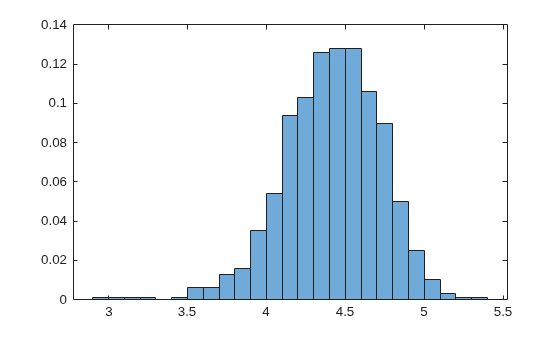
Fit a random effects panel data regression model to data and obtain robust estimates.
Load the simulated, balanced panel data set Data_SimulatedBalancedPanel.mat, which is available when you open this example. The data set contains 12 microeconomic measurements of 1000 randomly selected people taken yearly from 2006 through 2020. The response variable in the model is a series of log wages, while all other variables in the data are predictors.
load Data_SimulatedBalancedPanelFor details on the data set, enter Description at the command line.
Create separate variables for the predictor and response data.
X = Data(:,:,1:(end-1));
[T,n,p] = size(X);
Y = Data(:,:,end);
Create a binary numeric variable for whether the subject is female (coded as 1), by using predictor 2, and a binary numeric variable for whether the subject is married (coded as 1), by using predictor 9.
X(:,:,2) = double(X(:,:,2) == 1);
X(:,:,9) = double(X(:,:,9) == 1);
Simulate heteroscedasticity in the system by using unmeasured, subject-specific predictor variables such that, for each subject , and . For each subject, simulate values.
rng(1,"twister")
Z = zeros(T,n);
for j = 1:n
    lambda = randi(50);
    Z(:,j) = poissrnd(lambda,T,1);
end
Add the simulated predictor data to the response data with coefficient .
YSim = Y + 2*Z;
Assume that the heterogeneity is not associated with the predictor variables. Fit a random effects panel data regression model to the predictor data without and the simulated response data. Use default options.
EstMdl = fitrepanel(X,YSim);
Panel data information:
Number of cross-sectional units (N):  1000
Number of periods (T):  15
Number of observations:  15000
Method of estimation:  random effects (GLS)

                     | Estimator    SE     tStat   pValue
----------------------------------------------------------
 x1                  |    0.0196  0.0190   1.0279  0.3040
 x2                  |    1.4279  3.0659   0.4657  0.6414
 x3                  |   -0.1095  0.3385  -0.3236  0.7462
 x4                  |   -2.0201  3.6775  -0.5493  0.5828
 x5                  |    0.3700  0.2763   1.3392  0.1805
 x6                  |   -0.2306  0.3087  -0.7472  0.4550
 x7                  |    0.9527  0.6997   1.3616  0.1733
 x8                  |    0.1847  0.4256   0.4341  0.6642
 x9                  |    0.3463  0.6632   0.5223  0.6015
 x10                 |   -0.0337  0.2965  -0.1137  0.9094
 x11                 |    0.0070  0.0161   0.4345  0.6640
 DisturbanceVariance |  101.9401
 EffectVariance      |  859.3624
Compute model residuals , and plot them against the fitted responses. Color the residuals according to subject ID.
betahat = reshape(EstMdl.Coefficients,1,1,p);
alphahat = EstMdl.Effects;
Yhat = sum(X.*betahat,3) + alphahat;
Residuals = YSim - Yhat;
figure
plot(Yhat,Residuals,'.')
hold on
yline(0,"--")
hold off
title("Residuals by Subject")
ylabel("Residual")
xlabel("Fitted Value")
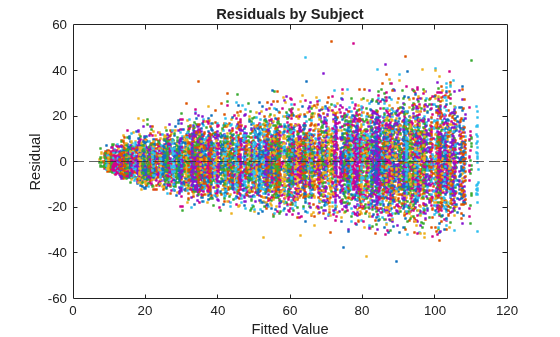
The residuals scatter more widely as the fitted values increase. This behavior is indicative of heteroscedasticity. Also, residuals appear clustered by groups.
Refit the model; compute robust covariance estimates.
EstMdlRobust = fitrepanel(X,YSim,RobustCovariance=true);
Panel data information:
Number of cross-sectional units (N):  1000
Number of periods (T):  15
Number of observations:  15000
Method of estimation:  random effects (GLS)

                     | Estimator    SE     tStat   pValue
----------------------------------------------------------
 x1                  |    0.0196  0.0191   1.0222  0.3067
 x2                  |    1.4279  2.8975   0.4928  0.6222
 x3                  |   -0.1095  0.3417  -0.3205  0.7486
 x4                  |   -2.0201  3.5807  -0.5642  0.5726
 x5                  |    0.3700  0.2755   1.3431  0.1792
 x6                  |   -0.2306  0.3215  -0.7174  0.4731
 x7                  |    0.9527  0.6701   1.4218  0.1551
 x8                  |    0.1847  0.4344   0.4253  0.6706
 x9                  |    0.3463  0.6501   0.5327  0.5942
 x10                 |   -0.0337  0.2976  -0.1133  0.9098
 x11                 |    0.0070  0.0159   0.4414  0.6589
 DisturbanceVariance |  101.9401
 EffectVariance      |  859.3624
The coefficient estimates between the regular and robust runs are the same; the difference between the runs is in the inferences.
Plot a heatmap of the difference between the estimated coefficient covariance matrix.
seriesSim = series(1:p);
heatmap(seriesSim,seriesSim,(EstMdlRobust.CoefficientCovariance-EstMdl.CoefficientCovariance)./EstMdl.CoefficientCovariance)
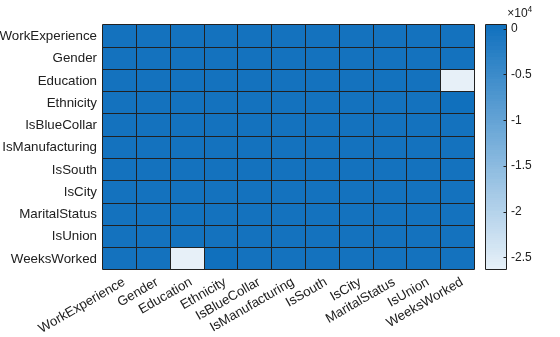
The estimated covariance of the coefficients of Education and WeeksWorked shows the greatest relative difference between the robust and non-robust analyses.
Alternative Functionality
When your longitudinal data set is the result of a controlled experiment study, fit a
linear mixed-effects model (LinearMixedModel object) by using fitlme.
References
Version History
Introduced in R2026a
See Also
fitrepanel | fitlme | fitrm | fitlmematrix

