fitrepanel
R2026bSyntax
Description
EstMdl = fitrepanel(X,Y)EstMdl, from fitting the model to the input panel data in wide
format. X is a
T-by-n-by-p array of predictor
data and Y is a T-by-n matrix of
response data, where T is the greatest number of sampling time points
among subjects, n is the number of sampled subjects, and
p is the number of predictor variables. A data set in wide format must
be organized as follows:
Rows correspond to time points in the sample. In other words, row t contains all p measurements for all n subjects at time t.
Columns correspond to sampled subjects. In other words, column c contains all p measurements over all T time points of subject c.
For
X, pages correspond to predictor variables. In other words, page k contains measurements of predictor k for all n subjects and T time points in the sample. None of the predictors can represent an intercept. Among subjects, sampled time points correspond (fitrepanelassumes all subjects are measured simultaneously).
EstMdl is a panel data regression model PanelModel.
EstMdl = fitrepanel(X,Y,groups)X is an
m-by-p matrix of predictor data and
Y is an m-by-1 vector of response data, where
m is the number of observations (for example, m =
Tn for a balanced panel data set). Each row is an observation (all
measurements) associated with a particular subject at a particular time, and each column is
a variable. The groups input specifies to which subject the observation
belongs. For a subject, larger row indices indicate measurements taken later in the
sample.
EstMdl = fitrepanel(Tbl,PredictorVariables=predictorVariables,GroupVariable=groupVariable)Tbl. Panel data in a table is in
long format. The Tbl input argument has
m rows; each row is an observation. The
predictorVariables input specifies which table variables are
predictor variables. groupVariable specifies to which subject the
measurements in the rows of the data belong. The last table variable is the response
variable, but you can specify a different variable as the response by using the
ResponseVariable name-value argument.
EstMdl = fitrepanel(___,Name=Value)fitrepanel(Tbl,PredictorVariables=predictors,GroupVariable="Country",ResponseVariable="LogGDP",FitEffects=false,Method="ssm")
specifies that the table variable LogGDP contains the response data,
the table variable Country contains the subject identifiers, and the
arbitrary string vector predictors contains the predictor variable names
in the table. This syntax skips fitting the unobserved effects and estimates the parameters
by using maximum likelihood in the state-space model framework.
Examples
Fit a random effects panel data regression model to data using default options. The data is in wide format.
Load the simulated, balanced panel data set Data_SimulatedBalancedPanel.mat, which is available when you open this example. The data set contains 12 microeconomic measurements of 1000 randomly selected people taken yearly from 2006 through 2020. The response variable in the model is a series of log wages, while all other variables in the data are predictors.
load Data_SimulatedBalancedPanelFor details on the data set, enter Description at the command line.
The variable Data is a 3-D numeric array containing the predictor and response variables. Each row is a time point in the sampling period, each column is a subject in the sample, and each page is a variable. The final variable in Data is the response variable (log wages series), while all other variables are predictors.
Create separate variables for the predictor and response data.
X = Data(:,:,1:(end-1));
Y = Data(:,:,end);
X is a 15-by-1000-by-11 numeric array of predictor data and Y is a 15-by-1000 numeric matrix. For example, X(10,501,3) is the education experience of subject 501 in 2015.
Create a binary numeric variable for whether the subject is female (coded as 1), by using predictor 2, and a binary numeric variable for whether the subject is married (coded as 1), by using predictor 9.
X(:,:,2) = double(X(:,:,2) == 1);
X(:,:,9) = double(X(:,:,9) == 1);
Assume that the subject effect (heterogeneity) is not associated with the predictor variables. Fit a random effects panel data regression model to the data. Use default options.
EstMdl = fitrepanel(X,Y);
Panel data information:
Number of cross-sectional units (N):  1000
Number of periods (T):  15
Number of observations:  15000
Method of estimation:  random effects (GLS)

                     | Estimator    SE      tStat   pValue
-----------------------------------------------------------
 x1                  |   0.0485   0.0003  154.4327   0
 x2                  |  -0.3381   0.0324  -10.4265  0.0000
 x3                  |   0.1003   0.0036   28.0246  0.0000
 x4                  |  -0.1370   0.0389   -3.5231  0.0004
 x5                  |  -0.0620   0.0047  -13.1530  0.0000
 x6                  |   0.0087   0.0053    1.6637  0.0962
 x7                  |  -0.0390   0.0112   -3.4902  0.0005
 x8                  |  -0.0191   0.0071   -2.6853  0.0072
 x9                  |  -0.0516   0.0107   -4.8406  0.0000
 x10                 |   0.0741   0.0051   14.6575  0.0000
 x11                 |   0.0016   0.0003    5.7319  0.0000
 DisturbanceVariance |   0.0302
 EffectVariance      |   0.0947
fitrepanel displays an estimation summary to the command line. Row xj contains, for predictor j, the coefficient estimate, standard error, and statistic for a two-tailed test that the coefficient is 0 with its -value. All predictor variables are significant except for x6 and x7.
Display the fitted model.
EstMdl
EstMdl =
  PanelModel with properties:

             Coefficients: [11×1 double]
    CoefficientCovariance: [11×11 double]
      DisturbanceVariance: 0.0302
           EffectVariance: 0.0947
                  Effects: [4.5484 4.3304 4.6605 4.9304 4.9176 4.5704 3.8183 4.7566 4.4485 4.1725 4.6417 4.5086 4.7519 4.4794 4.2617 4.7618 4.5002 4.3778 4.1206 3.8693 3.9290 4.5513 4.5366 4.2080 4.6091 4.2711 4.6690 3.7448 3.9863 … ] (1×1000 double)
            LogLikelihood: 4.9624e+03
                  Summary: [13×4 table]
                     Type: "RandomEffects"
EstMdl is a PanelModel object. You can access its properties using dot notation.
Plot the empirical distribution of the heterogeneity.
effects = EstMdl.Effects;
histogram(effects,Normalization="probability")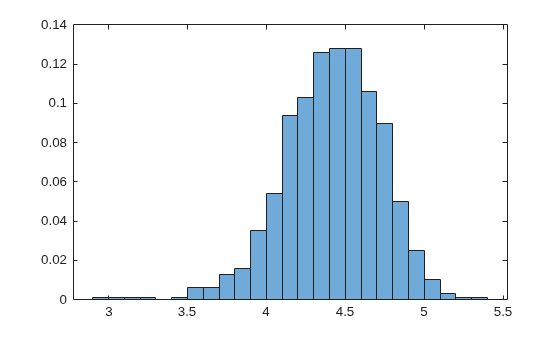
Fit a random effects panel data regression model to data using default options. The data is in long format.
Load the simulated, balanced panel data set Data_SimulatedBalancedPanel.mat, which is available when you open this example. The data set contains 12 microeconomic measurements of 1000 randomly selected people taken yearly from 2006 through 2020. The response variable in the model is a series of log wages, while all other variables in the data are predictors.
Load and Extract Data
load Data_SimulatedBalancedPanelFor details on the data set, enter Description at the command line.
The variable Data is a 3-D numeric array containing the predictor and response variables. Each row is a time point in the sampling period, each column is a subject in the sample, and each page is a variable. The final variable in Data is the response variable (log wages series), while all other variables are predictors. This data format is wide.
Create separate variables for the predictor and response data.
X = Data(:,:,1:(end-1));
Y = Data(:,:,end);
[T,n,p] = size(X)
T =
15
n =
1000
p =
11
X is a 15-by-1000-by-11 numeric array of predictor data and Y is a 15-by-1000 numeric matrix. For example, X(10,501,3) is the education experience of subject 501 in 2015.
Convert Data to Long Format
Data in long format must have the following characteristics:
The response data is a -by-1 vector, where is the number of periods in the time base and is the number of subjects. In this example, the long-format response data is a 15000-by-1 vector.
The predictor data is a -by- matrix, where is the number of predictors. In this example, the long-format predictor data is a 15000-by-11 matrix.
The software must be able to identify to which subject the observation belongs by a -by-1 vector of subject IDs.
For each subject, the software assumes that observations in higher rows were sampled later.
Convert the response data to long format by stacking the columns of Y using linear indexing with a single colon.
YLong = Y(:);
size(YLong)
ans = 1×2

       15000           1
For selected subjects, verify that the responses are arranged by blocks of subjects, increasing by sampling time within each block. To choose a subject to check, use the control.
j =3; % Subject index YSubj = Y(1:T,j); YLongSubj = YLong((T*(j-1)+1):(T*j)); sum(YSubj - YLongSubj)
ans =
0
Convert the predictor data to long format by stacking the columns of X and setting its pages to columns using reshape.
XLong = reshape(X,T*n,11);
size(XLong)
ans = 1×2

       15000          11
XLong is arranged such that all subject-specified measurements are blocked together and stacked, and within-subject blocks of observations are arranged in increasing order by sampling time.
For selected subjects, verify that the predictor data are arranged by blocks of subjects, increasing by sampling time within each block. To choose a subject to check, use the control.
j =  6;
XSubj = squeeze(X(1:T,j,:));
XLongSubj = XLong((T*(j-1)+1):(T*j),:);
sum(sum(XSubj - XLongSubj))
6;
XSubj = squeeze(X(1:T,j,:));
XLongSubj = XLong((T*(j-1)+1):(T*j),:);
sum(sum(XSubj - XLongSubj))ans = 0
Observations are arranged by blocks of subjects. Create a numeric vector, which identifies each subject, by repeating each integer in the interval times, and then stacking the results.
Groups = repmat(1:n,T,1);
Groups = Groups(:);
Preprocess Data
Create a binary numeric variable for whether the subject is female (coded as 1), by using predictor 2, and a binary numeric variable for whether the subject is married (coded as 1), by using predictor 9.
XLong(:,2) = double(XLong(:,2) == 1);
XLong(:,9) = double(XLong(:,9) == 1);
Fit the Model to Data
Assume that the heterogeneity is not associated with the predictor variables. Fit a random effects panel data regression model to the long-format data. Specify the grouping variable. Use default options.
EstMdl = fitrepanel(XLong,YLong,Groups);
Panel data information:
Number of cross-sectional units (N):  1000
Number of periods (T):  15
Number of observations:  15000
Method of estimation:  random effects (GLS)

                     | Estimator    SE      tStat   pValue
-----------------------------------------------------------
 x1                  |   0.0485   0.0003  154.4327   0
 x2                  |  -0.3381   0.0324  -10.4265  0.0000
 x3                  |   0.1003   0.0036   28.0246  0.0000
 x4                  |  -0.1370   0.0389   -3.5231  0.0004
 x5                  |  -0.0620   0.0047  -13.1530  0.0000
 x6                  |   0.0087   0.0053    1.6637  0.0962
 x7                  |  -0.0390   0.0112   -3.4902  0.0005
 x8                  |  -0.0191   0.0071   -2.6853  0.0072
 x9                  |  -0.0516   0.0107   -4.8406  0.0000
 x10                 |   0.0741   0.0051   14.6575  0.0000
 x11                 |   0.0016   0.0003    5.7319  0.0000
 DisturbanceVariance |   0.0302
 EffectVariance      |   0.0947
The results are the same as the results from the model fit to data in wide format.
Fit a random effects panel data regression model to data using default options. The data is in a timetable.
Load the simulated, balanced panel data set Data_SimulatedBalancedPanel.mat, which is available when you open this example. The data set contains 12 microeconomic measurements of 1000 randomly selected people taken yearly from 2006 through 2020. The response variable in the model is a series of log wages, while all other variables in the data are predictors.
load Data_SimulatedBalancedPanelFor details on the data set, enter Description at the command line.
The variable DataTimeTable is a timetable containing the data. LogWage is the response variable, Group is the subject ID (grouping) variable, and all other variables are predictors. Each row is an observation for a subject at a time point in the sampling period (in other words, this data format is long).
Display the head and size of the timetable of data.
head(DataTimeTable)
    Time    WorkExperience    Gender    Education    Ethnicity    IsBlueCollar    IsManufacturing    IsSouth    IsCity    MaritalStatus    IsUnion    WeeksWorked    Group    LogWage
    ____    ______________    ______    _________    _________    ____________    _______________    _______    ______    _____________    _______    ___________    _____    _______

    2006          29          female       12            0             1                 0              0         0       nevermarried        0           48           1      6.7956
    2007          30          female       12            0             1                 0              0         0       nevermarried        0           49           1      6.6592
    2008          31          female       12            0             1                 0              0         0       nevermarried        0           51           1      6.9801
    2009          32          female       12            0             0                 0              0         0       nevermarried        0           45           1      7.2397
    2010          33          female       12            0             0                 0              0         0       nevermarried        0           25           1       7.123
    2011          34          female       12            0             0                 0              0         0       nevermarried        0           42           1      6.9183
    2012          35          female       12            0             0                 0              0         0       nevermarried        0           48           1      7.1639
    2013          36          female       12            0             0                 0              0         0       nevermarried        0           49           1      7.0534
size(DataTimeTable)
ans = 1×2

       15000          13
Create a new timetable TT containing a binary numeric variable for whether the subject is female, by using Gender, and a binary numeric variable for whether the subject is married, by using MaritalStatus. Then, remove the corresponding variables from TT.
TT = DataTimeTable;
TT.IsFemale = double(TT.Gender == "female");
TT = movevars(TT,"IsFemale","Before","Gender");
TT.Gender = [];
TT.IsMarried = double(TT.MaritalStatus == "married");
TT = movevars(TT,"IsMarried","Before","MaritalStatus");
TT.MaritalStatus = [];
Fit a random effects panel data regression model of the log wage series (LogWage) to all other variables in the timetable except the subject ID (Group). Specify the predictor and grouping variable names; fitrepanel assumes the final variable is the response variable.
prednames = TT.Properties.VariableNames(1:end-2);
EstMdl = fitrepanel(TT,PredictorVariables=prednames,GroupVariable="Group");
Panel data information:
Number of cross-sectional units (N): 1000
Number of periods (T): 15
Number of observations: 15000
Method of estimation: random effects (GLS)
| Estimator SE tStat pValue
-----------------------------------------------------------
WorkExperience | 0.0485 0.0003 154.4327 0
IsFemale | -0.3381 0.0324 -10.4265 0.0000
Education | 0.1003 0.0036 28.0246 0.0000
Ethnicity | -0.1370 0.0389 -3.5231 0.0004
IsBlueCollar | -0.0620 0.0047 -13.1530 0.0000
IsManufacturing | 0.0087 0.0053 1.6637 0.0962
IsSouth | -0.0390 0.0112 -3.4902 0.0005
IsCity | -0.0191 0.0071 -2.6853 0.0072
IsMarried | -0.0516 0.0107 -4.8406 0.0000
IsUnion | 0.0741 0.0051 14.6575 0.0000
WeeksWorked | 0.0016 0.0003 5.7319 0.0000
DisturbanceVariance | 0.0302
EffectVariance | 0.0947
The results are the same as the results from the model fit to data in wide format.
Estimate a random effects panel data regression model of log wages as a function of a set of predictors by viewing the model as a linear state-space model.
By default, fitrepanel uses GLS to estimate the model. Alternatively, you can specify that fitrepanel view the model as a linear state-space, and apply maximum likelihood to estimate the parameters.
Load the simulated, balanced panel data set Data_SimulatedBalancedPanel.mat, which is available when you open this example. The data set contains 12 microeconomic measurements of 1000 randomly selected people taken yearly from 2006 through 2020. The response variable in the model is a series of log wages, while all other variables in the data are predictors.
load Data_SimulatedBalancedPanelFor details on the data set, enter Description at the command line.
Create a new timetable TT containing a binary numeric variable for whether the subject is female, by using Gender, and a binary numeric variable for whether the subject is married, by using MaritalStatus. Then, remove the corresponding variables from TT.
TT = DataTimeTable;
TT.IsFemale = double(TT.Gender == "female");
TT = movevars(TT,"IsFemale","Before","Gender");
TT.Gender = [];
TT.IsMarried = double(TT.MaritalStatus == "married");
TT = movevars(TT,"IsMarried","Before","MaritalStatus");
TT.MaritalStatus = [];
Fit a random effects panel data regression model of the log wage series (LogWage) to all other variables in the processed timetable TT except the subject ID. Specify the state-space model estimation method.
varnames = TT.Properties.VariableNames;
prednames = varnames(~ismember(varnames,["Group" "LogWage"]));
EstMdl = fitrepanel(TT,PredictorVariables=prednames,GroupVariable="Group",Method="ssm");
Panel data information:
Number of cross-sectional units (N):  1000
Number of periods (T):  15
Number of observations:  15000
Method of estimation:  random effects (SSM)

                     | Estimator    SE      tStat   pValue
-----------------------------------------------------------
 WorkExperience      |   0.0485   0.0003  154.4004   0
 IsFemale            |  -0.3381   0.0325  -10.3976  0.0000
 Education           |   0.1003   0.0036   27.9469  0.0000
 Ethnicity           |  -0.1370   0.0390   -3.5132  0.0004
 IsBlueCollar        |  -0.0620   0.0047  -13.1543  0.0000
 IsManufacturing     |   0.0088   0.0053    1.6647  0.0960
 IsSouth             |  -0.0389   0.0112   -3.4838  0.0005
 IsCity              |  -0.0191   0.0071   -2.6810  0.0073
 IsMarried           |  -0.0516   0.0107   -4.8464  0.0000
 IsUnion             |   0.0741   0.0051   14.6588  0.0000
 WeeksWorked         |   0.0016   0.0003    5.7332  0.0000
 DisturbanceVariance |   0.0302   0.0004   84.7569   0
 EffectVariance      |   0.0953   0.0040   23.7771  0.0000
The results are nearly the same as the results from the model fit using GLS. This similarity occurs because, in this problem, maximum likelihood and GLS are asymptotically equal.
Fit a random effects panel data regression model to data; fix the random effects variance to a known value.
Load the simulated, balanced panel data set Data_SimulatedBalancedPanel.mat, which is available when you open this example. The data set contains 12 microeconomic measurements of 1000 randomly selected people taken yearly from 2006 through 2020. The response variable in the model is a series of log wages, while all other variables in the data are predictors.
load Data_SimulatedBalancedPanelFor details on the data set, enter Description at the command line.
Create a new timetable TT containing a binary numeric variable for whether the subject is female, by using Gender, and a binary numeric variable for whether the subject is married, by using MaritalStatus. Then, remove the corresponding variables from TT.
TT = DataTimeTable;
TT.IsFemale = double(TT.Gender == "female");
TT = movevars(TT,"IsFemale","Before","Gender");
TT.Gender = [];
TT.IsMarried = double(TT.MaritalStatus == "married");
TT = movevars(TT,"IsMarried","Before","MaritalStatus");
TT.MaritalStatus = [];
Fit a random effects panel data regression model of the log wage series (LogWage) to all other variables in the timetable except the subject ID (Group). Specify the predictor and grouping variable names. Fix the random effects variance to 0.05, 0.1, and then 0.2. Suppress the estimation display.
prednames = TT.Properties.VariableNames(1:end-2);
sigma2alpha = [0.05 0.1 0.5 1];
m = numel(sigma2alpha);
Coefficients = cell(3,1);
DisturbanceVariance = zeros(3,1);

for j = 1:m
    EstMdl = fitrepanel(TT,PredictorVariables=prednames,GroupVariable="Group", ...
        EffectVariance=sigma2alpha(j),Display=false);
    Coefficients{j} = EstMdl.Coefficients;
    DisturbanceVariance(j) = EstMdl.DisturbanceVariance;
end

cell2mat(Coefficients')
ans = 11×4

    0.0486    0.0485    0.0484    0.0483
   -0.3376   -0.3381   -0.3387   -0.3388
    0.1003    0.1004    0.1004    0.1004
   -0.1378   -0.1370   -0.1359   -0.1357
   -0.0621   -0.0620   -0.0618   -0.0618
    0.0082    0.0088    0.0094    0.0096
   -0.0451   -0.0385   -0.0294   -0.0278
   -0.0231   -0.0189   -0.0148   -0.0143
   -0.0413   -0.0523   -0.0653   -0.0673
    0.0744    0.0741    0.0740    0.0740
    0.0016    0.0016    0.0016    0.0016
DisturbanceVariance
DisturbanceVariance = 4×1

    0.0302
    0.0302
    0.0302
    0.0302
The estimates are nearly the same among the effects variance settings, which shows that the estimators are robust to moderate to extreme levels of the effects variance.
Fit a random effects panel data regression model to data and obtain robust estimates.
Load the simulated, balanced panel data set Data_SimulatedBalancedPanel.mat, which is available when you open this example. The data set contains 12 microeconomic measurements of 1000 randomly selected people taken yearly from 2006 through 2020. The response variable in the model is a series of log wages, while all other variables in the data are predictors.
load Data_SimulatedBalancedPanelFor details on the data set, enter Description at the command line.
Create separate variables for the predictor and response data.
X = Data(:,:,1:(end-1));
[T,n,p] = size(X);
Y = Data(:,:,end);
Create a binary numeric variable for whether the subject is female (coded as 1), by using predictor 2, and a binary numeric variable for whether the subject is married (coded as 1), by using predictor 9.
X(:,:,2) = double(X(:,:,2) == 1);
X(:,:,9) = double(X(:,:,9) == 1);
Simulate heteroscedasticity in the system by using unmeasured, subject-specific predictor variables such that, for each subject , and . For each subject, simulate values.
rng(1,"twister")
Z = zeros(T,n);
for j = 1:n
    lambda = randi(50);
    Z(:,j) = poissrnd(lambda,T,1);
end
Add the simulated predictor data to the response data with coefficient .
YSim = Y + 2*Z;
Assume that the heterogeneity is not associated with the predictor variables. Fit a random effects panel data regression model to the predictor data without and the simulated response data. Use default options.
EstMdl = fitrepanel(X,YSim);
Panel data information:
Number of cross-sectional units (N):  1000
Number of periods (T):  15
Number of observations:  15000
Method of estimation:  random effects (GLS)

                     | Estimator    SE     tStat   pValue
----------------------------------------------------------
 x1                  |    0.0196  0.0190   1.0279  0.3040
 x2                  |    1.4279  3.0659   0.4657  0.6414
 x3                  |   -0.1095  0.3385  -0.3236  0.7462
 x4                  |   -2.0201  3.6775  -0.5493  0.5828
 x5                  |    0.3700  0.2763   1.3392  0.1805
 x6                  |   -0.2306  0.3087  -0.7472  0.4550
 x7                  |    0.9527  0.6997   1.3616  0.1733
 x8                  |    0.1847  0.4256   0.4341  0.6642
 x9                  |    0.3463  0.6632   0.5223  0.6015
 x10                 |   -0.0337  0.2965  -0.1137  0.9094
 x11                 |    0.0070  0.0161   0.4345  0.6640
 DisturbanceVariance |  101.9401
 EffectVariance      |  859.3624
Compute model residuals , and plot them against the fitted responses. Color the residuals according to subject ID.
betahat = reshape(EstMdl.Coefficients,1,1,p);
alphahat = EstMdl.Effects;
Yhat = sum(X.*betahat,3) + alphahat;
Residuals = YSim - Yhat;
figure
plot(Yhat,Residuals,'.')
hold on
yline(0,"--")
hold off
title("Residuals by Subject")
ylabel("Residual")
xlabel("Fitted Value")
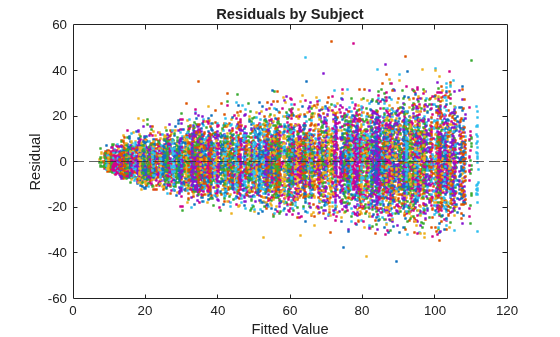
The residuals scatter more widely as the fitted values increase. This behavior is indicative of heteroscedasticity. Also, residuals appear clustered by groups.
Refit the model; compute robust covariance estimates.
EstMdlRobust = fitrepanel(X,YSim,RobustCovariance=true);
Panel data information:
Number of cross-sectional units (N):  1000
Number of periods (T):  15
Number of observations:  15000
Method of estimation:  random effects (GLS)

                     | Estimator    SE     tStat   pValue
----------------------------------------------------------
 x1                  |    0.0196  0.0191   1.0222  0.3067
 x2                  |    1.4279  2.8975   0.4928  0.6222
 x3                  |   -0.1095  0.3417  -0.3205  0.7486
 x4                  |   -2.0201  3.5807  -0.5642  0.5726
 x5                  |    0.3700  0.2755   1.3431  0.1792
 x6                  |   -0.2306  0.3215  -0.7174  0.4731
 x7                  |    0.9527  0.6701   1.4218  0.1551
 x8                  |    0.1847  0.4344   0.4253  0.6706
 x9                  |    0.3463  0.6501   0.5327  0.5942
 x10                 |   -0.0337  0.2976  -0.1133  0.9098
 x11                 |    0.0070  0.0159   0.4414  0.6589
 DisturbanceVariance |  101.9401
 EffectVariance      |  859.3624
The coefficient estimates between the regular and robust runs are the same; the difference between the runs is in the inferences.
Plot a heatmap of the difference between the estimated coefficient covariance matrix.
seriesSim = series(1:p);
heatmap(seriesSim,seriesSim,(EstMdlRobust.CoefficientCovariance-EstMdl.CoefficientCovariance)./EstMdl.CoefficientCovariance)
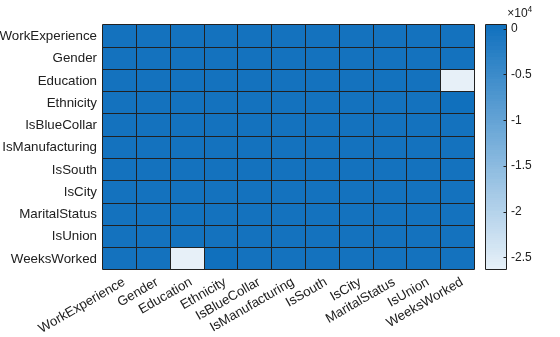
The estimated covariance of the coefficients of Education and WeeksWorked shows the greatest relative difference between the robust and non-robust analyses.
Input Arguments
Name-Value Arguments
Output Arguments
More About
A panel data set contains the measurements of
n subjects measured at most T times over a sampling
time frame. Panel data is a type of longitudinal data resulting from an observational study,
rather than a controlled experiment. This distinction affects regression procedures used to
analyze these types of data sets. (To analyze longitudinal data, see fitlme, fitlmematrix, and fitrm.)
You can format panel data sets in wide format or long format. In the following discussion, an observation is all measurements (predictors xi, i = 1,…,p and response y data) of a subject (gk, k = 1,...,n) at a particular time (tj, j = 1,…,T).
In wide format, the predictor data set X (input
X) is a
T-by-n-by-p 3-D numeric array,
where rows correspond to contemporaneous sampling times in increasing order by row, columns
correspond to individual subjects, and pages correspond to predictor variables. The response
data set Y (input Y) in wide format is a
T-by-n matrix. The figure below illustrates the
predictor and response data in wide format.
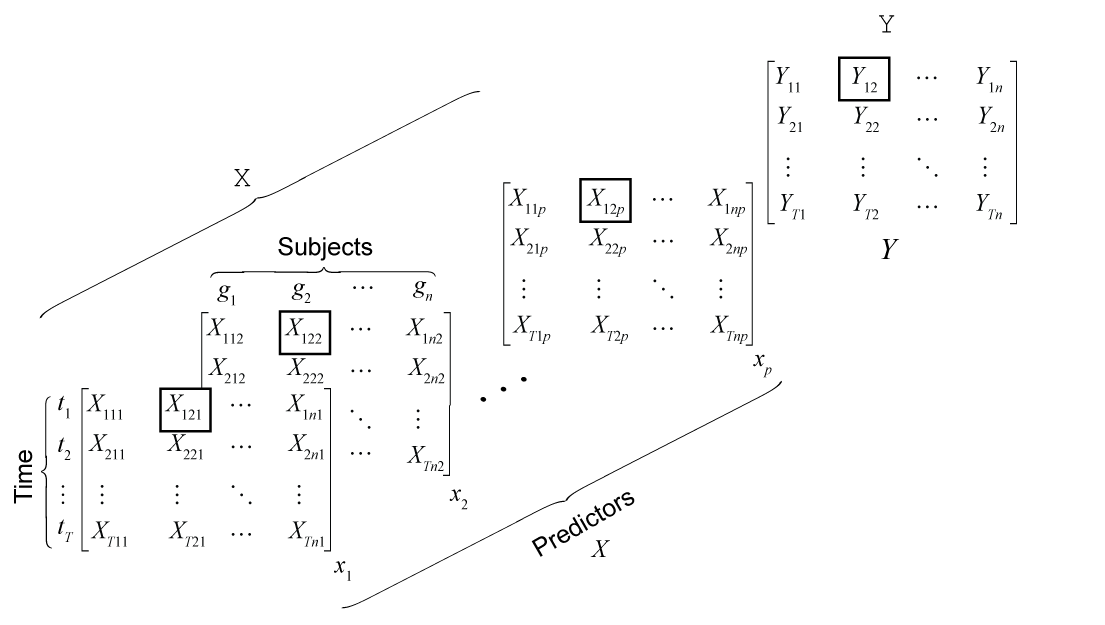
For a data set in this format, you can clearly infer the sampling time and subject by the
corresponding row and column, respectively. An observation of subject
gk
at time tj
is the set
{X(,
j,k,:)Y(}. For
example, the boxed values in the figure comprise the observation of subject
g2 at time
t1.j,k)
In long format, the predictor data set X is an m-by-p matrix, where the total sample size. Each row contains all predictor measurements of a particular subject at a particular time, and each column is a predictor variable. The response data set y is an m-by-1 vector, where each row is the response of the corresponding subject at the corresponding time. For data in this format, you cannot infer the subject and sampling time to which each observation belongs. A variable of subject identifiers (group variable), an m-by-1 vector, is required. For each subject, observations are recorded in increasing order by row. The figure below illustrates the predictor and response data in long format.
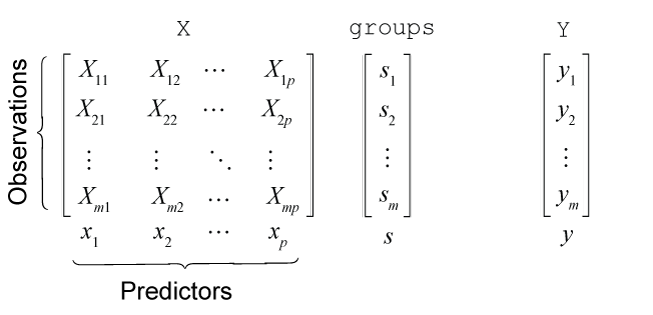
Row j of the subject identifier vector
sj is in the set
{g1,g2,…,gn}.
This figure illustrates the variables for all observations of subject
g2 (s =
g2, coded as g2). In the
figure, tj
= t(j). Because only those observations
belonging to subject g
2 are displayed, the row indices are not clear, but the sampling times
are clear and, therefore, labeled.
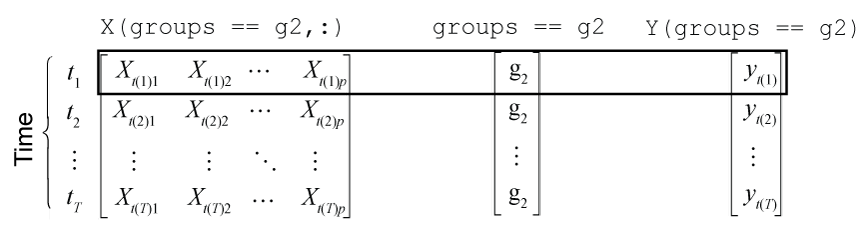
An observation of subject gk
at time tj
is the set {Xgk(,
j,:)Ygk(}, where j)Xgk = X(groups ==
g and k,:)Ygk =
Y(groups == g. For example,
the boxed values in the figure comprise the observation of subject
g2 at time
t1.k)
A panel data set in a table or timetable is in long format. The Time
variable of a timetable specifies the sampling times of the observations.
Regardless of format, when the data set contains the measurements for all subjects and sampling times, the data set is balanced. Otherwise, the data set is unbalanced.
Algorithms
References
Version History
Introduced in R2026a

