主要内容

Power HDL Optimized

R2026b

Compute arbitrary-base exponential of input

Since R2026b

  • Power HDL Optimized block

Libraries:
Fixed-Point Designer HDL Support / Math Operations

Description

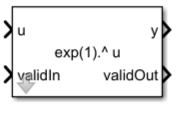
The Power HDL Optimized block computes the arbitrary-base-10 exponential of an input. This block is optimized for efficient HDL code generation with HDL Coder™.

Ports

Input

expand all

Value to compute arbitrary-base exponential of, specified as a real-valued scalar. Fixed-point inputs must use binary-point scaling.

Data Types: int8 | int16 | int32 | int64 | uint8 | uint16 | uint32 | uint64 | fixed point

Whether input is valid, specified as a Boolean scalar. This control signal indicates when the data from the u input port is valid. When this value is 1 (true), the block captures the value at the u input port. When this value is 0 (false), the block ignores the input samples.

Data Types: Boolean

Output

expand all

Arbitrary-base exponential of input, returned as a scalar.

Dependencies

  • To set the base of the exponential, use the Base parameter.

  • To set the data type of the output, use the Output Data Type parameter.

Data Types: int8 | int16 | int32 | int64 | uint8 | uint16 | uint32 | uint64 | fixed point

Whether output data is valid, returned as a Boolean scalar. When the value of this control signal is 1 (true), the block has successfully computed the output. When this value is 0 (false), the output data is not valid.

Data Types: Boolean

Parameters

expand all

To edit block parameters interactively, use the Property Inspector. From the Simulink® Toolstrip, on the Simulation tab, in the Prepare gallery, select Property Inspector.

Data type of the output y, specified as a Simulink.NumericType object, numerictype object, workspace variable, or MATLAB expression. Fixed-point data types must use binary-point scaling.

Programmatic Use

To set the block parameter value programmatically, use the set_param function.

To get the block parameter value programmatically, use the get_param function.

Parameter: OutDataType
Values: fixdt(0,16,12) (default) | Simulink.NumericType object | numerictype object | workspace variable | MATLAB expression

Base for exponential, specified as a real, finite, scalar value greater than 1.

Programmatic Use

To set the block parameter value programmatically, use the set_param function.

To get the block parameter value programmatically, use the get_param function.

Parameter: Base
Values: exp(1) (default) | real, finite, scalar value greater than 1
Data Types: single | double | int8 | int16 | int32 | int64 | uint8 | uint16 | uint32 | uint64 | fi

Example: set_param(gcb,Base = exp(1))

Algorithms

expand all

Extended Capabilities

expand all

HDL Code Generation
Generate VHDL, Verilog and SystemVerilog code for FPGA and ASIC designs using HDL Coder™.

Version History

Introduced in R2026b