Data Type Agent for Partial-Systolic Matrix Solve Using QR Decomposition Blocks
R2026bThe Data Type Agent for the Partial-Systolic Matrix Solve Using QR Decomposition blocks is an interactive graphical tool that simplifies the task of specifying fixed-point data types for these blocks:
Open the Data Type Agent
To open the Data Type Agent, click a supported block in the model. On the Block tab, under Data Type, click the Data Type Agent icon.
Examples
Use Data Type Agent to Recommend Fixed-Point Data Types for Real Partial-Systolic Matrix Solve Using QR Decomposition Block
Follow the Implement Hardware-Efficient Real Partial-Systolic Matrix Solve Using QR Decomposition example to set up a model containing the Real Partial-Systolic Matrix Solve Using QR Decomposition block.

To open the Data Type Agent, first select the Real Partial-Systolic Matrix Solve Using QR Decomposition block in the model. Then, on the Block tab, under Data Type, click the Data Type Agent icon.
The Data Type Agent automatically populates known block parameters. Under
Additional Parameters, assign a value of 1 for
both Max of absolute value of A and Max of absolute value
of B.
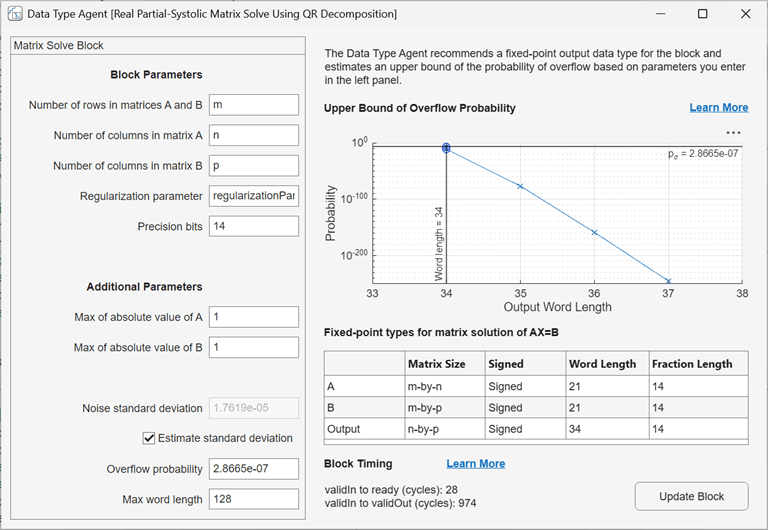
The Data Type Agent recommends fixed-point data types for the matrix
solution of AX=B based on the parameters you enter in the left pane. The word length and
fraction length of these data types are displayed in the table under Fixed-point
types for matrix solution of AX=B. The Upper Bound of Overflow
Probability plot displays an estimate of the upper bound of the probability
of overflow as a function of output word length. The Block Timing
section displays, for the given configuration, the number of cycles from
validIn to ready and validIn to
validOut.
To update the calculations, change the values under Block Parameters and Additional Parameters in the Data Type Agent. To apply these parameters to the selected block, click Update Block.
Parameters
Algorithms
Using the Data Type Agent for the Partial-Systolic Matrix Solve Using QR
Decomposition blocks is equivalent to manually determining fixed-point data types using the
fixed.realQRMatrixSolveFixedpointTypes or fixed.complexQRMatrixSolveFixedpointTypes function.
For a full description of the algorithms used by the Data Type Agent, see:
For more information about block timing, see:
Limitations
When the specified Overflow Probability value is small, the algorithms the tool uses to estimate the probability of overflow perform well, and the estimated upper bound of overflow probability is close to the true overflow probability. When the Overflow Probability value is large, the estimated upper bound of overflow probability diverges and the algorithms used by the tool may produce less accurate results.
See Also
Blocks
- Real Partial-Systolic Matrix Solve Using QR Decomposition | Complex Partial-Systolic Matrix Solve Using QR Decomposition
Functions
Topics
- Data Type Agent
- Determine Fixed-Point Types for Real Least-Squares Matrix Solve AX=B
- Determine Fixed-Point Types for Real Least-Squares Matrix Solve with Tikhonov Regularization
- Determine Fixed-Point Types for Complex Least-Squares Matrix Solve AX=B
- Determine Fixed-Point Types for Complex Least-Squares Matrix Solve with Tikhonov Regularization

