bwpropfilt3
R2026bSyntax
Description
Objects in Binary Images
Objects in Connected Component Structures
Examples
Define dimensions for a Volume object.
imSize = [40 40 40];
Create a logical, volumetric image that contains seven spherical objects of radius r. Display the image.
numSeeds = 7;
rng(0);
seedIdx = randi(prod(imSize),numSeeds,1);
BWseeds = zeros(imSize,"logical");
BWseeds(seedIdx) = 1;
r = 7;
BW = imdilate(BWseeds,strel("sphere",r));
volshow(BW)
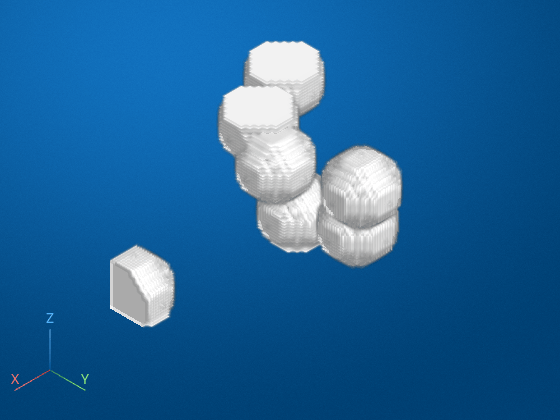
Find the two largest objects by surface area, and filter the image. Display the filtered image.
BW3 = bwpropfilt3(BW,"SurfaceArea",2);
volshow(BW3)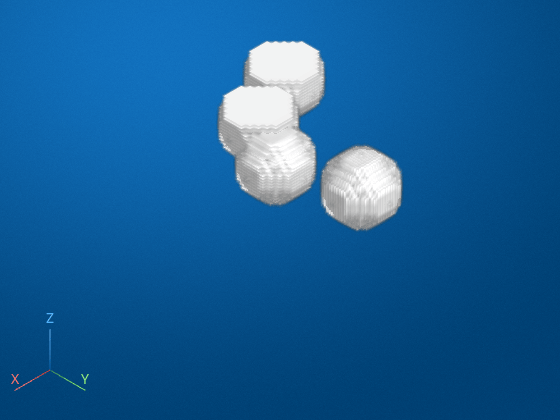
Input Arguments
Volumetric binary image to be filtered, specified as a logical array.
Data Types: logical
Connected components to be filtered, specified as a structure. You can get a
connected component structure from a binary image using the bwconncomp function.
Data Types: struct
Name of the property on which to filter, specified as one of these values.
Voxel Value Measurements
| Property Name | Description | Code Generation Support |
|---|---|---|
"ConvexVolume" | Number of voxels in the convex hull of volumetric binary image
BW, returned as a scalar. The convex hull is the smallest
convex polyhedron that can contain the region. | No |
"EquivDiameter" | Diameter of a sphere with the same volume as the region, returned as
a scalar. Calculated as | Yes |
"Volume" | Number of on voxels in the region, returned as a scalar.
Volume represents the metric or measure of the number of voxels in the regions
within the volumetric binary image BW. | Yes |
"SurfaceArea" | Distance around the boundary of the region, returned as a scalar. | No |
"Extent" | Ratio of voxels in the region to voxels in the total bounding box, returned
as a scalar, calculated as the value of Volume divided by the
volume of the bounding box. | Yes |
"Solidity" | Proportion of the voxels in the convex hull that are also in the region,
returned as a scalar, calculated as Volume/ConvexVolume. | No |
You can specify a voxel value measurement property from the following table when you
include a grayscale image, I, as an input argument to the
function.
Voxel Value Measurements
| Property Name | Description | Code Generation Support |
|---|---|---|
"MaxIntensity" | Value of the voxel with the greatest intensity in the region, returned as a scalar. | Yes |
"MeanIntensity" | Mean of all the intensity values in the region, returned as a scalar. | Yes |
"MinIntensity" | Value of the voxel with the lowest intensity in the region, returned as a scalar. | Yes |
Data Types: char | string
Minimum and maximum property values, specified as a 2-element numeric vector of the form [low high]. Values must be nondecreasing.
Data Types: single | double | int8 | int16 | int32 | int64 | uint8 | uint16 | uint32 | uint64
Number of objects to return, specified as a positive integer.
Data Types: double
Objects to retain, specified as "largest" or
"smallest".
Data Types: char | string
Marker image, specified as a grayscale image. Intensity values in the grayscale
image define regions in the input binary image. The marker image must be the same size
as the binary image BW or match the ImageSize
field of the connected component structure.
Data Types: single | double | int8 | int16 | int32 | int64 | uint8 | uint16 | uint32 | uint64
Pixel connectivity, specified as one of these values.
Value | Meaning | |
|---|---|---|
| Pixels are connected if their faces touch. Two adjoining pixels are
part of the same object if they are both
|
Current pixel is the center of the cube. |
| Pixels are connected if their faces or edges touch. Two adjoining
pixels are part of the same object if they are both
|
Current pixel is the center of the cube. |
| Pixels are connected if their faces, edges, or corners touch. Two
adjoining pixels are part of the same object if they are both
|
Current pixel is the center of the cube. |
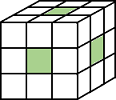
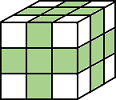
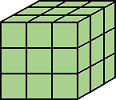
Connectivity can also be defined in a more general way by specifying a
3-by-3-by-3 array of 0s and 1s. The
1-valued elements define neighborhood locations relative to the
center element of conn. The array must be symmetric about its center
element.
Data Types: double | logical
Output Arguments
Extended Capabilities
Version History
Introduced in R2026b

