Alpha Shapes
R2026bFind the alpha shape of a 2-D point set using the alphaShape function.
Alpha shapes have a parameter that controls the level of detail, or how tightly the boundary fits around the point set. The parameter is called alpha or the alpha radius. Varying the alpha radius from 0 to Inf produces a set of different alpha shapes unique for that point set.
Create a set of 2-D points.
X = [-1.5 3.2; 1.8 3.3; -3.7 1.5; -1.5 1.3; 0.8 1.2; ...
      3.3 1.5; -4.0 -1.0; -2.3 -0.7; 0 -0.5; 2.0 -1.5; ...
      3.7 -0.8; -3.5 -2.9; -0.9 -3.9; 2.0 -3.5; 3.5 -2.25];
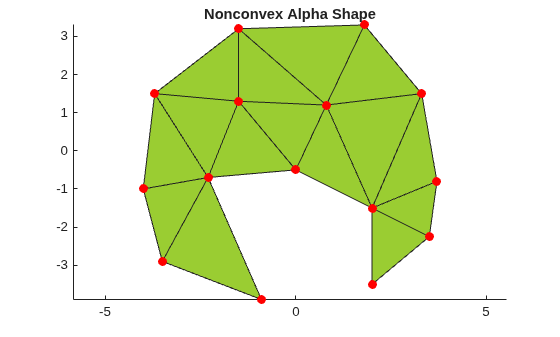
Compute and plot the alpha shape of this set of points.
shp = alphaShape(X)
shp =
  alphaShape with properties:

             Points: [15×2 double]
              Alpha: 1.7618
      HoleThreshold: 0
    RegionThreshold: 0
hold on
plot(shp)
plot(X(:,1),X(:,2),"r.",MarkerSize=20)
title("Nonconvex Alpha Shape")
hold off
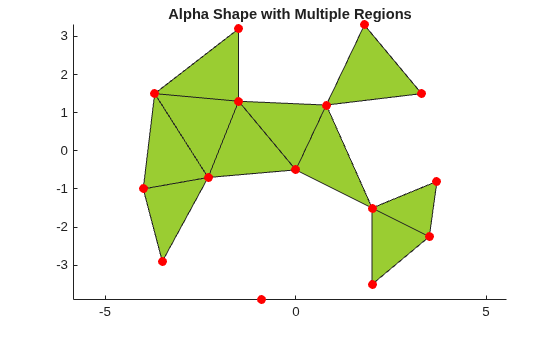
Varying the alpha radius can sometimes result in an alpha shape with multiple regions, which might or might not contain holes. However, the alphaShape function in MATLAB® always returns regularized alpha shapes, which prevents isolated or dangling points, edges, or faces.
figure
shp = alphaShape(X,1.5)
shp =
  alphaShape with properties:

             Points: [15×2 double]
              Alpha: 1.5000
      HoleThreshold: 0
    RegionThreshold: 0
hold on
plot(shp)
plot(X(:,1),X(:,2),"r.",MarkerSize=20)
title("Alpha Shape with Multiple Regions")
hold off
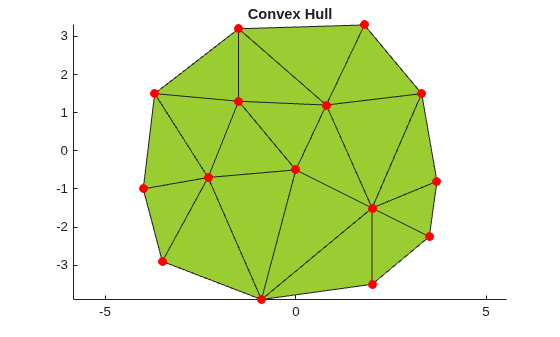
The alpha shape of a set of points is a generalization of the convex hull and a subgraph of the Delaunay triangulation. That is, the convex hull is one type of alpha shape, and the full family of alpha shapes can be derived from the Delaunay triangulation of a given point set.
Compute and plot the convex hull of the point set. When the alpha radius is set to Inf, the resulting alpha shape is the convex hull of the point set.
shp = alphaShape(X,Inf);
hold on
plot(shp)
plot(X(:,1),X(:,2),"r.",MarkerSize=20)
title("Convex Hull")
hold off