Check Function Compatibility Using Metadata
R2026bYou can use function metadata to verify that the output type of one function strictly
matches the input type of a second function. In other words, for the function composition
f(g(x)), you can check that the output class validation of
g matches the input class validation of function
f. If the class validations of the two functions are not compatible,
then chaining them together might cause errors or other unintended side effects.
The first example in this topic uses a function to check class validation for one pair of arguments. The second example uses a class-based approach to enable more customization of the compatibility checks, including class and size validation for multiple argument pairs.
Check Class Validation for One Pair of Arguments
Define a function checkFuncChainCompatibility that takes the
names of two functions, f and g, and assumes
that g has one output value, and f has one
input value. checkFuncChainCompatibility returns
true only if the class validation of the output of
g exactly matches the class validation of the input of
f. If one type can be converted to the other—for example,
g outputs double and f
accepts int64—checkFuncChainCompatibility returns
false.
function tf = checkFuncChainCompatibility(f,g)
% Verify that the data types for composition of
% functions f(g(x)) is valid.
    arguments (Input)
        f (1,1) string
        g (1,1) string
    end

    tf = false;

    gMeta = metafunction(g);
    fMeta = metafunction(f);

    if isempty(gMeta.Signature.Outputs.Validation) ||...
            isempty(fMeta.Signature.Inputs.Validation)
        return;
    end

    gOutputType = gMeta.Signature.Outputs.Validation.Class;
    fInputType = fMeta.Signature.Inputs.Validation.Class;

    if gOutputType == fInputType
        tf = true;
    end

end
Given the names of the two functions,
checkFuncChainCompatibility calls metafunction to create matlab.metadata.Function instances for both functions, gMeta
and fMeta. Before proceeding,
checkFuncChainCompatibility verifies that function
g uses output validation and function f
uses input validation. checkFuncChainCompatibility retrieves the
class validations of the output of g and the input of
f.
To retrieve the class validations for the two functions,
checkFuncChainCompatibility indexes through the properties of
the function metadata classes:
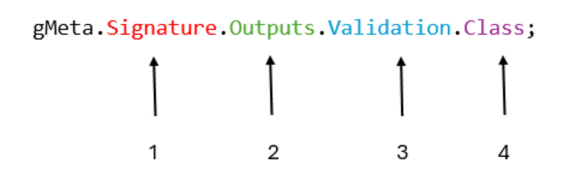
The
Signatureproperty ofgMetaandfMetaare of typematlab.metadata.CallSignature.The
InputsandOutputsproperties ofCallSignatureare of typematlab.metadata.Argument.The
Validationproperty ofArgumentis of typematlab.metadata.ArgumentValidation.The
Classproperty ofArgumentValidationis a metaclass instance.
As the final step, the function checks if the class validation of the function
f input matches the class validation of the function
g output.
Apply the Test Function
Use checkFuncChainCompatibility to check if two functions in
an image processing workflow can be run in sequence. The first function,
cleanData, is a general purpose function that replaces
missing data and outliers in a data set.
function revisedData = cleanData(data)
% This function fills missing data points and replaces outliers.

    arguments (Input)
        data double
    end

    arguments (Output)
        revisedData double
    end

    dataNoNaNs = fillmissing(data,"linear");
    revisedData = filloutliers(dataNoNaNs,"linear","median");
end
The second function takes raw image data, which is typically uint8,
and normalizes it to double values in the interval [0, 1].
function processedData = preprocessImageData(rawData)
% This function preprocesses raw image data by
% normalizing and converting to double.

    arguments (Input)
        rawData uint8
    end

    arguments (Output)
        processedData double
    end

    processedData = double(rawData)/255;
end
Use checkFuncChainCompatibility to test if the output type of
cleanData matches the input type required for
preprocessImageData. The functions fail the compatibility
test because cleanData outputs double, but
preprocessImageData expects uint8.
tf = checkFuncChainCompatibility("preprocessImageData","cleanData")
tf =

  logical

   0
This kind of testing can be particularly useful in cases where the functions could
be chained without explicit error. For example, cleanData
introduces noninteger values into the array a.
a = [1 2 NaN 5 47 6 -3];
a1 = cleanData(a)
a1 =

    1.0000    2.0000    3.5000    5.0000    5.5000    6.0000   -3.0000
In this case, preprocessImageData can implicitly convert the
double output to uint8 without error. When
converting double to uint8, MATLAB® rounds the noninteger values and replaces negative values with
0.
a2 = uint8(a1)
a2 =

  1×7 uint8 row vector

   1   2   4   5   6   6   0
These implicit conversions might not be desirable for the processing workflow.
checkFuncChainCompatibility provides a check for this by
noting the mismatch of classes between the two functions.
Check Class and Size Validation for Multiple Arguments
The checkFuncChainCompatibility function checked class
validation for one output of the first function with one input of the second function.
You can expand those checks to include both class and size validations for multiple sets
of arguments. Define a set of classes to perform these checks and determine how strict
you want the checks to be.
The FunctionChainingChecker class is the starting point. You construct
an object of this class and define its SigChecker property with the
desired level of strictness for your test. The SigChecker property
is of type SignatureChecker, an abstract class that has two subclasses
for the purpose of this example, StrictSignatureChecker and
PermissiveSignatureChecker.
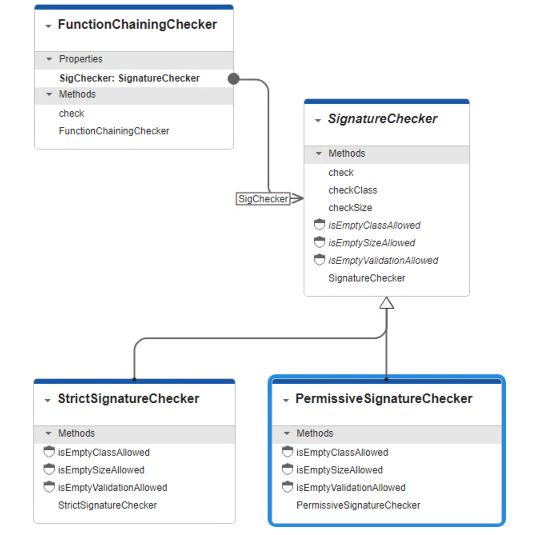
FunctionChainingChecker Class
The FunctionChainingChecker class defines a check
method that takes in two function names as input and uses its
SigChecker property to determine how strict the compatibility
must be. The check method of FunctionChainingChecker
calls metafunction and accesses the Inputs
and Outputs properties in the function metadata interface. The
method checks that the number of input and output arguments of the functions match,
and then it calls the check method of the SigChecker
class.
classdef FunctionChainingChecker
    properties
        SigChecker (1,1) SignatureChecker = StrictSignatureChecker
    end
    methods
        function obj = FunctionChainingChecker(checker)
            if nargin > 0
                obj.SigChecker = checker;
            end
        end
        function tf = check(obj,f,g)
            arguments (Input)
                obj
                f (1,1) string
                g (1,1) string
            end
            inputs = metafunction(f).Signature.Inputs;
            outputs = metafunction(g).Signature.Outputs;
            tf = numel(inputs) == numel(outputs) &&...
                obj.SigChecker.check(inputs,outputs);
        end
    end
end
SignatureChecker Class
SignatureChecker is an abstract class that defines three abstract
methods that determine how strict the compatibility check is. The concrete
check method of this class returns false if
the validations of the two functions are mismatched, depending on the strictness
specified by the implementation of the abstract methods. For example, if function
g uses class validation on any of its output arguments but
the corresponding input argument of function f does not use
class validation, the test fails. However, the three abstract methods determine
whether both functions can omit class validation and still pass:
isEmptyValidationAllowed— Returnstrueif the functions can be considered compatible even if both functions use no validation at all on a pair of corresponding argumentsisEmptyClassAllowed— Returnstrueif the functions can be considered compatible even if both functions use no class validation on a pair of corresponding argumentsisEmptySizeAllowed— Returnstrueif the functions can be considered compatible even if both functions use no size validation on a pair of corresponding arguments
For example implementations of these methods in subclasses of
SignatureChecker, see StrictSignatureChecker and PermissiveSignatureChecker Classes.
classdef (Abstract) SignatureChecker
    methods (Abstract,Access=protected)
        tf = isEmptyValidationAllowed(~)
        tf = isEmptyClassAllowed(~)
        tf = isEmptySizeAllowed(~)
    end

    methods
        function tf = check(checker,fArgs,gArgs)
            tf = false;
            for i = 1:numel(fArgs)
                fValidation = fArgs(i).Validation;
                gValidation = gArgs(i).Validation;

                if isempty(fValidation) ~= isempty(gValidation)
                    return;
                end

                if isempty(fValidation) && isempty(gValidation)
                    if checker.isEmptyValidationAllowed
                        continue;
                    else
                        return;
                    end
                end

                if ~checker.checkClass(fValidation.Class, gValidation.Class) || ...
                        ~checker.checkSize(fValidation.Size, gValidation.Size)
                    return;
                end
            end
            tf = true;
        end
    end

    methods (Access=private)
        function tf = checkClass(checker,fClass,gClass)
            tf = false;

            if isempty(fClass) ~= isempty(gClass)
                return;
            end

            if isempty(fClass) && isempty(gClass)
                if ~checker.isEmptyClassAllowed
                    return;
                end
            end

            tf = isequal(fClass,gClass);
        end
        function tf = checkSize(checker, fSize, gSize)
            tf = false;

            if numel(fSize) ~= numel(gSize)
                return;
            end

            if isempty(fSize) && isempty(gSize)
                if ~checker.isEmptySizeAllowed
                    return;
                end
            end

            for j = 1:numel(fSize)
                if metaclass(fSize(j)) ~= metaclass(gSize(j))
                    return;
                end
                if isa(fSize(j),"matlab.metadata.FixedDimension") && ...
                        fSize(j).Length ~= gSize(j).Length
                    return;
                end
            end
            tf = true;
        end
    end
end
The concrete methods of SignatureChecker compare the validations of
the arguments on the input functions.
check— This method loops through the arguments and retrieves the validation metadata. If one argument uses validation and the other does not, the compatibility test fails. If there is no validation, the method relies on a call toisEmptyValidationAllowedto determine whether the functions can be compatible. After those tests, the method callscheckClassandcheckSizeto compare the actual classes.checkClass— This method checks one pair of arguments. If one argument uses class validation and the other does not, the compatibility test fails. If there is no class validation for either argument, the method relies on a call toisEmptyClassAllowedto determine whether the functions can be compatible. If the arguments pass these tests, the method compares the actual classes used.checkSize— This method checks one pair of arguments. If one argument uses size validation and the other does not, the compatibility test fails. If there is no size validation for either argument, the method relies on a call toisEmptySizeAllowedto determine whether the functions can be compatible. If the arguments pass these tests, the method then loops through the individual dimensions to compare the actual values, which can be of typematlab.metadata.FixedDimensionormatlab.metadata.UnrestrictedDimension.
StrictSignatureChecker and
PermissiveSignatureChecker Classes
The concrete methods of SignatureChecker handle most of the
comparisons between arguments, but the implementations of the abstract methods in
subclasses of SignatureChecker enable you to customize how some
comparisons are handled. For example, StrictSignatureChecker returns
false for all three methods.
classdef StrictSignatureChecker < SignatureChecker
    methods(Access=protected)
        function tf = isEmptyValidationAllowed(~)
            tf = false;
        end
        function tf = isEmptyClassAllowed(~)
            tf = false;
        end
        function tf = isEmptySizeAllowed(~)
            tf = false;
        end
    end
end
These output values mean that if a pair of arguments from two functions define no
validation at all, no class validation, or no size validation, the functions are not
considered compatible. For example, the multiplyBy2 and
subtract1 functions use class validation for input and output
arguments, but they do not use size validation.
function [twice1,twice2] = multiplyBy2(input1,input2)

    arguments (Input)
        input1 double
        input2 double
    end

    arguments (Output)
        twice1 double
        twice2 double
    end

    twice1 = 2*input1;
    twice2 = 2*input2;
end
function [oneMinus1,twoMinus1] = subtract1(input1,input2)

    arguments (Input)
        input1 double
        input2 double
    end

    arguments (Output)
        oneMinus1 double
        twoMinus1 double
    end

    oneMinus1 = input1 - 1;
    twoMinus1 = input2 - 1;
end
Create an instance of FunctionChainingChecker with its
SigChecker property set to a
StrictSignatureChecker instance.
strict = FunctionChainingChecker(StrictSignatureChecker)
strict =

  FunctionChainingChecker with properties:

SigChecker: [1×1 StrictSignatureChecker]multiplyBy2 and
subtract1. The two functions fail the compatibility check
because neither of the corresponding pairs of output and input arguments use size
validation. strict.check("multiplyBy2","subtract1")
ans =

  logical

   0
However, because both of these functions can accept input and output arrays of any
size, a checker that allows the functions to skip size validation might be more
appropriate. Create a subclass of SignatureChecker that allows
functions with pairs of corresponding arguments that both skip size validation to be
compatible.
classdef PermissiveSignatureChecker < SignatureChecker
    methods (Access=protected)
        function tf = isEmptyValidationAllowed(~)
            tf = false;
        end
        function tf = isEmptyClassAllowed(~)
            tf = false;
        end
        function tf = isEmptySizeAllowed(~)
            tf = true;
        end
    end
end
Using a PermissiveSignatureChecker instance as the
SigChecker property allows the two functions to pass, because
although the corresponding input and output argument pairs do not use size
validation, they do use class validation, and the classes match.
permit = FunctionChainingChecker(PermissiveSignatureChecker);
permit.check("multiplyBy2","subtract1")
ans =

  logical

   1
SignatureChecker subclasses can implement these methods in any way
that fits the requirements of your compatibility checks.

