MATLAB 帮助中心
使用 RGBA 接口读取图像
[RGB,alpha] = readRGBAImage(t)
[RGB,alpha] = readRGBAImage(t) 使用 RGBA 接口从与 Tiff 对象 t 关联的 TIFF 文件中读取图像和 alpha 抠图数据。
RGB
alpha
t
Tiff
示例
全部折叠
从 TIFF 文件获取所有图像数据及其关联的 alpha 抠图。
为图像文件创建一个 Tiff 对象。
t = Tiff('example.tif','r');
读取图像数据和关联的 alpha 抠图。
[RGB,A] = readRGBAImage(t);
显示图像。
imshow(RGB)
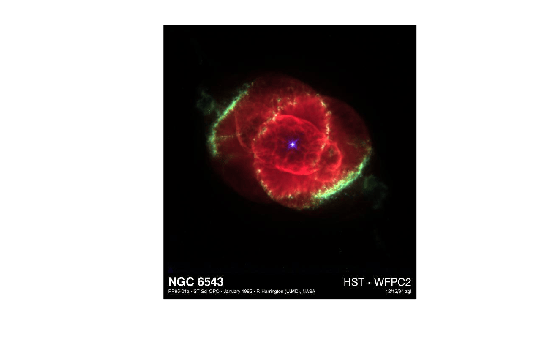
关闭 Tiff 对象。
close(t);
代表 TIFF 文件的 Tiff 对象。使用 Tiff 函数创建该对象。
图像数据,以 m×n×3 数值数组形式返回。其中 m 和 n 分别是图像的高度和宽度。
m
n
3
readRGBAImage 函数可以根据下列标记中的设定来转换像素值:
readRGBAImage
PhotometricInterpretation
BitsPerSample
SamplesPerPixel
Orientation
ExtraSamples
ColorMap
与图像关联的 alpha 抠图,以 m×n 数值数组形式返回。其中 m 和 n 分别是图像的高度和宽度。
如果图像没有相关的 alpha 抠图,则 alpha 是其所有值都设为 255(透明)的矩阵。
255
此函数对应于 LibTIFF C API 中的 TIFFReadRGBAImage 函数。要使用此函数,您必须熟悉 TIFF 规范和技术说明。请访问 LibTIFF - TIFF 库和实用工具查看此文档。
TIFFReadRGBAImage
在 R2009b 中推出
readRGBAStrip | readRGBATile | read
readRGBAStrip
readRGBATile
read
You clicked a link that corresponds to this MATLAB command:
Run the command by entering it in the MATLAB Command Window. Web browsers do not support MATLAB commands.
选择网站
选择网站以获取翻译的可用内容,以及查看当地活动和优惠。根据您的位置,我们建议您选择:。
您也可以从以下列表中选择网站:
如何获得最佳网站性能
选择中国网站(中文或英文)以获得最佳网站性能。其他 MathWorks 国家/地区网站并未针对您所在位置的访问进行优化。
美洲
欧洲
亚太
联系您当地的办事处