主要内容

Data-Driven MPC Controller

Simulate data-driven model predictive controller

Since R2026a

  • Data-Driven MPC Controller block

Libraries:
Model Predictive Control Toolbox

Description

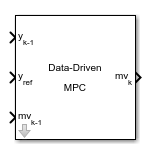
The Data-Driven MPC Controller block receives the plant output signal measured in the previous control interval yk-1, the reference signal yref, and the plant input signal measured at the previous control interval mvk-1. The block then computes the optimal manipulated variable for the current control interval mvk by solving the data-driven quadratic programming problem described in Data-Driven MPC Principles.

To use the block in simulation and code generation, you must specify a DataDrivenMPC object, which defines a data-driven model predictive controller, and a DataDrivenMPCState object, which defines the initial past input and output trajectories that represent the initial condition of the plant. This controller must have already been designed for the plant that it controls.

Examples
Ports

Input

expand all

Required Inputs

Plant outputs measured in the previous control interval, specified as a column vector signal with as many elements as the number of measured outputs. The block uses this signal for estimation.

Plant output reference values, specified as a matrix signal with Ny columns and p rows. Each row contains the references for one prediction horizon step.

Here p is the value of the FutureSteps property of the DataDrivenMPC object specified in the Data-Driven MPC block parameter.

Note

If you have a constant 1-by-Ny reference signal ry that you want to use across prediction steps, add a gain block between ry and yref. In the gain block, use the matrix multiplication option and specify ones(ddobj.FutureSteps,1) as the gain.

Plant inputs measured in the previous control interval, specified as a column vector signal with as many elements as the number of measured inputs. The block uses this signal for estimation.

Additional Inputs

To specify manipulated variable targets, enable this input port and connect a matrix signal with Nu columns and p rows. Each row contains the references for one prediction horizon step.

Here p is the value of the FutureSteps property of the DataDrivenMPC object specified in the Data-Driven MPC block parameter.

Note

If you have a constant 1-by-Nu reference signal rmv that you want to use across prediction steps, add a gain block between rmv and mvref. In the gain block, use the matrix multiplication option and specify ones(ddobj.FutureSteps,1) as the gain.

To make a given manipulated variable track its specified target value, you must also specify a nonzero tuning weight for that manipulated variable.

Dependencies

To enable this port, select the Targets for manipulated variables parameter.

Output

expand all

Required Output

Optimal manipulated variable control action, returned as a column vector signal of length Nmv, where Nmv is the number of manipulated variables (for data-driven MPC control, each plant input must be a manipulated variable).

If the solver converges to a local optimum solution (qp.status is positive), then mv contains the optimal solution, otherwise mv remains at its most recent successful solution; that is, the controller output freezes.

Additional Outputs

Optimization status, returned as an integer signal.

If the block solves the QP problem for a given control interval, the qp.status is 1. If qp.status is not positive, the solution returned by the QP solver is likely invalid or infeasible and the block holds its mv output at the most recent successful solution.

In a real-time application, you can use qp.status to set an alarm or take other special action.

Dependencies

To enable this port, select the Optimization status parameter.

Number of QP solver iterations, returned as an integer signal. This value is a finite, positive integer and is proportional to the time required for the calculations. Therefore, a large value means a relatively slow block execution for this time interval.

Dependencies

To enable this port, select the Optimization Iterations parameter.

Optimal manipulated variable sequence, returned as a matrix signal with p+1 rows and Nmv columns, where p is the value of the FutureSteps property of the DataDrivenMPC object specified in the Data-Driven MPC block parameter, and Nmv is the number of manipulated variables.

The first p rows of mv.seq contain the calculated optimal manipulated variable values from current time k to time k+p-1. The first row of mv.seq contains the current manipulated variable values (output mv). Because the controller does not calculate optimal control moves at time k+p, the final two rows of mv.seq are identical.

Dependencies

To enable this port, select the Optimal control sequence parameter.

Optimal output variable sequence, returned as a matrix signal with p+1 rows and Ny columns, where p is the value of the FutureSteps property of the DataDrivenMPC object specified in the Data-Driven MPC block parameter and Ny is the number of output variables.

The first p rows of y.seq contain the calculated optimal output values from current time k to time k+p-1. Because the controller does not calculate optimal output values at time k+p, the final two rows of y.seq are identical.

Dependencies

To enable this port, select the Optimal output sequence parameter.

Parameters

expand all

Controller object, specified as the name of the DataDrivenMPC object that defines the data-driven MPC controller designed for the plant you want to control. The specified object must be in the MATLAB® workspace.

The Data-Driven MPC block runs at the sample time set in the Ts property of the specified controller object.

Programmatic Use

Block Parameter: DDMPCObject
Type: string, character vector
Default: ""

Initial state, specified as a DataDrivenMPCState for the object in the Data-Driven MPC block parameter.

Use this parameter to make sure that the controller state reflects the state of the plant at the start of your simulation, to the best of your knowledge. Specifically, make sure the PastInputBuffer and PastOutputBuffer properties of the DataDrivenMPCState are populated with the correct values that reflect the plant inputs and outputs before the simulation. The default values are zeros, which are only applicable when the nominal values of input and output signals at the initial condition are zero.

Programmatic Use

Block Parameter: DDMPCState
Type: string, character vector
Default: ""

Select this parameter to add the mv.target input port to the block.

Programmatic Use

Block Parameter: MVTargetEnabled
Type: string, character vector
Values: "off", "on"
Default: "off"

Select this parameter to add the qp.status output port to the block.

Programmatic Use

Block Parameter: ExitFlagEnabled
Type: string, character vector
Values: "off", "on"
Default: "off"

Select this parameter to add the mv.seq output port to the block.

Programmatic Use

Block Parameter: UoptEnabled
Type: string, character vector
Values: "off", "on"
Default: "off"

Select this parameter to add the y.seq output port to the block.

Programmatic Use

Block Parameter: YoptEnabled
Type: string, character vector
Values: "off", "on"
Default: "off"

Extended Capabilities

expand all

C/C++ Code Generation
Generate C and C++ code using Simulink® Coder™.

GPU Code Generation
Generate CUDA® code for NVIDIA® GPUs using GPU Coder™.

PLC Code Generation
Generate Structured Text code using Simulink® PLC Coder™.

Version History

Introduced in R2026a