checkPrediction
R2026bCompare outputs predicted by data-driven model to validation outputs
Since R2026a
Description
Examples
This example shows how to use the checkPrediction function to validate the prediction model of a DataDrivenMpc object.
Create data-driven MPC controller
Define the sample time and time vector.
Ts = 0.1;
t = 0:Ts:10;
Use a simple integrator as a plant to produce output data.
plant = tf(1,[1 0]);
Create model input and output data vector.
dataU = (rand(length(t),1)-0.5)*3;
dataY = lsim(plant,dataU,t,0);
Create a DataDrivenMPC object.
ddobj = DataDrivenMPC(dataU,dataY,Ts);
Define the main properties.
ddobj.FutureSteps = 21;
ddobj.PastSteps = 4;
ddobj.PlantOrder = 1;
Check the controller prediction model
Create the validation time vector. You must use a number of samples equal to the sum of the values of the FutureSteps and PastSteps properties.
Nval = ddobj.FutureSteps + ddobj.PastSteps;
tval = Ts*(0:Nval-1)';
Create the validation input and output data.
dataUval = (rand(length(tval),1)-0.5)*3;
dataYval = lsim(plant,dataUval,tval,0);
Use the checkPrediction function to validate the prediction model of ddobj.
checkPrediction(ddobj,dataUval,dataYval)
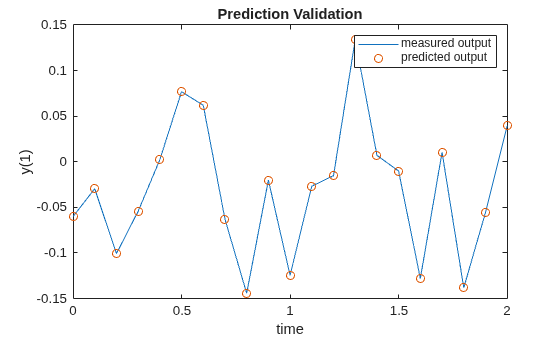
The plot shows how well the output of the predicted model (displayed with red circles) matches the validation output dataYval (displayed with a blue line).
Input Arguments
Tips
If the quality of the prediction is not satisfactory, consider adjusting the
PastSteps, FutureSteps, or
PlantOrder property of ddobj or recreating
ddobj using a different input-output trajectory.
Algorithms
This function divides the input and output validation data into past and future values
(Up,
Yp,Uf,Yf),
and then uses the Hankel matrices in the ddobj object to estimate the
future output
Yefaccording to the
method described in Data-Driven Open-Loop Output Prediction. The function then plots the
estimated future output
Yef against the
validation future output Yf to show the quality of
the prediction.
Version History
Introduced in R2026a

