SPMD 计算中工作单元之间的通信
R2026b本示例演示了如何在 spmd 计算过程中,利用 spmdSend 和 spmdReceive 在各工作单元之间交换数据。这类似于消息传递接口 (MPI) 标准中的点对点通信。
在此示例中,您将使用并行有限差分法求解铜板上的二维瞬态热方程。由于每个网格点的更新取决于邻近网格点的值,因此工作单元必须在每个时间步长与邻居节点交换边界数据,以确保整个计算域内解的准确性和一致性。
问题概述
二维热方程用于建模瞬态热传导,其表达式为:
其中:
表示温度,
是热扩散率。
可以通过对和空间域进行有限差分法离散化,并施加狄利克雷边界条件(即边界处的温度保持恒定)来求解二维热方程。
为了对计算进行并行化,需沿方向将空间域在各工作单元之间进行划分。每个工作单元计算其子域的更新结果,并在每个时间步长中与相邻的工作单元交换边界列。通过这种通信机制,每个工作单元都能利用相邻子域的最新信息来更新其边界点。
定义参数
定义仿真所需的物理参数和数值参数。
L = 1;           % Length of the plate (m)
H = 1;           % Height of the plate (m)
tmax = 2000;        % Total simulation time (s)
alpha = 1.11e-4;   % Thermal diffusivity for copper (m^2/s)
dx = 0.0025;       % Grid spacing in x-direction (m)
dy = 0.0025;       % Grid spacing in y-direction (m)
dt = 0.01;         % Time step size (s)
nt = tmax/dt;
检查这些值是否满足显式法所需的稳定性条件,否则,调整 dt、dx 或 dy 以保持稳定性
% Stability parameters
rX = alpha*dt/dx^2;
rY = alpha*dt/dy^2;

% Assert stability condition for explicit scheme
assert(rX + rY < 0.5, ...
    "Stability condition violated: decrease dt or increase dx/dy.");
设置网格和边界条件
例如,在此示例中,您将对一块尺寸为 1 米×1 米的铜板进行建模。第一步是使用二维网格将其离散化。根据预定义的网格间距,确定每个维度(X 和 Y,)中的网格点数量。
nx = round(L/dx)+1;
ny = round(H/dy)+1;
使用 meshgrid 函数将空间维度离散化为二维网格。使用 linspace 按照点数均匀划分各个维度。
[X,Y] = meshgrid(linspace(0,L,nx),linspace(0,H,ny));
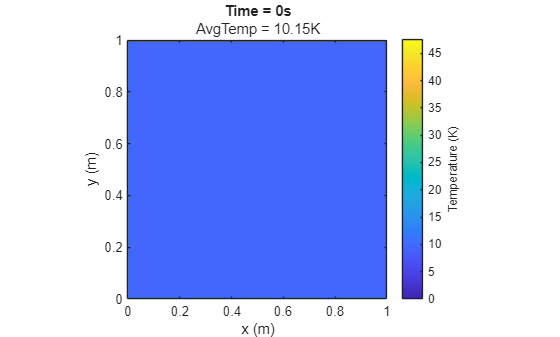
定义初始内部温度和边界温度。假设这块铜板静置在热源上。该板的内部温度从 10K 开始。左边界和右边界的温度恒定为 25K,顶边界的温度恒定为 0K,底边界的温度恒定为 50K。这些边界条件指定了解决方案沿域边界必须采用的常数值。这种类型的边界条件称为狄利克雷边界条件。
u0 = ones(size(X))*10;
u0(:,1) = 25;
u0(:,end) = 25;
u0(1,:) = 50;
u0(end,:) = 0;
当 t 等于 0 时,绘制该板的初始温度分布图。
figure;
plotTemperature(X,Y,u0,0);
在工作单元上划分网格
使用远程集群配置文件启动一个并行工作单元进程池。要尝试此示例,请将集群配置文件名称替换为您自己的集群配置文件,或者改用本地 Process 配置文件。
pool = parpool("myCluster",10);Starting parallel pool (parpool) using the 'myCluster' profile ... Connected to parallel pool with 10 workers.
使用 spmd 模块,将温度变量 u 手动分区到集群中各工作单元的内存中。每个工作单元都会获得一组连续的列模块。您还可以使用 codistributed 数组将温度变量分发给各工作单元。
spmd
    colsPerWkr = floor(ny/spmdSize);
    extra = mod(ny,spmdSize);
    if spmdIndex <= extra
        localCols = colsPerWkr+1;
        startCol = (spmdIndex-1)*localCols + 1;
    else
        localCols = colsPerWkr;
        startCol = (extra*(colsPerWkr+1)) ...
            + (spmdIndex-extra-1)*colsPerWkr + 1;
    end
    endCol = startCol + localCols - 1;

    uLocal = u0(:,startCol:endCol);
end
交换初始工作单元边界并设置幽灵列
在开始时间步进循环之前,每个工作单元必须更新其本地温度数组 uLocal,将其直接邻居的“幽灵列”纳入其中。这些“幽灵列”至关重要,因为有限差分法要求相邻子域的值才能正确更新边界点。在本节中,每个工作单元使用 spmdSendReceive 与其左右邻居交换边界列。随后,工作单元将接收到的列作为幽灵列添加到 uLocal 的相应一侧。
在邻居之间交换边界列时,使用 spmdSendReceive 等对称通信模式可以简化代码,并使通信在各个工作单元之间更均匀地分布。为每个工作单元定义其左邻和工作单元的索引。在每个工作单元中,spmdIndex-1 工作单元是左侧工作单元,spmdIndex+1 工作单元是右侧工作单元。当使用模运算时,工作单元 1 会从索引等于 spmdSize 的工作单元处接收数据。边缘工作单元只需不添加“幽灵列”即可,这样所有工作单元都能遵循相同的逻辑,而无需进行特殊情况的分支处理。
spmd
    offset = 1;
    leftWkr = mod((spmdIndex-offset)-1,spmdSize) + 1;
    rightWkr = mod((spmdIndex+offset)-1,spmdSize) + 1;
end
spmd提取本地边界列。
    leftSend  = uLocal(:,1);
    rightSend = uLocal(:,end);
发送左边界,接收右幽灵。对于最右侧的工作单元,不要追加右侧的虚拟列。
    rightRecv = spmdSendReceive(leftWkr,rightWkr,leftSend);
    if spmdIndex < spmdSize
        uLocal = [uLocal,rightRecv];
    end
发送右边界,接收左幽灵。对于最左侧的工作单元,不要追加左侧的幽灵列。
    leftRecv = spmdSendReceive(rightWkr,leftWkr,rightSend);
    if spmdIndex > 1
        uLocal = [leftRecv,uLocal];
    end

end
执行带边界交换的时间步进循环
确定本地温度数组的大小。在具有额外“幽灵边界”的工作单元上,该值会有所不同,您在更新本地温度值时应使用此值。
spmd
    [lx,ly] = size(uLocal);
此外,每个工作单元都会在四分之一、一半、四分之三和最后一个时间步长时,记录其本地温度数组的快照。确定在哪些时间步长处采集快照,并预先分配一个元胞数组来存储温度数据。
    snapSteps = round([0.25,0.5,0.75,1]*nt);
    numSnaps = numel(snapSteps);
    uSnapshots = cell(1,numSnaps);
end
执行热方程的主时间步进循环。在每个时间步长,每个工作单元都会使用有限差分法更新其本地温度值。更新完成后,工作单元会与邻近节点交换边界列,以确保幽灵列在下一轮迭代中保持最新状态。如果时间步长是快照时间步长,则每个工作单元会将当前的本地温度值存储在一个元胞数组中。
spmd
    snapIdx = 1;
    for t = 1:nt
        uNewLocal = uLocal;
        % Vectorized finite-difference update on the interior
        uNewLocal(2:lx-1,2:ly-1) = uLocal(2:lx-1,2:ly-1) ...
            + rX*(uLocal(2:lx-1,3:ly)   ...       % right
            - 2*uLocal(2:lx-1,2:ly-1) ...
            + uLocal(2:lx-1,1:ly-2)) ...          % left
            + rY*(uLocal(3:lx,2:ly-1) ...         % down
            - 2*uLocal(2:lx-1,2:ly-1) ...
            + uLocal(1:lx-2,2:ly-1));           % up

        uLocal = uNewLocal;

        leftSend  = uLocal(:,2);       % inner-left updated boundary
        rightSend = uLocal(:,end-1);   % inner-right updated boundary

        % Send updated left column and receive right ghost
        rightRecv = spmdSendReceive(leftWkr,rightWkr,leftSend);
        if spmdIndex < spmdSize
            uLocal(:,end) = rightRecv;
        end

        leftRecv = spmdSendReceive(rightWkr,leftWkr,rightSend);
        if spmdIndex > 1
            uLocal(:,1) = leftRecv;
        end

        % Collect snapshot if this is a designated time step
        if snapIdx <= numSnaps && t == snapSteps(snapIdx)
            uSnapshots{snapIdx} = uLocal;
            snapIdx = snapIdx+1;
        end
    end
end
重建全局解
在时间步进循环结束后,每个工作单元都会持有部分温度快照数据,其中在子域边界处包含额外的“幽灵”列。要重建完整的全局解,请从每个工作单元中移除幽灵列。
spmd
    if spmdIndex > 1
        for idx = 1:numSnaps
            uSnapshots{idx} = uSnapshots{idx}(:,2:end);
        end
    end

    if spmdIndex < spmdSize
        for idx = 1:numSnaps
            uSnapshots{idx} = uSnapshots{idx}(:,1:end-1);
        end
    end
end
使用 spmdCat 函数,按正确的列顺序将各工作单元上的剩余快照数据拼接起来,并将生成的数据存储在工作单元 1 上。
spmd
    globalSnapshots = cell(1,numSnaps);
    for s = 1:numSnaps
        globalSnapshots{s} = spmdCat(uSnapshots{s},2,1);
    end
end
从工作单元 1 检索全局快照结果。
snapshotTimes = snapSteps{1}*dt;
finalSnapshots = globalSnapshots{1};
可视化结果
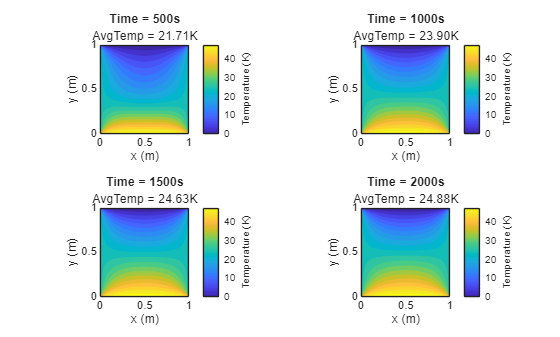
绘制第 1/4、1/2、3/4 和最后一个时间步长处的温度分布图。
figure;
tiledlayout(2,2);
for idx = 1:4
    nexttile
    plotTemperature(X,Y,finalSnapshots{idx},snapshotTimes(idx));
end
function plotTemperature(X,Y,u,t)
contourf(X,Y,u,20,LineColor="none");
title("Time = "+num2str(t)+"s");
meanT = mean(u,"all");
subtitle(compose("AvgTemp = %.2fK",meanT))
xlabel("x (m)");
ylabel("y (m)");
axis equal tight;
c = colorbar;
c.Label.String = "Temperature (K)";
end
另请参阅
spmdSendReceive | spmdSend | spmdReceive

