directivity
R2026bCompute array manifold directivity
Description
returns the Directivity (dBi) of an array manifold, D = directivity(arraymanifold,FREQ,ANGLE)arraymanifold, at frequencies
specified by FREQ and in angles of direction specified by
ANGLE.
The integration used when computing array directivity has a minimum sampling grid of 0.1 degrees. If an array pattern has a beamwidth smaller than this, the directivity value will be inaccurate.
directivity(___, plots the
array pattern with additional options specified by one or more Name=Value)Name=Value
pair arguments.
Examples
Create a phased.ArrayManifold System object™ and evaluate the manifold values in multiple directions.
First, set up the azimuth angle, elevation angle, and frequency grids.
az = -180:10:180; el = -90:10:90; fc = [0 1e9 2e9]; manval = complex(ones(numel(az),numel(el),numel(fc),8));
Create the array manifold.
man1 = phased.ArrayManifold(manval,az,el,fc);
Evaluate the manifold at two frequencies and two directions.
M1 = man1([0 1e9],[30 40; 0 10])
M1 =
M1(:,:,1) =
1 1
1 1
1 1
1 1
1 1
1 1
1 1
1 1
M1(:,:,2) =
1 1
1 1
1 1
1 1
1 1
1 1
1 1
1 1
Create a second frequency-invariant manifold.
man2 = phased.ArrayManifold( ...
manval(:,:,1,:),az,el,[]);Frequency query values are ignored for frequency-invariant data.
M2 = man2([0 1e9 2e9],[0;0]);
Use the directivity object function to compute the directivity of the second manifold at az=-90 degrees and el=10 degrees.
[az(10),el(11)]
ans = 1×2
-90 10
directivity(man2,fc(2),[az(10);el(11)])
ans = 1.1025e-04
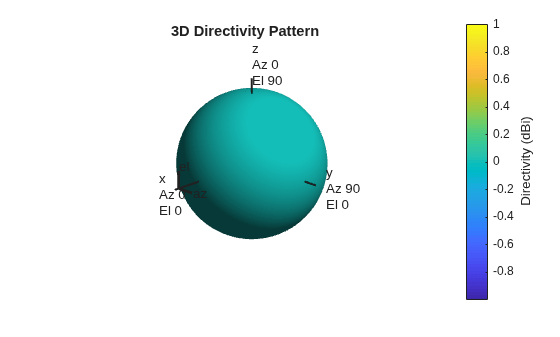
Using the pattern object function, plot the directivity pattern of the array manifold.
pattern(man2,fc(2))
Input Arguments
Array manifold, specified as a phased.ArrayManifold
System object.
Frequencies for computing directivity and patterns, specified as a positive scalar or 1-by-L real-valued row vector. Frequency units are in Hz.
Example: [1e8 2e6]
Data Types: double
Angles for computing directivity, specified as a 1-by-M real-valued
row vector or a 2-by-M real-valued matrix, where M is
the number of angular directions. Angle units are in degrees. If ANGLE is
a 2-by-M matrix, then each column specifies a direction
in azimuth and elevation, [az;el]. The azimuth
angle must lie between –180° and 180°. The elevation
angle must lie between –90° and 90°.
If ANGLE is a 1-by-M vector,
then each entry represents an azimuth angle, with the elevation angle
assumed to be zero.
The azimuth angle is the angle between the x-axis and the projection of the direction vector onto the xy plane. This angle is positive when measured from the x-axis toward the y-axis. The elevation angle is the angle between the direction vector and xy plane. This angle is positive when measured towards the z-axis. See Azimuth and Elevation Angles.
Example: [45 60; 0 10]
Data Types: double
Name-Value Arguments
Specify optional pairs of arguments as
Name1=Value1,...,NameN=ValueN, where Name is
the argument name and Value is the corresponding value.
Name-value arguments must appear after other arguments, but the order of the
pairs does not matter.
Before R2021a, use commas to separate each name and value, and enclose
Name in quotes.
Example: CoordinateSystem="polar",Type="directivity"
Array weights, specified as the equal sign separated pair consisting of
"Weights" and an N-by-1 complex-valued column
vector or N-by-L complex-valued matrix. Array
weights are applied to the elements of the array to produce array steering, tapering, or
both. The dimension N is the number of elements in the array. The
dimension L is the number of frequencies specified by
FREQ.
| Weights Dimension | FREQ Dimension | Purpose |
|---|---|---|
| N-by-1 complex-valued column vector | Scalar or 1-by-L row vector | Applies a set of weights for the single frequency or for all L frequencies. |
| N-by-L complex-valued matrix | 1-by-L row vector | Applies each of the L columns of "Weights" for the
corresponding frequency in FREQ. |
Note
Use complex weights to steer the array response toward different
directions. You can create weights using the phased.SteeringVector System object or
you can compute your own weights. In general, you apply Hermitian
conjugation before using weights in any Phased Array System Toolbox™ function
or System object such as phased.Radiator or phased.Collector. However, for the directivity, pattern, patternAzimuth,
and patternElevation methods of any array System object use
the steering vector without conjugation.
Example: Weights=ones(N,M)
Data Types: double
Complex Number Support: Yes
Output Arguments
More About
Directivity describes the directionality of the radiation pattern of a sensor element or array of sensor elements.
Higher directivity is desired when you want to transmit more radiation in a specific direction. Directivity is the ratio of the transmitted radiant intensity in a specified direction to the radiant intensity transmitted by an isotropic radiator with the same total transmitted power
where Urad(θ,φ) is the radiant intensity of a transmitter in the direction (θ,φ) and Ptotal is the total power transmitted by an isotropic radiator. For a receiving element or array, directivity measures the sensitivity toward radiation arriving from a specific direction. The principle of reciprocity shows that the directivity of an element or array used for reception equals the directivity of the same element or array used for transmission. When converted to decibels, the directivity is denoted as dBi. For information on directivity, read the notes on Element Directivity and Array Directivity.
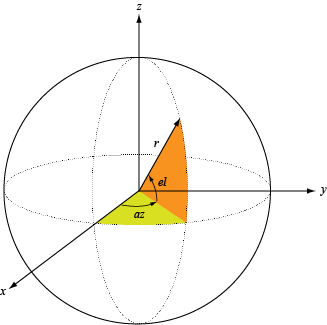
Define the azimuth and elevation conventions used in the toolbox.
The azimuth angle of a vector is the angle between the x-axis and its orthogonal projection onto the xy-plane. The angle is positive when going from the x-axis toward the y-axis. Azimuth angles lie between –180° and 180° degrees, inclusive. The elevation angle is the angle between the vector and its orthogonal projection onto the xy-plane. The angle is positive when going toward the positive z-axis from the xy-plane. Elevation angles lie between –90° and 90° degrees, inclusive.
Extended Capabilities
C/C++ Code Generation
Generate C and C++ code using MATLAB® Coder™.
Version History
Introduced in R2021a
See Also
MATLAB Command
You clicked a link that corresponds to this MATLAB command:
Run the command by entering it in the MATLAB Command Window. Web browsers do not support MATLAB commands.
选择网站
选择网站以获取翻译的可用内容,以及查看当地活动和优惠。根据您的位置,我们建议您选择:。
您也可以从以下列表中选择网站:
如何获得最佳网站性能
选择中国网站(中文或英文)以获得最佳网站性能。其他 MathWorks 国家/地区网站并未针对您所在位置的访问进行优化。
美洲
- América Latina (Español)
- Canada (English)
- United States (English)
欧洲
- Belgium (English)
- Denmark (English)
- Deutschland (Deutsch)
- España (Español)
- Finland (English)
- France (Français)
- Ireland (English)
- Italia (Italiano)
- Luxembourg (English)
- Netherlands (English)
- Norway (English)
- Österreich (Deutsch)
- Portugal (English)
- Sweden (English)
- Switzerland
- United Kingdom (English)