e57FileReader
R2026bDescription
The e57FileReader object reads point cloud data from an E57 file.
Creation
Description
e57Reader = e57FileReader(fileName)e57FileReader object that reads point cloud data from an E57
file. The fileName argument, which specifies the absolute or
relative path to the E57 file, sets the FileName object property.
You specify fileName as character vector or string scalar.
Properties
Object Functions
readPointCloud | Read point cloud data from E57 file |
readCRS | Read coordinate reference system data from E57 file |
hasPointCloud | Determine if another point cloud is available in E57 file |
reset | Reset e57FileReader object to first frame |
Examples
Download a ZIP file containing an E57 file, and then unzip the file.
zipFile = matlab.internal.examples.downloadSupportFile("lidar","data/e57ParkingLot.zip");
saveFolder = fileparts(zipFile);
e57FileName = [saveFolder filesep 'parkingLot.e57'];
if ~exist(e57FileName,"file")
    unzip(zipFile,saveFolder)
end
Create an e57FileReader object using the downloaded E57 file.
e57Reader = e57FileReader(e57FileName);
Define a variable for storing point clouds, ptCloudArr and their corresponding poses, tformArr.
ptCloudArr = [];
tformArr = [];
Read the point clouds sequentially. Use the hasPointCloud object function to check whether the next point cloud is available.
while hasPointCloud(e57Reader)
   [ptCloud,pcMetadata] = readPointCloud(e57Reader);
    for j = 1:numel(ptCloud) % To read multiple returns
        ptCloudArr = [ptCloudArr ptCloud(j)];
        tformArr = [tformArr pcMetadata.RelativePose];
    end
end
Align the point clouds from the file to create a map.
pcMap = pcalign(ptCloudArr,tformArr);
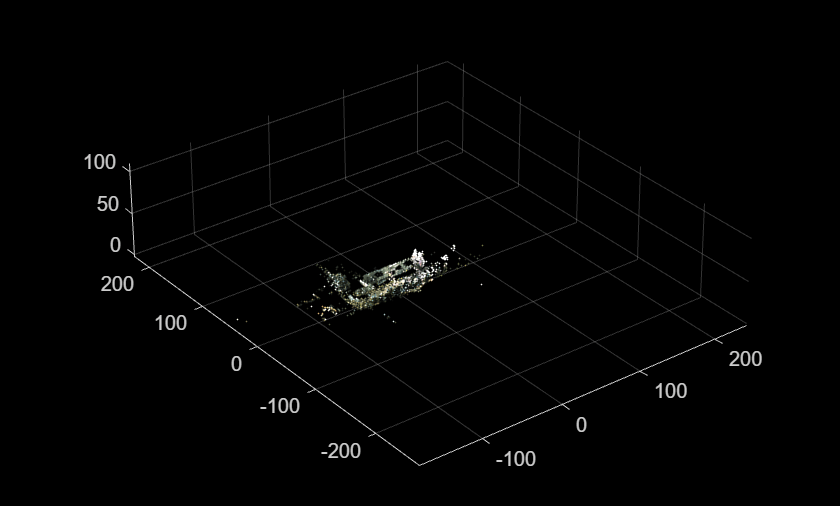
Display the map.
figure
pcshow(pcMap)
More About
The E57 file format, specified by the American Society for Testing and Materials (ASTM), is an open standard for storing point cloud and image data along with associated sensor metadata. Each E57 file has a hierarchical tree structure based on the XML format. An E57 file has a header, a binary section, and an XML section.
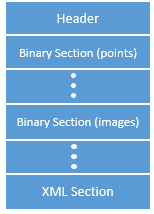
Header — Contains information such as the file version number and the location of the XML section.
Binary section — Contains the actual data of the point clouds and images.
XML section — Contains a hierarchical tree that references the data stored in the binary section.
This figure shows the typical structure of the XML section.
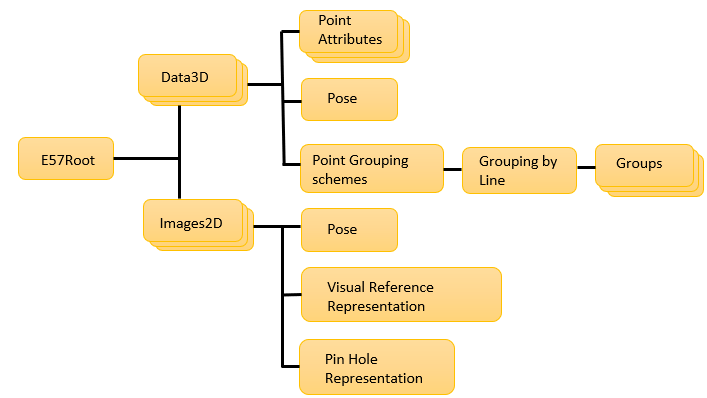
The
E57Rootelement is the root node of the XML hierarchy. It stores point clouds and images in a common file coordinate system. The structure also contains additional file information, such as file creation date and time.Data3Delement stores each point cloud as an individual structure. Each structure stores the pose information and individual point attributes of the point cloud.Images2Delement stores images as individual structures, similar to theData3Delement.For more information on the E57 file format, see the standard specification on the ASTM INTERNATIONAL website.

