gatherLabelData
R2026bSyntax
Description
returns time-synchronized label data gathered from multi-sensor ground truth data,
labelData = gatherLabelData(gTruth,signalNames,labelTypes)gTruth. The function returns label data for the signals specified by
signalNames and the label types specified by
labelTypes.
[
additionally returns the signal timestamps associated with the gathered label data, using
the arguments from the previous syntax.labelData,timestamps] = gatherLabelData(___)
Use timestamps with the writeFrames
function to write the associated signal frames from the
groundTruthMultiSensor objects to disk. Use these frames and the
associated labels as training data for machine learning or deep learning models.
[___] = gatherLabelData(___,
specifies options using one or more name-value arguments in addition to any combination of
arguments from previous syntaxes. For example, Name=Value)Verbose=True enables
display to the workspace environment.
Examples
Gather label data for a video signal and a lidar point cloud sequence
signal from a groundTruthMultiSensor object. Write the signal frames associated with that
label data to disk and visualize the frames.
This example assumes you have a groundTruthMultiSensor object,
gTruth, in the workspace that contains label data for a video and a
lidar point cloud sequence.
Specify the signals from which to gather label data.
signalNames = ["video_01_city_c2s_fcw_10s" "lidarSequence"];
The video contains rectangle labels, whereas the lidar point cloud sequence contains cuboid labels. Gather the rectangle labels from the video and the cuboid labels from the lidar point cloud sequence.
labelTypes = [labelType.Rectangle labelType.Cuboid]; [labelData,timestamps] = gatherLabelData(gTruth,signalNames,labelTypes);
Display the first eight rows of label data from the two signals. Both signals
contain data for the Car label. In the video, the
Car label is drawn as a rectangle bounding box. In the lidar point
cloud sequence, the Car label is drawn as a cuboid bounding
box.
videoLabelSample = head(labelData{1})
lidarLabelSample = head(labelData{2})videoLabelSample =
table
Car
_________________
{[299 213 42 33]}
lidarLabelSample =
table
Car
____________________________________________________
{[17.7444 6.7386 3.3291 3.6109 3.2214 3.5583 0 0 0]}
Write signal frames associated with the gathered label data to temporary folder
locations, with one folder per signal. Use the timestamps returned by the
gatherLabelData function to indicate which signal frames to
write.
outputFolder = fullfile(tempdir,["videoFrames" "lidarFrames"]); fileNames = writeFrames(gTruth,signalNames,outputFolder,timestamps);
Writing 2 frames from the following signals: * video_01_city_c2s_fcw_10s * lidarSequence
Load the written video signal frames by using an imageDatastore
object. Load the associated rectangle label data by using a
boxLabelDatastore object.
imds = imageDatastore(fileNames{1});
blds = boxLabelDatastore(labelData{1});Load the written lidar signal frames by using a fileDatastore
object. Load the associated cuboid label data by using a
boxLabelDatastore object.
fds = fileDatastore(fileNames{2},ReadFcn=@pcread);
clds = boxLabelDatastore(labelData{2});Visualize the written video frames by using a vision.VideoPlayer
object. Visualize the written lidar frames by using a pcplayer
object.
videoPlayer = vision.VideoPlayer; ptCloud = preview(fds); ptCloudPlayer = pcplayer(ptCloud.XLimits,ptCloud.YLimits,ptCloud.ZLimits); while hasdata(imds) % Read video and lidar frames. I = read(imds); ptCloud = read(fds); % Visualize video and lidar frames. videoPlayer(I); view(ptCloudPlayer,ptCloud); end
Input Arguments
Multi-sensor ground truth data, specified as a groundTruthMultiSensor object or vector of
groundTruthMultiSensor objects.
Each groundTruthMultiSensor object in gTruth
must include all the signals specified in the signalNames
input.
In addition, each object must include at least one marked label per gathered label definition.
Names of the signals from which to gather label data, specified as a character
vector, string scalar, cell array of character vectors, or string vector. The signal
names must be valid signal names stored in the input multi-sensor ground truth data,
gTruth.
To obtain the signal names from a groundTruthMultiSensor object,
use this syntax, where gTruth is the variable name of the
object:
gTruth.DataSource.SignalName
Example: "video_front_camera"
Example: ["video_front_camera" "lidarSequence"]
Label types from which to gather label data, specified as a labelType (Computer Vision Toolbox) enumeration scalar, labelType enumeration vector,
or a cell array of labelType enumeration scalars and vectors. The
gatherLabelData function gathers label data for each signal
specified by input signalNames and each
groundTruthMultiSensor object specified by input
gTruth. The number of elements in labelTypes
must match the number of signals in signalNames.
Gather Label Data for Single Label Type per Signal
To gather label data for a single label type per signal, specify
labelTypes as a labelType enumeration scalar
or vector. Across all groundTruthMultiSensor objects in
gTruth, the gatherLabelData function
gathers labelTypes(n) label data from
signalName(n), where n is the index of the
label type and the corresponding signal name whose label data is to be gathered. Each
returned table in the output labelData cell array contains data
for only one label type per signal.
In this code sample, the gatherLabelData function gathers
labels of type Rectangle from a video signal named
video_front_camera. The function also gathers labels of type
Cuboid from a lidar point cloud sequence signal stored in a
folder named lidarData. The gTruth input
contains the groundTruthMultiSensor objects from which this data is
to be
gathered.
labelData = gatherLabelData(gTruth, ... ["video_front_camera","lidarData"], ... [labelType.Rectangle,labelType.Cuboid]);
To gather label data for a single label type from separate signals, you must
repeat the label type for each signal. In this code sample, the
gatherLabelData function gathers labels of type
Rectangle from the video_left_camera and
video_right_camera video
signals.
labelData = gatherLabelData(gTruth, ... ["video_left_camera","video_right_camera"], ... [labelType.Rectangle,labelType.Rectangle]);
Gather Label Data for Multiple Label Types per Signal
To gather label data for multiple label types per signal, specify
labelTypes as a cell array of labelType
enumeration scalars and vectors. Across all groundTruthMultiSensor
objects in gTruth, the gatherLabelData
function gathers labelTypes{n} label data from
signalName(n), where n is the index of the
label types and the corresponding signal name whose label data is to be gathered. The
function groups the data for these label types into one table per signal per
groundTruthMultiSensor object.
In this code sample, the gatherLabelData function gathers
labels of type Rectangle and Line from the
video_front_camera video signal. The function also gathers labels
of type Cuboid from a lidar point cloud sequence signal stored in a
folder named lidarData. The gTruth input
contains the groundTruthMultiSensor objects from which this data is
to be
gathered.
labelData = gatherLabelData(gTruth, ... ["video_front_camera", ... "lidarData"], ... {[labelType.Rectangle labelType.Line], ... labelType.Cuboid});
Valid Enumeration Types
You can specify one or more of these enumeration types.
labelType.Rectangle-- Rectangle ROI labelslabelType.RotatedRectangle-- Rotated Rectangle ROI labelslabelType.Cuboid-- Cuboid ROI labels (point clouds)labelType.ProjectedCuboid-- Projected cuboid ROI labels (images and video data)labelType.Line-- Line ROI labelslabelType.PixelLabel-- Pixel ROI labelslabelType.Polygon-- Polygon ROI labelslabelType.SemanticPointLabel-- Semantic point ROI labels (point clouds). For semantic point labels, the gathered data contains indices that map each point in the point cloud to a semantic class.labelType.SceneLogical-- Logical Scene labelslabelType.SceneNumeric-- Numeric Scene labelslabelType.SceneString-- String Scene labels
To gather label data for scenes, you must specify labelTypes
as the labelType.Scene enumeration scalar. You cannot specify any
other label types with labelType.Scene.
Name-Value Arguments
Example: labelData =
gatherLabelData(gTruth,"video_front_camera",labelType.Rectangle,SamplingFactor=5)
Specify optional pairs of arguments as
Name1=Value1,...,NameN=ValueN, where Name is
the argument name and Value is the corresponding value.
Name-value arguments must appear after other arguments, but the order of the
pairs does not matter.
Sample factor used to subsample label data, specified as a positive integer. A
sample factor of K includes every Kth signal
frame. Increase the sample factor to drop redundant frames from signals with high
sample rates, such as videos.
Group columns from label data, specified as "LabelName" or
"LabelType".
"LabelName"-- Groups the label data into columns by label definitions."LabelType"-- Groups the label data into columns by label type.
Logical to indicate if attribute and sublabel data is returned in label data
output, specified as a logical false (0) or
true (1).
Output Arguments
Label data, returned as an M-by-N cell array
of tables, where:
Mis the number ofgroundTruthMultiSensorobjects ingTruth.When
labelTypescontains ROIlabelTypeenumerations,Nis the number of signals insignalNamesand the number of elements inlabelTypes. In this case,labelData{m,n}contains a table of label data for thenth signal ofsignalNamesthat is in themthgroundTruthMultiSensorobject ofgTruth. The table contains label data for only the label types in thenth position oflabelTypes.When
labelTypescontains either alabelType.SceneLogical,labelType.SceneNumericorlabelType.SceneStringenumeration only,Nis equal to1. In this case,labelData{m}contains a table of scene label data across all signals in themthgroundTruthMultiSensorobject ofgTruth.
For a given label data table, tbl, the table is of size
T-by-L, where:
Tis the number of timestamps in the signal for which label data exists.Lis the number of label definitions that are of the label types gathered for that signal.tbl(t,l)contains the label data gathered for thelth label at thetth timestamp.
If one of the signals has no label data at a timestamp, then the corresponding label data table does not include a row for that timestamp.
For each cell in the table, the format of the returned label data depends on the type of label.
| Label Type | Storage Format for Labels at Each Timestamp |
|---|---|
labelType.Rectangle |
|
labelType.RotatedRectangle |
For one or more rotated rectangles, specify in spatial coordinates as an M-by-5 numeric matrix, where each row specifies a rotated rectangle of the form [xctr yctr w h yaw].
|
|
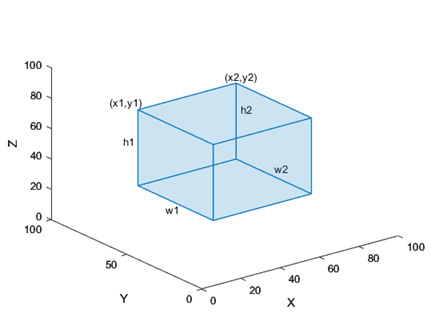
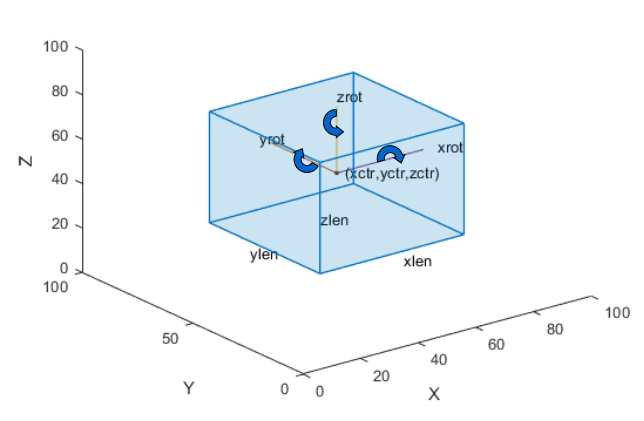
The figure shows how these values determine the position of a cuboid.
|
|
The figure shows how these values determine the position of a cuboid.
|
labelType.Line |
|
labelType.PixelLabel | Label data for all pixel label definitions is stored in a
single M-by-1 |
labelType.Polygon |
|
labelType.SemanticPointLabel | Label data for all semantic point
label definitions stored in a single M-by-1
|
labelType.SceneLogical | Logical 1 (true) if the scene label
is applied. Otherwise logical 0
(false) |
labelType.SceneNumeric | A numeric scalar value associated with the scene label. |
labelType.SceneString | A string scalar value associated with the scene label. |
Label Data Format
Consider a cell array of label data gathered by using the
gatherLabelData function. The function gathers labels from
three groundTruthMultiSensor objects with variable names
gTruth1, gTruth2, and
gTruth3.
For a video signal named
video_front_camera, the function gathers labels of typeRectangleandLine.For a lidar point cloud sequence signal stored in a folder named
lidarData, the function gathers labels of typeCuboid.
This code shows the call to the gatherLabelData
function.
labelData = gatherLabelData([gTruth1 gTruth2 gTruth3], ... ["video_front_camera", ... "lidarData"], ... {[labelType.Rectangle labelType.Line], ... labelType.Cuboid});
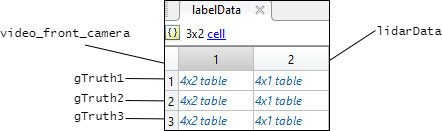
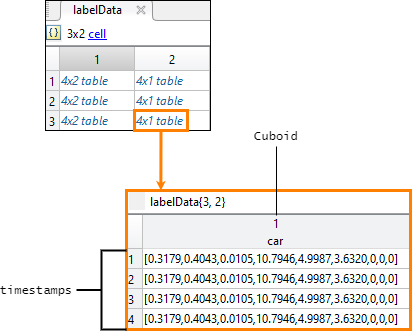
labelData output is a 3-by-2 cell array of tables. Each row of
the cell array contains label data for one of the
groundTruthMultiSensor objects. The first column contains the label
data for the video signal, video_front_camera. The second column
contains the label data for the point cloud sequence signal,
lidarData. This figure shows the labelData
cell array.
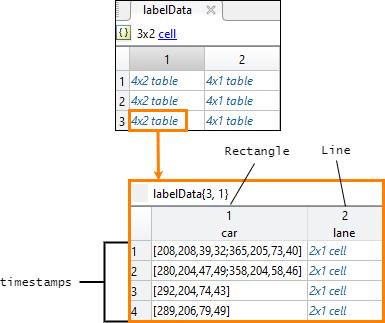
This figure shows the label data table for the video signal in the third
groundTruthMultiSensor object. The
gatherLabelData function gathered data for a
Rectangle label named car and a
Line label named lane. The table contains
label data at four timestamps in the signal.
This figure shows the label data table for the lidar signal in the third
groundTruthMultiSensor object. The
gatherLabelData function gathered data for a
Cuboid label, also named car. The
car label appears in both signal types because it is marked as a
Rectangle label for video signals and a Cuboid
label for lidar signals. The table contains label data at four timestamps in the
signal.
Semantic Point Label Data Format
When you gather SemanticPointLabel data, the output table for
point cloud signals includes a SemanticPointLabelData column
containing file paths to MAT files. Each MAT file stores a variable named
semanticPointLabels that contains a vector of integer label IDs
with the same length as the number of points in the corresponding point cloud.
The semantic point label data can be in one of two formats:
Organized — For organized point clouds, the label data is stored as a 2-D matrix with the same dimensions as the organized point cloud.
Unorganized — For unorganized point clouds, the label data is stored as a column vector with one element per point.
When multiple point cloud signals are labeled in the Multi-Sensor Labeler app, the semantic point label data files are organized into separate folders per signal. Each folder is named after the signal and contains sequentially numbered MAT files corresponding to each frame.
Signal timestamps, returned as an M-by-N cell
array of duration vectors, where:
Mis the number ofgroundTruthMultiSensorobjects ingTruth.Nis the number of signals insignalNames.timestamps{m,n}contains the timestamps for thenth signal ofsignalNamesthat is in themthgroundTruthMultiSensorobject ofgTruth.
If you gather label data from multiple signals, the signal timestamps are
synchronized to the timestamps of the first signal specified by
signalNames.
Version History
Introduced in R2026b
MATLAB Command
You clicked a link that corresponds to this MATLAB command:
Run the command by entering it in the MATLAB Command Window. Web browsers do not support MATLAB commands.
选择网站
选择网站以获取翻译的可用内容,以及查看当地活动和优惠。根据您的位置,我们建议您选择:。
您也可以从以下列表中选择网站:
如何获得最佳网站性能
选择中国网站(中文或英文)以获得最佳网站性能。其他 MathWorks 国家/地区网站并未针对您所在位置的访问进行优化。
美洲
- América Latina (Español)
- Canada (English)
- United States (English)
欧洲
- Belgium (English)
- Denmark (English)
- Deutschland (Deutsch)
- España (Español)
- Finland (English)
- France (Français)
- Ireland (English)
- Italia (Italiano)
- Luxembourg (English)
- Netherlands (English)
- Norway (English)
- Österreich (Deutsch)
- Portugal (English)
- Sweden (English)
- Switzerland
- United Kingdom (English)