Find Existing Tests for Function in Polyspace Platform User Interface
R2026bYou can author graphical tests for C/C++ functions in the Polyspace Platform user interface. When you author a new test for a function, to avoid repetitions, it can be helpful to know if any existing tests already call the function. This topic shows how to:
Find the tests that explicitly call a given function as code under test.
Find all tests that call a given function, either intentionally as code under test or incidentally as a callee of the code under test.
Find Tests Written for Function
To find which graphical tests are explicitly invoking a function:
Open the Polyspace® Platform project containing your source code.
On the toolstrip, select Parse Code.
For more information on code parsing, see Parse Source Code for Auto-Populating Test Information in Polyspace Platform User Interface.
Select the Code Explorer button
 on the toolstrip.
On the Code pane, find the function through search.
Select the function. The Properties pane shows the graphical test steps that directly call the function, listed in the property Code Under Test in.
In this image, the Properties pane shows that the function
update()is being called in two tests,update_test_1andupdate_test_2. In both tests, the function is called in the stepStep_ID1.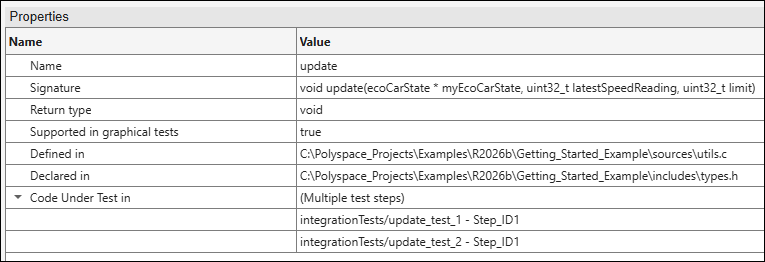
Right-click the test step that you want to see and select Open Test Step.
Find Tests Calling Function
To find which tests are covering a function by calling it directly or indirectly:
Open the Polyspace Platform project containing your source code.
Enable code coverage computation, build the project, and run all tests in the project. For more information, see Calculate C/C++ Code Profiling Metrics in Polyspace Platform User Interface.
Open the code coverage results and locate the function on the Results List pane by inspection or by using the Show only filter on the toolstrip.
Select the function name. The Result Details pane shows which tests are covering the function.

