Write Multistep Tests in Polyspace Platform User Interface
R2026bA simple C/C++ unit test calls a single function to test with certain input values and assesses the function return value or other modified global variables against expected results. You can write more complicated multistep tests in the Polyspace Platform user interface that call several functions in a sequence and make assessments at the end of the sequence.
When to Author Multistep Tests
Multistep tests are useful when the sequence of functions called in the test represent a sequence of calls in your program, but there is no one function that calls only that sequence and nothing else.
Consider these functions:
void setVal(int), which initializes a global variable with its input parametervoid modifyVal(int), which modifies the global variable valueint getVal(void), which returns the global variable value
If your program main function calls these functions in this order but also contains calls to other functions and you want to test the end results of calling only these three functions in this order, write a multistep test.
In the first step, call
setVal()with an input value.In the second step, call
modifyVal()with another input value.In the third step, call
getVal()and assess its return value.
Multistep tests are also useful when testing values that are not directly evaluated in your code. The second example below demonstrates the use of multistep tests in this context.
Authoring Multistep Tests
In this tutorial, you will author multistep tests using two different strategies for data exchange between steps – test data and global variables.
Example Files
This tutorial uses the files in the folder <polyspaceroot>\polyspace\examples\doc_pstest\multi_step_tests\src. Here, <polyspaceroot> is the Polyspace® installation folder, for instance, C:\Program Files\Polyspace\R2026b. To continue with this tutorial:
Create a new Polyspace Platform project and add the folder to the project.
Select Parse Code on the toolstrip to analyze the files in the folder.
Multistep Tests Using Test Data Element for Data Exchange
This example creates a test data element to exchange data between test steps. In the context of graphical test authoring, the term test data refers to variables that are local to a test and accessible from all test steps. You create a test data variable from an input, assessment, or function return value in a test step but the variable appears in a Test Data section that appears outside a test step.
Write a multistep test that invokes the two functions in the file multistep_test_with_test_data.c in sequence to confirm that the functions work as intended. The utility function isDataClean() verifies whether a value falls between 1 and 5, and the utility function cleanUpData() constrains a value to that same range.
#include "decls.h"

int32_t isDataClean(int32_t arg) {
   return (arg >= 1 && arg <= 5);
}

int32_t cleanUpData(int32_t arg) {
   if (arg < 1) {
      arg = 1;
   } else if (arg > 5) {
      arg = 5;
   }
   return arg;
}
On the Projects pane, right-click the
cleanUpDatanode and select Add Test Case.This action creates a single-step test that invokes the function
cleanUpData()and opens the test document. The Test section of this document represents data that is applicable to all steps, while the Step section represents data that applies to the first (and currently the only) step of the test.In the Step section of the test, set step data as follows:
In the Inputs section, in the row for the parameter
arg, set Value to 6.Remove the assessment in the Assessments section.
Specify that the return value of the code under test must be stored for use in other steps:
Click the
 button next to the label Store Return Value.
Keep the default name
Step_ID1_outand click OK. A new element appears in the Test Data section above the step.In the Test Data section, leave the Value column in its default state. This entry in the Value column represents the initial value of the test data. In this test, the initial value is overwritten by the return value of
cleanUpData()and is irrelevant for the test.
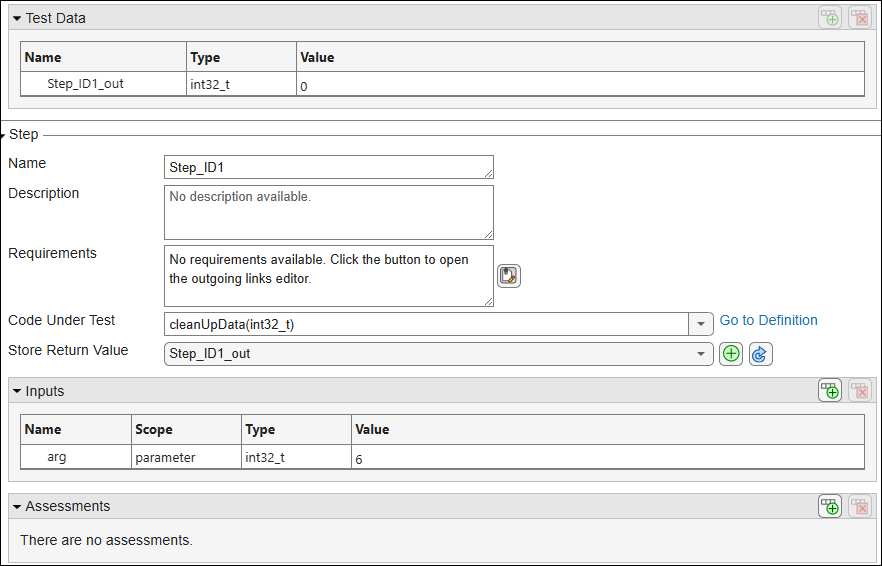
Add a second step to this test by right-clicking the node Step_ID1 in the test case browser and selecting Add Step After. In this new step, set the step data:
Specify
isDataClean(int32_t)as Code Under Test.In the Inputs section, right-click the row corresponding to the parameter
argand select Select Test Data. Select the test data nameStep_ID1_outand click OK. The Value column of the row now showsStep_ID1_outto indicate that the input has the same value as the test data value from the previous test step.In the Assessments section, set the expected value of the function return value
pst_call_outin the Value column to1.
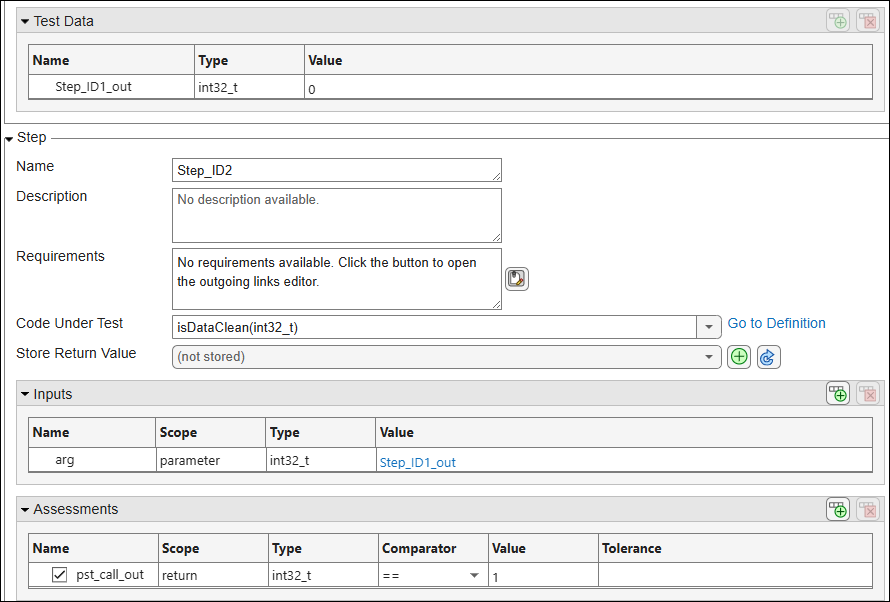
Build and run the tests to see passing test results. For more information, see Build and Run Tests in Polyspace Platform User Interface.
Multistep Test Using Global Variables for Data Exchange
This example uses global variables in the source code to exchange data between test steps.
Consider the function setGlobal() defined in the file multistep_test_with_globals.c:
#include "decls.h"

int32_t global1;
int32_t global2;

void setGlobal(int32_t arg1, int32_t arg2) {
    global1 = arg1;
    global2 = arg2;
}global1 and global2 satisfy these constraints:
You want to verify that
global1is more than twiceglobal2.You want to verify that their geometric mean is greater than
1.0f.
You cannot test these properties directly in the Polyspace Platform user interface. Instead, you can write your own comparison functions to check for these properties and then write a multistep test that first calls the function under test and subsequently calls the comparison functions. The file test_helpers_multistep_test_with_globals.c contains two such comparison functions
#include <math.h>
#include "decls.h"

/* Helper function 1 */
int32_t isGreaterThanTwice(void) {
    if(global1 > global2 * 2) {
        return 1;
    }
    return 0;
}

/* Helper function 2 */
int32_t isGMeanGreaterThanOne(void) {
    return (sqrt(global1 * global2) > 1.0f ? 1 : 0);
}isGreaterThanTwice() allows you to verify that global1 is more than twice global2, while the function isGMeanGreaterThanOne() allows you to verify that their geometric mean is greater than 1.Write two multistep tests, one that invokes the function sequence setGlobal() followed by isGreaterThanTwice() and another that invokes the function sequence setGlobal() followed by isGMeanGreaterThanOne().
To start writing tests, right-click the Tests node of the project and select Add Test Case.
Write two multistep tests, each verifying a particular property of the global variables. After writing the first step, to add a new step, do one of the following:
Right-click the root node on the left side of the test case editor and select Add New Step.
Using this method, you can keep adding steps at the bottom of the current steps.
Right-click a step node and select Add Step After or Add Step Before.
Using this method, you can add a step after or before the current step. You can also start a new step by duplicating an existing step. Duplicating a step is most useful when the new step has the same function under test as the original step and same input values for all but a few inputs. To duplicate a step, right-click the step node and select Duplicate Step.
The two multi-step tests are as follows:
In the first test, call
setGlobal(int32_t, int32_t)with inputs12and3in the first step. Remove all assessments.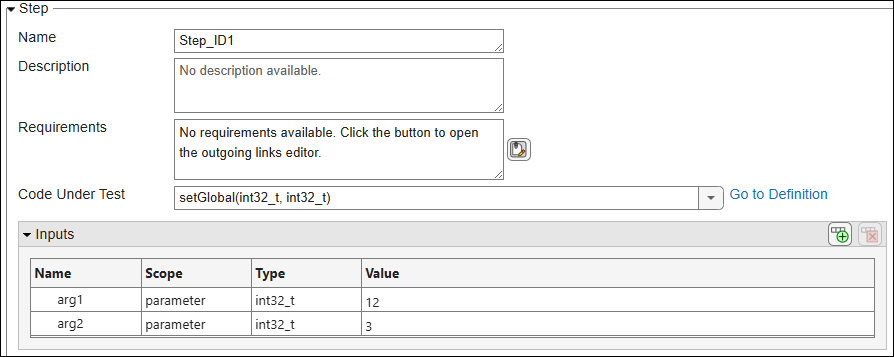
Add a second step and call
isGreaterThanTwice()in this second step. Remove all inputs and add an assessment that verifies that the return value ofisGreaterThanTwice()is 1.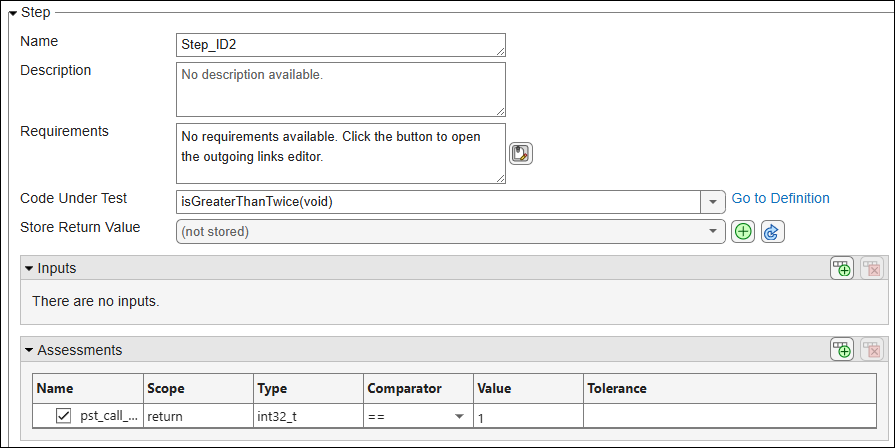
In the second test, call
setGlobal(int32_t, int32_t)with inputs12and3in the first step. Remove all assessments.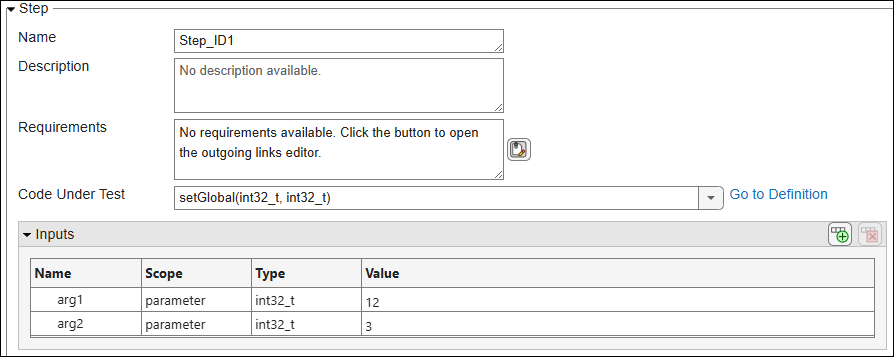
Add a second step and call
isGMeanGreaterThanOne()in this second step. Remove all inputs and add an assessment that verifies that the return value ofisGMeanGreaterThanOne()is 1.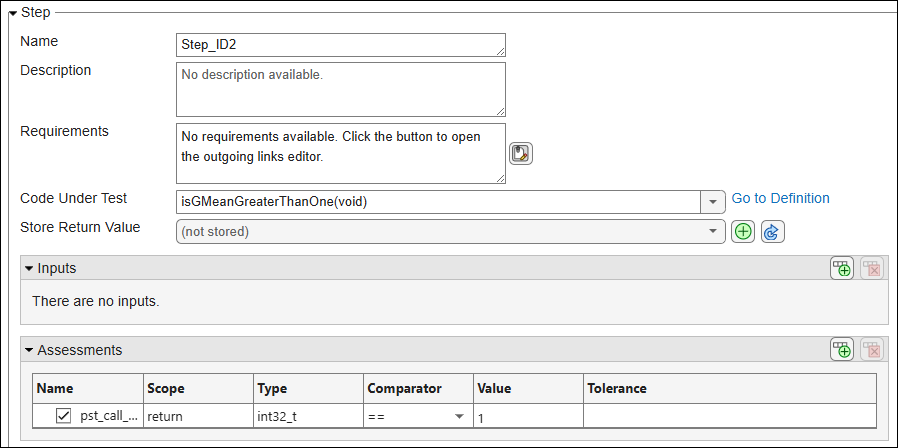
Build and run the tests to see passing test results. For more information, see Build and Run Tests in Polyspace Platform User Interface.
See Also
polyspace.project.TabularTestStep

