Specify Test Inputs in Polyspace Platform User Interface
R2026bA C/C++ unit test typically calls a function with some inputs and compares the function outputs against expected values (assessments). To author a unit test for a function, you have to specify the following inputs:
Values of function parameters.
Starting values of global variables that the function reads (directly or indirectly via called functions).
For instance, to test the function updateGlobalVar defined below, you have to specify the value of the function parameter, arg, and the values of the global variables, globalVar, globalMin and globalMax.
int globalVar;
int globalMin;
int globalMax;

void updateGlobalVar(int arg) {
   globalVar += arg;
   if(globalVar > globalMax)
      globalVar = globalMax;
   else if(globalVar < globalMin)
      globalVar = globalMin;
}globalVar, globalMin and globalMax all set to 0. Note that in C, integer global variables that are not explicitly initialized get default values of 0.Simple Data Types
In the Polyspace Platform user interface, after the initial code analysis, you can right-click a function on the Projects pane and select Add Test Case. All function inputs are automatically populated in the Inputs section of the test editor. To complete the test authoring, populate the entries in the Value column (or leave the default values). See also Parse Source Code for Auto-Populating Test Information in Polyspace Platform User Interface.
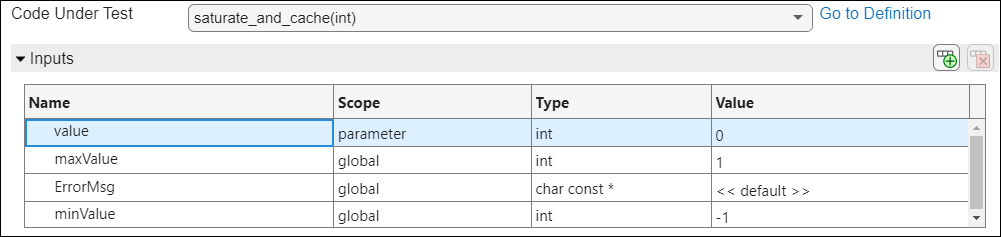
Specify input values based on their data types. The data types are listed in the Type column.
For integer types such as
intandlongor floating point types such asfloatanddouble, specify a number.For character types such as
char, specify a character in single quotes (or ASCII equivalent).
If a global variable that might be read by the function does not appear in the list of inputs, click the Add button to add a new row and explicitly specify this global variable name and type. You can also use this facility to verify that a global variable is unaffected by the function call. Specify an input value for the global variable and verify that the value remains unchanged after the function call.
Complex Data Types
You can also specify values for structured, enum, array or pointer inputs in the Polyspace Platform user interface.
For aggregate data types such as structures or enum-s, the type definitions must be in headers in include folders that you add to your project (to add include paths to your project, use the project-wide option Include paths or the build-specific option Additional include paths). Otherwise, the generated test code cannot access the type definitions and fails to build. Note that headers in the same folders as sources are in the include search path of a project by default and do not need to be explicitly added as an include folder.
Example Files
This example uses the files in the folder <polyspaceroot>\polyspace\examples\doc_pstest\complex_types\src. Here, <polyspaceroot> is the Polyspace® installation folder, for instance, C:\Program Files\Polyspace\R2026b. To try out this example:
Create a new Polyspace Platform project and add the folder to the project.
Select Parse Code on the toolstrip to analyze the files in the folder.
Structures
A structure consists of one or more data members. To specify a structure input, you have to specify the values of all the data members (or leave the default values for inputs that are global).
For instance, to specify the input of the function negateStruct that has the type MyStruct defined below, you have to specify the values of the individual members x and y:
typedef struct {
    float x;
    float y;
} MyStruct;

MyStruct negateStruct(MyStruct s) {
    s.x *= -1.0;
    s.y *= -1.0;
    return s;
}
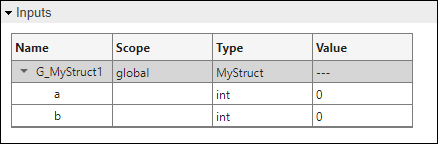
A structured input appears as a collapsible node in the Inputs section of the test editor. Expand the node to see the data members and enter their values. For instance, the previously defined structure appears as follows.
Strictly speaking, this approach also applies to POD classes in C++.
For the definition of POD classes, see POD Class.
For more information on how to specify values for non-POD class type inputs, see Class Objects (C++).
Enumerations
A variable of enum type can only have a finite list of values. For an enum input, you cannot specify a value that falls outside this list.
For instance, the function colorValue takes a parameter n of type MyEnum defined below that can only have one of the three values RED, GREEN, or BLUE:
typedef enum {
    RED,
    GREEN,
    BLUE
} MyEnum;

int colorValue(MyEnum n) {
    switch (n) {
        case RED:
            return 0;
        case GREEN:
            return 1;
        case BLUE:
            return 2;
        default:
            return -1;
    }
}
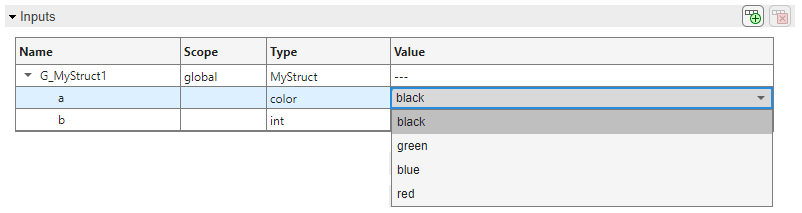
An enum input appears like a variable of fundamental type in the test editor, except that the Value column is constrained. Instead of entering the value, pick from a drop down list that shows the allowed enumerator values. For instance, the enum parameter of colorValue appears as follows.
Unions
A union is similar to a structure, but all its members share a single memory location and only one of them can be set at a time.
For instance, consider the function doubleVal that takes a parameter of union type MyUnion:
typedef union {
    int intValue;
    float floatValue;
} MyUnion;

int doubleVal(MyUnion u, int useFloat) {
    if (useFloat)
        return u.floatValue*2.0f;
    else
        return u.intValue*2;
}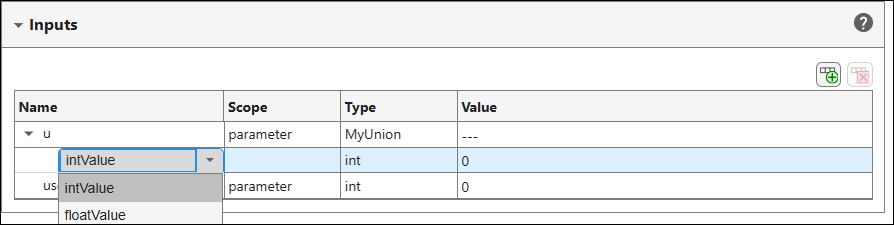
Note that if an input of union type points to test data, you cannot change its member from the Inputs section of a test step. You have to change the member from the Test Data section above the steps.
Pointers
A pointer can point to a single variable or an array of several elements. To specify a pointer input, you have to specify how many elements the pointer points to, and their values (or point to an existing memory location).
A pointer input appears like a variable of fundamental type in the test editor. For pointer inputs, you can specify a target variable that the pointer will point to or point to the same array as another pointer.
For more information, see Specify Pointer Targets for C/C++ Test Authoring in Polyspace Platform User Interface.
Class Objects (C++)
A class object must be initialized using a constructor from the class. If you create a test for a function that takes objects as inputs, each object input is initialized using the default class constructor if it exists or left as undefined. To initialize an object using a non-default constructor, explicitly enter a call to the non-default constructor in the Value column. The same initialization strategy applies to global variables that are class objects. However, note that a global variable of class type is supported as test input only if the class contains a copy or move assignment operator.
If you create a test for a class member function, the input list contains an entry pst_obj that stands for the object used to call the member function. This object is also initialized using the default class constructor if it exists or left as undefined. For initialization using a non-default constructor, you have to explicitly enter a constructor call in the Value column. For examples, see Test C++ Member Functions in Polyspace Platform User Interface.
If a class contains non-const public members, you can enter values for these members explicitly or leave the value as <<default>>:
If you enter a value, this value is assigned to the class member after the class is initialized using a constructor call.
If you leave the value as
<<default>>, the class member has an initial value as determined by the constructor call.
For examples, see Test C++ Member Functions of Classes with Non-Default Initialization.
Sometimes, to test a method, you have to call that method and then call a second method using the same object, and perform an assessment on the return value from the second call. In cases like this, write a multi-step test, where you invoke each method in a separate step. To reuse the same object across the steps, create a test data out of the object in the first step and point to this test data from the second step. For an example, see Test C++ Member Functions in Polyspace Platform User Interface.
Use of objects as test data has the following limitations:
Creation of test data is restricted to objects of class type that have a default constructor and a copy or move assignment operator.
You can use test data for the value of
pst_obj, a function parameter, a member of a function parameter, or the right-hand side of an assessment. If you use test data for the value of a member of a function parameter, the member type must have a copy assignment operator.
The same restrictions apply to the use of objects as test parameters. For more information on test parameters, see Run Same Test with Different Inputs in Polyspace Platform User Interface.
Strictly speaking, this approach applies only to non-POD classes in C++.
For the definition of POD classes, see POD Class.
For more information on how to specify values for POD class type inputs, see Structures.

