主要内容

mlreportgen.dom.TableEntrySpacing Class

Namespace: mlreportgen.dom

Distance between borders of adjacent table cells

Since R2022a

Description

Use an object of the mlreportgen.dom.TableEntrySpacing class to specify the spacing between adjacent cells in a table.

Note

To modify the spacing between cells in tables in PDF and HTML reports, set the BorderCollapse property of the mlreportgen.dom.Table object to "off".

The mlreportgen.dom.TableEntrySpacing class is a handle class.

Creation

Description

spacingObj = mlreportgen.dom.TableEntrySpacing creates a table entry spacing object with a value of 0.03 inches.

spacingObj = mlreportgen.dom.TableEntrySpacing creates a table entry spacing object with a value specified by value.

example

Input Arguments

expand all

Spacing between table cells, specified as a string or character vector. Specify a value followed by the unit abbreviation. For example, to specify a spacing of 0.04 inches, use "0.04in". Valid abbreviations are:

  • "px" — Pixels

  • "cm" — Centimeters

  • "in" — Inches

  • "mm" — Millimeters

  • "pc" — Picas

  • "pt" — Points

You can also specify pixels by omitting the unit. For example, "5" specifies 5 pixels.

This argument sets the Value property as a character vector.

Data Types: char | string

Properties

expand all

Spacing between table cells, specified as a character vector or string scalar that contains a number followed by an abbreviation for a unit of measurement. For example, "2in" specifies 2 inches. Valid abbreviations are:

  • "px" — Pixels

  • "cm" — Centimeters

  • "in" — Inches

  • "mm" — Millimeters

  • "pc" — Picas

  • "pt" — Points

You can also specify pixels by omitting the unit. For example, "5" specifies 5 pixels.

Attributes:

GetAccess
public
SetAccess
public
NonCopyable
true

Data Types: char | string

Tag, specified as a character vector or string scalar. The DOM API generates a session-unique tag as part of the creation of this object. The generated tag has the form CLASS:ID, where CLASS is the object class and ID is the value of the Id property of the object. Use this value to help identify where an issue occurs during document generation.

Attributes:

GetAccess
public
SetAccess
public
NonCopyable
true

Data Types: char | string

Object identifier, specified as a character vector or string scalar. The DOM API generates a session-unique identifier when it creates the document element object.

Attributes:

GetAccess
public
SetAccess
public
NonCopyable
true

Data Types: char | string

Examples

collapse all

This example shows how to set the spacing between entries in a table.

First, import the namespace and create a Document object.

import mlreportgen.dom.*; 
d = Document("Table_with_cell_spacing","html"); 

Create and format a table with a border, a table entry spacing of 0.2 centimeters, and a light blue background.

table = Table(magic(5));
border = Border("inset");
border.Width = "1pt";
table.Style = {border,TableEntrySpacing("0.2cm"),...
    BorderCollapse("off"),...
    BackgroundColor("lightblue"),Width("50%")};
table.TableEntriesStyle = {border};

Add the table to the document.

append(d,table);

Close the document and view the report.

close(d);
rptview(d);
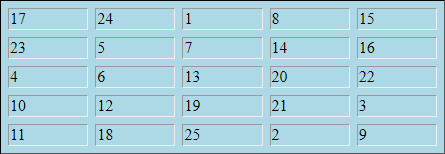
A light blue table with five rows, five columns, and spacing between the entries

Version History

Introduced in R2022a