瓷砖 Simulink 图
R2026b此示例显示如何创建包含跨越多页的大型图的报告。
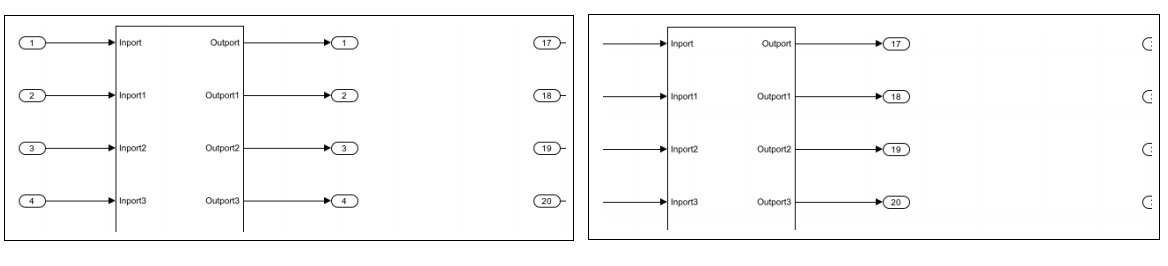
使用图片块创建报告
打开一个带有大图的模型。
model = "slreportgen_demo_big_diagram";
open_system(model);
创建一个大图像文件,然后将其分割成多个图块。
imgFile = model + ".png";
print("-dpng", "-s" + model, imgFile);
创建并打开报告。
% To create a Word report, change the output type from "pdf" to "docx".
% To create an HTML report, change "pdf" to "html" or "html-file" for
% a multifile or single-file report, respectively.
rpt = slreportgen.report.Report("myreport2", "pdf");
open(rpt);
获取页面布局信息。
pageLayout = rpt.Document.CurrentPageLayout;
pageSize = pageLayout.PageSize;
pageMargins = pageLayout.PageMargins;
将页眉和页脚设置为 0 英寸以最大化空间。
pageMargins.Header = "0in";
pageMargins.Footer = "0in";
确定适合页面的图像块尺寸。最佳图块大小是页面大小减去页边距、页边距、页眉和页脚。另外,调整图块高度,使标题留出 0.5 英寸。请注意,对于 PDF 文档,MATLAB® Report Generator™ 将一英寸定义为等于 96 像素。
dpi = 96;
units = mlreportgen.utils.units;

tileHeight = units.toPixels(pageSize.Height, "Resolution", dpi) ...
    - units.toPixels(pageMargins.Top, "Resolution", dpi) ...
    - units.toPixels(pageMargins.Bottom, "Resolution", dpi) ...
    - units.toPixels(pageMargins.Header, "Resolution", dpi) ...
    - units.toPixels(pageMargins.Footer, "Resolution", dpi) ...
    - units.toPixels("0.5in", "Resolution", dpi);

tileWidth = units.toPixels(pageSize.Width, "Resolution", dpi) ...
    - units.toPixels(pageMargins.Left, "Resolution", dpi) ...
    - units.toPixels(pageMargins.Right, "Resolution", dpi) ...
    - units.toPixels(pageMargins.Gutter, "Resolution", dpi);

tileSize = [tileWidth tileHeight];
调用局部函数 sliceImage(见下文)将大图像文件切分成多个图块。
tiles = sliceImage(imgFile, [tileWidth tileHeight]);
将图块图像添加到报告中。另外,添加标题来指示平铺图像相对于整体图像的位置。
for i = 1:numel(tiles)
    tile = tiles{i};
    formalImage = mlreportgen.report.FormalImage(tile.File);
    formalImage.ScaleToFit = false;
    formalImage.Caption = sprintf("row: %d, col: %d", tile.Row, tile.Col);
    add(rpt, formalImage);
end
生成并显示报告。
close(rpt);
rptview(rpt);
定义 sliceImage 本地函数
要将图像文件切成小块,请读取图像文件并将小块大小的部分复制到多个图像文件中。
function tiles = sliceImage(imgFile, tileSize)
    % Read in the image file and determine the number of row and column
    % tiles. Note that the image data is row-major, where the rows are
    % specified first and the columns are second.
    img = imread(imgFile);
    imgSize = size(img);

    imgRows = imgSize(1); % image height
    imgCols = imgSize(2); % image width

    tileNumRows = tileSize(2); % tile height
    tileNumCols = tileSize(1); % tile width

    numCols = ceil(imgCols / tileNumCols);
    numRows = ceil(imgRows / tileNumRows);

    % Preallocate the tile data structures.
    tiles = cell(1, numCols*numRows);

    % Determine the base filename to create the tile image filenames.
    [fPath, fName, fExt] = fileparts(imgFile);
    tileName = fullfile(fPath, fName);

    % Iterate through all rows and columns.
    count = 0;
    for rowIdx = 1:numRows
        for colIdx = 1:numCols
            % Determine the starting and ending image data indices to copy
            % into the tile image.  At the edges, the ending indices are
            % the number of rows and number of columns.
            rowStart = (rowIdx - 1) * tileNumRows + 1;
            rowEnd = rowStart + tileNumRows - 1;

            colStart = (colIdx - 1) * tileNumCols + 1;
            colEnd = colStart + tileNumCols - 1;

            if (rowEnd >= imgRows)
                rowEnd = imgRows;
            end
            nTileRows = rowEnd - rowStart + 1;

            if (colEnd >= imgCols)
                colEnd = imgCols;
            end
            nTileCols = colEnd - colStart + 1;

            % Copy the tile image data onto a white image tile.
            tileImg = uint8(255 * ones(tileNumRows, tileNumCols, 3));
            tileImg(1:nTileRows, 1:nTileCols, :) = img(rowStart:rowEnd,...
                colStart:colEnd, :);

            % Write out the image tile.
            outFile = sprintf("%s_%d_%d.%s", tileName, rowIdx, colIdx, fExt);
            imwrite(tileImg, outFile);

            % Create the tile data structure to describe the tile.
            count = count + 1;
            tiles{count} = struct( ...
                "File", outFile, ...
                "Row", rowIdx, ...
                "Col", colIdx);
        end
    end
end

