simscape.removeConnection
R2026bDescription
simscape.removeConnection(
removes the connection line that leads to the specified port, block,portName)portName,
on the block, block, leaving the other connections intact.
Supported block types include:
Simscape™ blocks in the Foundation and Utilities libraries and in the add-on product libraries
Custom Simscape blocks
Simscape Multibody™ blocks
Subsystems containing Simscape or Simscape Multibody blocks
Examples
In this example, you create a new Simscape model, programmatically add electrical blocks and connect them using their port names, and then programmatically disconnect a block port.
Create a new model, named MyModel.
sscnew("MyModel");
Add and position two Resistor blocks.
add_block("fl_lib/Electrical/Electrical Elements/Resistor","MyModel/Resistor1");
set_param("MyModel/Resistor1","position",[435,110,475,140]);
add_block("fl_lib/Electrical/Electrical Elements/Resistor","MyModel/Resistor2");
set_param("MyModel/Resistor2","position",[435,186,475,214]);
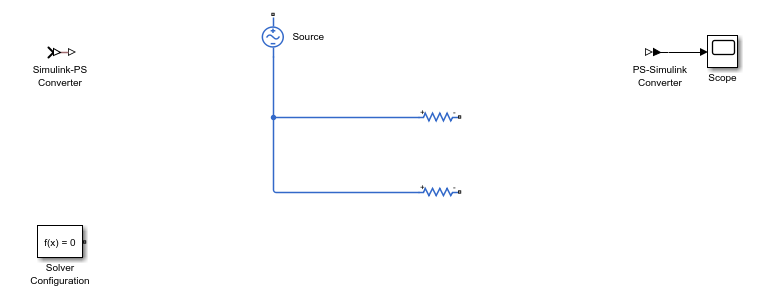
Add an AC Voltage Source block and connect its negative port to the positive ports of the two resistors.
add_block("fl_lib/Electrical/Electrical Sources/AC Voltage Source","MyModel/Source");
simscape.addConnection("MyModel/Source","n","MyModel/Resistor1","p")
simscape.addConnection("MyModel/Source","n","MyModel/Resistor2","p")
The model, with the connected blocks, looks like this.
Disconnect the negative port of the Source block.
simscape.removeConnection("MyModel/Source","n")
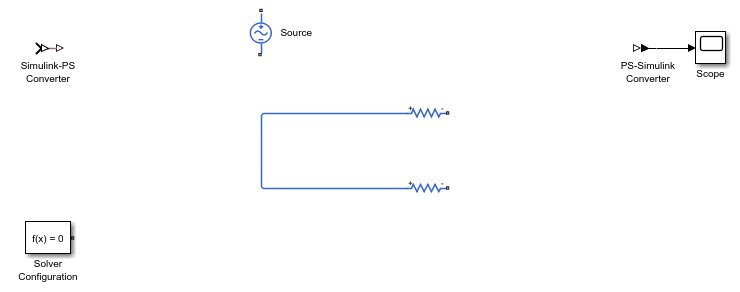
The two resistors are still connected. The function removed only the portion of the connection line between the negative port of the Source block and the first junction, leaving the other connections intact.
Input Arguments
Limitations
Two-way connection ports are not supported.
Version History
Introduced in R2026a

