Define Constraint Using Referenced Configurations
R2026bIn Simulink® Variant Manager™, you can define constraints for the top-level model using referenced component configurations. This approach is especially helpful for complex models, where manually writing out control variable expressions to define the constraint can be time-consuming.
In the plant controller system of the top-level model
slexVariantManagerOverviewGS, the low-fidelity nonlinear controller is not
designed to handle noise from the plant's feedback signal. Define a constraint in the top-level
model that fails for configurations that implement such a variant combination.
Open Example Model
This tutorial uses the example model slexVariantManagerOverviewGS, which comes with a minimal set of variant configurations. You can use this model to follow along with the steps in the tutorial.
modelName = "slexVariantManagerOverviewGS";
open_system(modelName);
Define Variant Constraint
Open Variant Manager.
Go to the Constraints tab and add a new constraint named
UnsupportedControllersForNoise.Click the Show referenced component configurations button
 . The Referenced
Configurations view for the constraint opens as a tab in the
model hierarchy pane.
. The Referenced
Configurations view for the constraint opens as a tab in the
model hierarchy pane.For the
Controllercomponent, select theNonLinearLowFidconfiguration in the Selected Configuration column.Click the Add button
 . This action inserts the corresponding condition
controllerConfigsGS.isConfigActive('NonLinearLowFid')into the Condition box.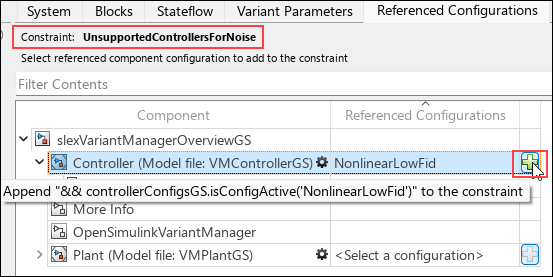
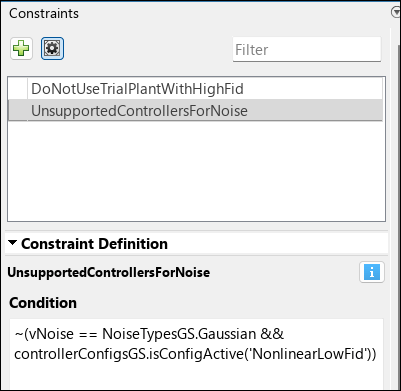
Manually edit the expression in the Condition box to append the variant condition expression corresponding to noisy input:
vNoise == NoiseTypesGS.Gaussian.Negate the condition using the
~operator.Click Apply Changes and save the top-level data dictionary
dVariantManagerGS.sldd.
If you try to activate a configuration that uses this combination now, it will fail due to this constraint.
Open Completed Model
You can also access a fully set-up version of the models used in this tutorial, which already includes all configurations. To open this version, use this command.
open_system("slexVariantManagerOverview");See Also
Simulink.VariantManager.validateConstraint | Simulink.VariantConfigurations

