Save Variant Configurations
R2026bSimulink®
Variant Manager™ saves the variant configurations for a model in the
Simulink.VariantConfigurations object you specify. Once you have finished
adding the variant configurations for a model, click Apply Changes in
the Variant Manager toolstrip. This action exports your updates to the variant configurations
object in the workspace used by the model.
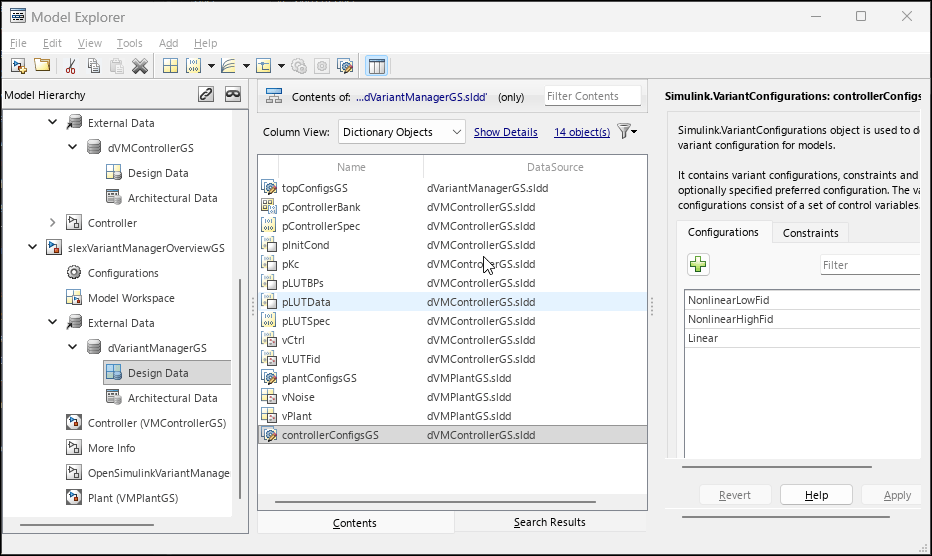
If the object is defined in the data dictionary, as in this tutorial, save the data dictionary. You can view the variant configuration objects defined in a data dictionary in the Design Data section of the dictionary in the Model Explorer.
Tip
If your variant configurations object is in the base workspace, click Export to file in the Variant Manager toolstrip to save the object as a MAT file or MATLAB® script for future use.
Open Model Explorer for the top-level model. In the Simulink Toolstrip, on the Modeling tab, click Model
Explorer. Select an object to open the
Simulink.VariantConfigurations dialog box that shows the data
stored in the object.
See Also
Simulink.VariantConfigurations | Simulink.VariantManager.applyConfiguration

