主要内容

Local Solver Analyzer

R2026b

Profile and configure local solvers in model reference hierarchies

Since R2026b

Description

The Local Solver Analyzer configures and profiles local solvers throughout a model reference hierarchy. Use the Local Solver Analyzer to:

  • Enable, disable, and configure local solvers in referenced models.

  • Select local solvers to profile.

  • View a summary of profiling simulation results for all profiled local solvers.

  • Open instances of the Local Solver Profiler to inspect and analyze detailed profiling results for each profiled local solver.

To profile the top solver and selected local solvers, click Run in the Local Solver Analyzer. To profile a local solver, the referenced model that uses the local solver must simulate in normal mode.
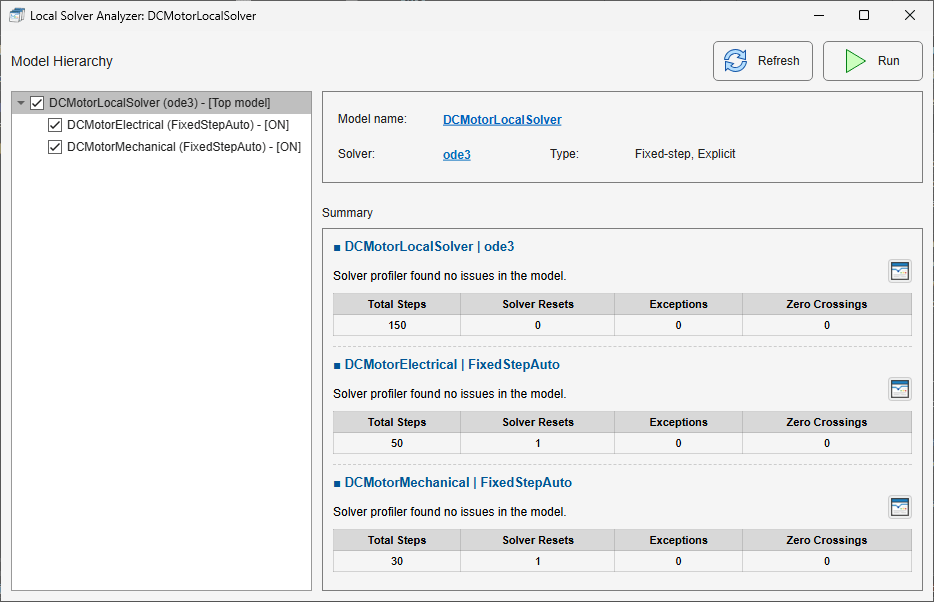
The Local Solver Analyzer shows configuration and profiling information for solvers in a model reference hierarchy.

Open the Local Solver Analyzer

Open the Solver Profiler. In the Solver Profiler toolstrip, in the Analyze section, click Local Solver.

Examples

expand all

To analyze the performance of local solvers throughout a model hierarchy, select the local solvers to profile and run the profiling simulation using the Local Solver Analyzer.

To select local solvers to profile, use the check boxes in the Model Hierarchy pane.
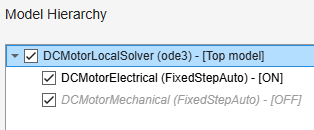
The Model Hierarchy pane shows the hierarchy of a model that references two different models. The check box is selected for all three models. One referenced model uses a local solver and one does not.

When you click Run in the Local Solver Analyzer, the Solver Profiler profiles the local solver for each selected node only if the referenced model is configured to use a local solver. To configure a referenced model to use a local solver, select the node for the referenced model. Then, if Use local solver is off, click off. The Local Solver Analyzer enables Use local solver when referencing model in the referenced model, and the Use local solver value changes to on
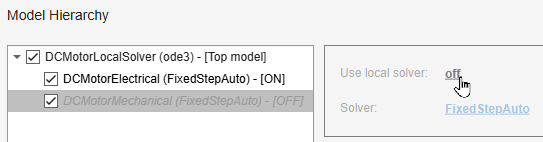
The node for a referenced model that does not use a local solver is selected in the Model Hierarchy pane. The pointer is paused on the Use local solver value.

In the Local Solver Analyzer, click Run. The Solver Profiler profiles the top solver and each selected local solver. After the simulation completes, the Summary section provides a summary of the profiling results for each solver.
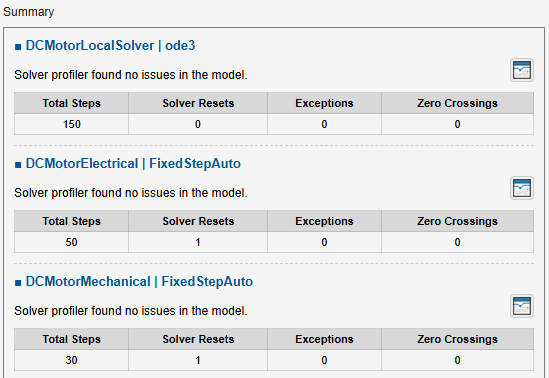
Summary of profiling results for the top solver and two local solvers in a model reference hierarchy.

To view detailed results for a local solver, open an instance of the Local Solver Profiler. In the summary of results for the local solver, click Open Local Solver Profiler to analyze profiling data .

By default, the options you specify in the Configure section of the Solver Profiler toolstrip apply to the top solver and the selected local solvers. To specify different profiling options for a local solver, use the Local Solver Profiler.

  1. Open the Local Solver Analyzer. In the Solver Profiler toolstrip, in the Analyze section, click Local Solver.

  2. In the Model Hierarchy pane, select the node of the referenced model that uses the local solver.

  3. Open an instance of the Local Solver Profiler for the selected referenced model. In the right pane, click Open Local Solver Profiler to configure settings for new profiling simulation .

  4. In the Local Solver Profiler, specify the profiling options for the local solver.

The options you specify in the Local Solver Profiler apply to only the selected referenced model. To specify different profiling options for more than one local solver, open an instance of the Local Solver Profiler for each referenced model.

To profile local solvers using the specified settings, in the Local Solver Analyzer, click Run.

Related Examples

Parameters

expand all

The Model Hierarchy pane displays the model reference hierarchy, local solver configuration, and local solver profiling selection in a tree structure. Each node corresponds to a model reference. For each node, the Model Hierarchy pane shows:

  • A check box that enables or disables profiling

  • The name of the referenced model

  • The solver specified in the configuration parameters of the referenced model

  • Whether the referenced model uses a local solver

  • The model reference simulation mode, if the model simulates in a mode other than normal

The current value of the Use local solver when referencing model configuration parameter of the referenced model selected in the Model Hierarchy pane, displayed as on or off. To enable or disable the local solver for the selected model, click the value.

This item is not shown when the top model is selected in the Model Hierarchy pane.

The solver specified in the configuration parameters of the model selected in the Model Hierarchy pane. To change the selected solver and view or modify additional solver settings, click the solver name. The Configuration Parameters dialog box for the selected model opens.

If the referenced model does not use a local solver, this item is not active.

The full path to the Model block that references the model selected in the Model Hierarchy pane. If the parent of the selected model is a referenced model, the Local Solver Analyzer displays the path to each Model block in the path to the model reference, with each path separated by a pipe character (|). The name of the referenced model is shown in parentheses at the end of the path.

For example, the path for a model named RefModel2 that is referenced by a Model block named ModelBlock2 inside a referenced model named RefModel1 is shown as TopModel/ModelBlock1|RefModel1/ModelBlock2(RefModel2).

To navigate to the block in the model hierarchy and view or modify block parameters, such as the Communication step size, click the block path. The Simulink Editor comes to the front and highlights the Model block in the block diagram.

This item is not shown when the top model is selected in the Model Hierarchy pane.

To view or modify the top model block diagram, click the model name. The Simulink Editor comes to the front and displays the top model block diagram. This item is shown only when the top model is selected in the Model Hierarchy pane.

This parameter is read-only.

The Local Solver Analyzer provides additional information about the characteristics of the solver for the model selected in the Model Hierarchy pane. The Type field indicates whether the solver is fixed- or variable-step and whether the solver is explicit, implicit, or discrete.

Version History

Introduced in R2026b