Signal Conversion
R2026bConvert signal to new type without altering signal values
Signal Conversion block

To add a block to a model, double-click the canvas and start typing the block name. Then, select the block from the list.
Libraries:
Simulink /
Signal Attributes
HDL Coder /
Signal Attributes
Alternative Configurations of Signal Conversion Block:
Signal Copy | To Virtual Bus | To Nonvirtual Bus
Description
The Signal Conversion block converts a signal from one type to another. To select the type of conversion to perform, use the Output parameter or one of the alternative configurations of the Signal Conversion block:
Signal Copy block
To Virtual Bus block
To Nonvirtual Bus block
Examples
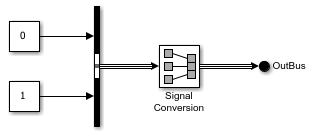
To create a contiguous copy of the input to a Signal
Conversion block, set the Output block
parameter to Signal copy. In this example, the
block input is a virtual bus. The block output is a contiguous copy of that
bus.
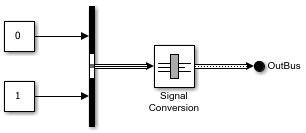
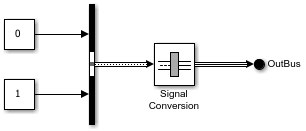
To convert a nonvirtual bus to a virtual bus, use a Signal
Conversion block. Connect a nonvirtual bus to the block input
port. Then, set the Output block parameter to
Virtual bus.
Ports
Input
Output
Parameters
To edit block parameters interactively, use the Property Inspector. From the Simulink® Toolstrip, on the Simulation tab, in the Prepare gallery, select Property Inspector.
Specify the type of conversion to perform.
Signal copy— Create a contiguous copy of the input signal. This value is the default value for the Signal Conversion and Signal Copy blocks.Virtual bus— Convert a nonvirtual bus to a virtual bus. This value is the default value for the To Virtual Bus block.Nonvirtual bus— Convert a virtual bus to a nonvirtual bus. This value is the default value for the To Nonvirtual Bus block.
For the Signal copy option, the type of input determines how
the block makes the copy.
For example, suppose the block receives a mux signal, which has elements that occupy discontiguous areas of memory. The conversion allocates a contiguous area of memory for the elements of the mux signal and copies the values from the discontiguous areas represented by the block input to the contiguous areas represented by the block output at each time step. The output is a vector with elements that occupy contiguous areas of memory.
The type of conversion that you use depends on your modeling goal.
| Modeling Goal | Option |
|---|---|
Reduce generated code for a muxed signal. For an example involving Simulink Coder™ software, see Generate Reentrant Code from Subsystems (Simulink Coder). | Signal copy |
Connect a block with a constant sample time to an output port of an enabled subsystem. | Signal copy |
Save memory by converting a nonvirtual bus to a virtual bus. | Virtual bus |
Pass a virtual bus to a modeling construct that requires a nonvirtual bus. | Nonvirtual bus |
Create a copy of an array of buses. The block cannot convert an array of buses to a nonvirtual or virtual bus. To extract a bus from an array of buses, use a Selector block. | Signal copy |
Programmatic Use
To set the block parameter value programmatically, use
the set_param function.
| Parameter: | ConversionOutput |
| Values: | 'Signal copy' (default) | 'Virtual bus' | 'Nonvirtual bus' |
Example: set_param(gcb,'ConversionOutput','Virtual
bus')
Specify the output data type of the nonvirtual bus that this block produces.
Inherit: auto— Inherit the data type from an upstream block. For example, inherit theSimulink.Busobject data type from an upstream Bus Creator block.Bus: <object name>or<data type expression>— Specify aSimulink.Busobject that matches the hierarchy of the input bus. If an upstream Bus Creator block specifies a bus object, specify the same bus object.
The Data Type Assistant helps you set data
attributes. To use the Data Type Assistant, click  . For more information, see Specify Data Types Using Data Type Assistant.
Dependencies
To enable this parameter, set Output to Nonvirtual
bus.
Programmatic Use
To set the block parameter value programmatically, use
the set_param function.
| Parameter: | OutDataTypeStr |
| Values: | 'Inherit: auto' (default) | 'Bus: <object name>' | '<data type expression>' |
Example: set_param(gcb,'OutDataTypeStr','Bus:
myBusObj')
When the elements of the input signal occupy contiguous areas of memory, by default, the software eliminates this block from the compiled model as an optimization. For more information, see Block reduction.
To prevent this block from being eliminated from the compiled model, select this parameter.
Changes to this parameter take effect the next time you compile the model.
Dependencies
To enable this parameter, set Output
to Signal copy.
Programmatic Use
To set the block parameter value programmatically, use
the set_param function.
| Parameter: | OverrideOpt |
| Values: | 'off' (default) | 'on' |
Example: set_param(gcb,'OverrideOpt','on')
Block Characteristics
Data Types |
|
Direct Feedthrough |
|
Multidimensional Signals |
|
Variable-Size Signals |
|
Zero-Crossing Detection |
|

