Target Object 属性
R2026bslrealtime 用于配置和状态的对象属性
利用这些属性,您可以配置 Target 对象并监控目标计算机的状态。
配置
TargetOptions 属性包含一个 TargetOptions 结构,该结构包含 restApiServerPort、supportHttps、sslCertificateFilePath、sslPrivateKeyFilePath 和 useNetrc 这几个字段。要查看 TargetOptions,在 MATLAB 命令行窗口中输入:
tg.TargetOptions
ans =

  TargetOptions with properties:

         restApiServerPort: 8080
              supportHttps: 0
    sslCertificateFilePath: ''
     sslPrivateKeyFilePath: ''
                  useNetrc: 1
有关如何使用 restApiServerPort、supportHttps、sslCertificateFilePath 和 sslPrivateKeyFilePath 的信息,请参阅 setupTLSCertificate。useNetrc 的值用于指定是否启用 (true) 或禁用 (false) 使用 .netrc 文件进行身份验证。禁用后,目标计算机上的 .netrc 文件将被删除。启用此功能后,系统将在下次连接目标计算机或对目标计算机进行更新时创建或更新 .netrc 文件。
Instruments 属性包含一个 Instruments 结构体,该结构体包含 ForSDI、ForMATLAB 和 ForFileLog 这三个字段。要查看 Instruments,在 MATLAB 命令行窗口中输入:
tg.Instruments
Instruments added to target computer 'TargetPC1':
    ForSDI
        <EMPTY>

    ForMATLAB
        <EMPTY>

    ForFileLog
        <EMPTY>
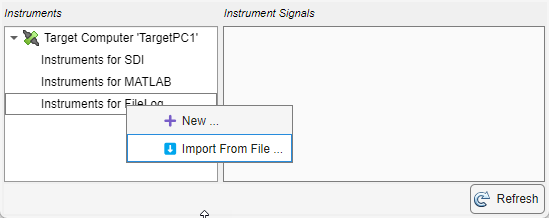
您可以使用 Instrument Viewer App 查看、创建或删除目标计算机上的仪表。创建仪表时,您可以向该仪表添加信号。使用命令 view(tg.Instruments) 打开该 App,其中 tg 是目标计算机的名称。使用 App 中的按钮或上下文菜单来查看、创建或删除仪表。
TargetSettings 属性包含一个 TargetSettings 结构体,该结构体包含 name、address、sshPort、xcpPort、username、userPassword 和 rootPassword 这些字段。要查看 TargetSettings,在 MATLAB 命令行窗口中输入:
tg.TargetSettings
ans =

  TargetSettings with properties:

            name: 'TargetPC1'
         address: '192.168.7.5'
         sshPort: 22
         xcpPort: 5555
        username: 'slrt'
    userPassword: 'slrt'
    rootPassword: 'root'
SDIRunId 属性存储了当前仿真运行的“仿真数据检查器”运行标识符。要查看 SDIRunId,在 MATLAB 命令行窗口中输入:
tg.SDIRunId
ans =

  int32

   22110
ptpd 属性包含一个 PTPControl 结构体,该结构体包含 Command 和 AutoStart 两个字段。有关详细信息,请参阅 Target.ptpd 对象。要查看 TargetSettings,在 MATLAB 命令行窗口中输入:
tg.ptpd
ans =

  PTPControl with properties:

      Command: 'ptpd -L -K -g'
    AutoStart: 1
Stimulation 属性可用于访问 Target.Stimulation 对象。要查看 Stimulation,在 MATLAB 命令行窗口中输入:
tg.Stimulation
ans =

  StimulationControl with no properties.
状态
版本历史记录
在 R2020b 中推出

