Define State Behavior by Using Actions
R2026bUse state actions to define behavior at points in the execution of a state. Actions specify what happens when a state activates, while it is active, and when it deactivates.
State Action Types
There are four types of state actions in Stateflow:
Entry actions execute when a state becomes active, before any during actions. Use these actions for initialization tasks or one-time setup operations.
During actions execute while a state remains active. During actions execute at each time step or each time step that an event triggers the chart.
Exit actions execute once when a state becomes inactive, after any during actions and before the entry action of the next state.
On actions execute when events occur while the state is active.
To add a state action, enter the type of the action, a colon, and the action to take.
Entry actions (
entry:oren:)During actions (
during:ordu:)Exit actions (
exit:orex:)On actions (
on:)
You can combine any action type to perform the same action at different stages of execution. For example:
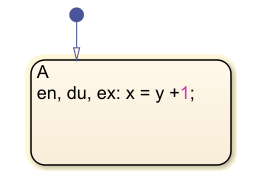
In this Stateflow® chart, x = y + 1; for every stage of state
execution.
State Action Execution Order
When you add multiple actions of the same type to a state, they execute from top to bottom. For each action type, statements execute in sequence.
States execute combined actions in the same order as they execute separate actions:
Entryactions, from top to bottom in the order they appear in the stateDuringactions, from top to bottomExitactions, from top to bottom
The order in which you combine actions does not affect state execution behavior. For example:
| Combined Actions | Order of Execution |
|---|---|
|
|
|
|
|
|
|
|
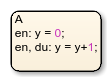

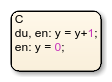
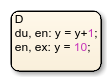
Operations with State Actions
You can perform a variety of actions in state actions, including assignment operations, function calls, string manipulation, and actions that broadcast events, trigger at specific times, or trigger based on state activity or due to threshold crossings.
Assignment Operations
Assignment operations that assign values to data variables, including simple assignments (=), arithmetic operations (+, -, *, /), and, in charts that use C as the action language, compound assignments (+=, -=, *=, /=). Use these operations to update state variables, counters, and flags based on conditions or events. For more information, see Supported Symbols in Actions.
Function Calls
Function calls are calls to graphical functions, MATLAB functions, C library functions, or custom functions that perform specific tasks. Use function calls to write complex logic, perform calculations, and reuse logic across different parts of your state machine. For more information, see Reuse Logic Patterns by Defining Graphical Functions.
Event Operators
Event operators broadcast events, check for event occurrences, or handle event-based logic. Use these operators to communication between states and synchronize parallel activities in the chart. For more information, see Use Events to Execute Charts.
Temporal Logic Operators
Temporal operators like after, before,
at, every, and duration control
behavior based on time or event counts. Use these operators to implement delays, timeouts,
periodic actions, and to monitor conditions over specified time periods. For more
information, see Control Chart Execution by Using Temporal Logic.
State Activity Operators
State activity operators trigger based on the activity of the state. The
in operator triggers based on the status of a state, and the
enter and exit operators trigger when a chart
enters or exits a state. Use these operators to create behaviors that depend on which
states are currently active in the system. For more information, see enter, exit, and in.
Change and Edge Detection Operators
The hasChanged, hasChangedTo,
hasChangedFrom, rising,
falling, and crossing operators detect changes in
data values or threshold crossings. Use these operators to create behaviors that react to
changes in input signals or internal variables. For more information, see Detect Changes in Data and Expression Values.
String Manipulation
String manipulation operators modify strings. For example, you can use
strcmp to compare strings, strcat to concatenate
them, or str2double to convert strings to the double data type. Use
these operators to process text-based data and create readable outputs. For more
information, see Manage Textual Information by Using Strings.

