Implement Parallel States
R2026bUse parallel (AND) states to enable multiple states to be active in a parent state. When a parent state with parallel decomposition becomes active, all of the child states activate simultaneously. These states differ from exclusive (OR) states, where only one child state can be active at any time. For more information about exclusive states, see Create Hierarchical State Structures.
Create Parallel States
To create parallel states in your Stateflow chart:
Add a parent state to contain your parallel states.
Set the state decomposition property of the parent state to Parallel (AND). In the Modeling tab, select Decomposition > Parallel (AND).
Add child states inside the parent state.
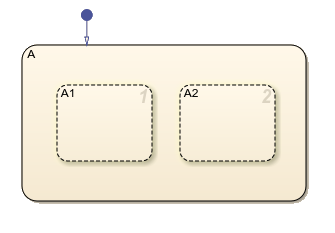
The child states appear with a dashed line, which indicates that they execute simultaneously.
Control Execution Order
Although parallel states are active simultaneously, the chart executes them in a specific sequence. The numbers in the top-right corner of each state indicate its execution order. This execution order is important when states share data or need to coordinate actions.
To control the execution order of parallel states, first select a child state. In the State tab, under Decomposition, use the Execution Order drop-down menu to change the order. Changing the execution order for states may affect the behavior of events and data updates.
For example, if state A1 sets a value that state
A2 reads, set the execution order so that state A1
executes before state A2.
Communicate Between Parallel States
When you share information or coordinate state actions between parallel states, use variables that are accessible by all parallel states. Execution order is important when states both read and write to the same variables.
Broadcast Events
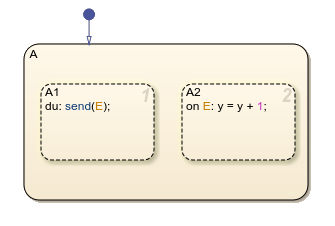
Broadcast events from one state to trigger actions in other states by using the
send function.
Check State Activity
Use the in operator to check if another state is active. For more
information, see Check State Activity by Using the in Operator.
Synchronize with Temporal Logic
Synchronize parallel states based on time or event counts using temporal logic
operators like after, every, and temporalCount.
Patterns for Parallel State Design
When creating charts that use parallel state execution, consider using these common modeling patterns.
Supervisor-Worker Pattern
Create a supervisor state that controls or monitors worker states. The supervisor state can broadcast events or set data that influences the behavior of the worker states.
Producer-Consumer Pattern
One state produces data or events that another state consumes. The producer state sets values or broadcasts events, and the consumer state responds to those events or reads the shared data.
Components
Model subsystems that operate separately, but coordinate at points. Each parallel state represents a component of the system.

