DataFlash Log
R2026bLog input signals to ArduPilot DataFlash log (.bin) format on
the SD card
Since R2026b
DataFlash Log block
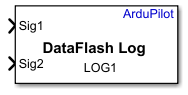
To add a block to a model, double-click the canvas and start typing the block name. Then, select the block from the list.
Libraries:
UAV Toolbox Support Package for ArduPilot Autopilots /
Utility Blocks
Description
Add-On Required: This feature requires the UAV Toolbox Support Package for ArduPilot Autopilots add-on.
The DataFlash Log block logs input signals to the ArduPilot DataFlash log
(.bin) format on the SD card. Specify the name of the log message and use
the Signal selection table to add or remove input signals.
Each input signal corresponds to a field in the DataFlash log
message. The block automatically prepends a timestamp (TimeUS) to each
log entry and writes the input signal values to the SD card at each time step. You can
review the logged data after flight by using ArduPilot log analysis tools such as Mission
Planner, MAVExplorer, or the Flight Log Analyzer app in UAV Toolbox.
This block supports both ArduCopter and ArduPlane vehicle types.
Ports
Input
Parameters
Specify the name of the log message. This name identifies the log message in
the DataFlash log file (.bin) on the SD card.
Programmatic Use
To set the block parameter value programmatically, use
the set_param (Simulink) function.
| Parameter: | messageNameMask |
| Values: | character vector |
| Data Types: | char |
To change the message name programmatically, use
set_param with the full block path. The block path includes
the model name and subsystem hierarchy leading to the block.
% Specify the full path to the DataFlash Log block
blockPath = "DataFlashLog/Enabled Subsystem/DataFlash Log";

% Change the message name to MYLOG
set_param(blockPath, "messageNameMask", "MYLOG");
Note
Use the block path (for example,
"ModelName/Subsystem/BlockName"), not the model name
alone. You can find the block path by right-clicking the block in the canvas
and selecting Properties, or by using
gcb after selecting the block.
Specify the signals to log in the DataFlash log message. The Signal
selection table lists the signal names associated with each input
port. By default, the block has two signals (Sig1 and
Sig2).
You can add more signals up to a maximum of 15 signals. The
block requires at least one signal.
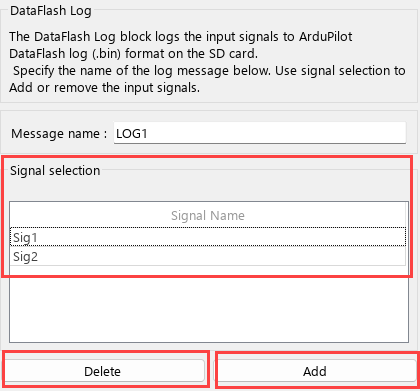
Click Add to add a new signal and Delete to remove a selected signal. Each signal name in the table corresponds to an input port on the block.
Programmatic Use
To set the block parameter value programmatically, use
the set_param (Simulink) function.
| Parameter: | signalTableMask |
| Values: | character vector |
| Data Types: | char |
To change the signal selection programmatically, use
set_param with the full block path (not the model handle).
The block path includes the model name and the subsystem hierarchy leading to
the block.
% Specify the full path to the DataFlash Log block
blockPath = "DataFlashLog/Enabled Subsystem/DataFlash Log";

% Update the signal names
set_param(blockPath, "signalTableMask", "Altitude,Speed,Heading");
Version History
Introduced in R2026b

