Validate RC Trim and Failsafe Parameters Using Read and Write Parameter Blocks
R2026bThis example shows how to use the Read Parameter, Write Parameter, and RC Receive blocks in the UAV Toolbox Support Package for ArduPilot® Autopilots to validate RC trim and throttle failsafe parameter settings on ArduPilot-compatible flight controller hardware.
The example writes RC trim and failsafe parameter values to the flight controller, reads back selected parameter values, and monitors RC input values from the transmitter. You can use this workflow to verify that ArduPilot parameter updates are applied correctly before using the configured RC input in a control algorithm.
The model in this example performs these tasks:
Initializes selected ArduPilot parameters to known values.
Writes trim values for RC channels during simulation.
Reads back RC trim parameters from the flight controller.
Monitors RC channel values and failsafe status using the RC Receive block.
Restores selected parameters when the simulation terminates.
The RC Receive block reads raw RC channel data from an RC transmitter and can output failsafe status and channel data for selected channels.
Prerequisites
Before you begin:
If you are new to Simulink, watch the Simulink Quick Start video.
If you have not done so already, complete the steps in Install UAV Toolbox Support Package for ArduPilot Autopilots in Windows.
Install and configure Mission Planner for hardware calibration and parameter verification.
Bind the RC transmitter and receiver.
Calibrate the RC transmitter in Mission Planner before running the model.
Required Hardware
This example requires:
ArduPilot-compatible flight controller. This example uses Pixhawk® 6x.
USB cable to connect the flight controller to the host computer.
RC transmitter.
RC receiver compatible with ArduPilot.
Battery or external power source, if required by your hardware setup.
Open the Example Model
Open the apReadWriteParameter.slx model.
modelName = "apReadWriteParameter";
open_system(modelName)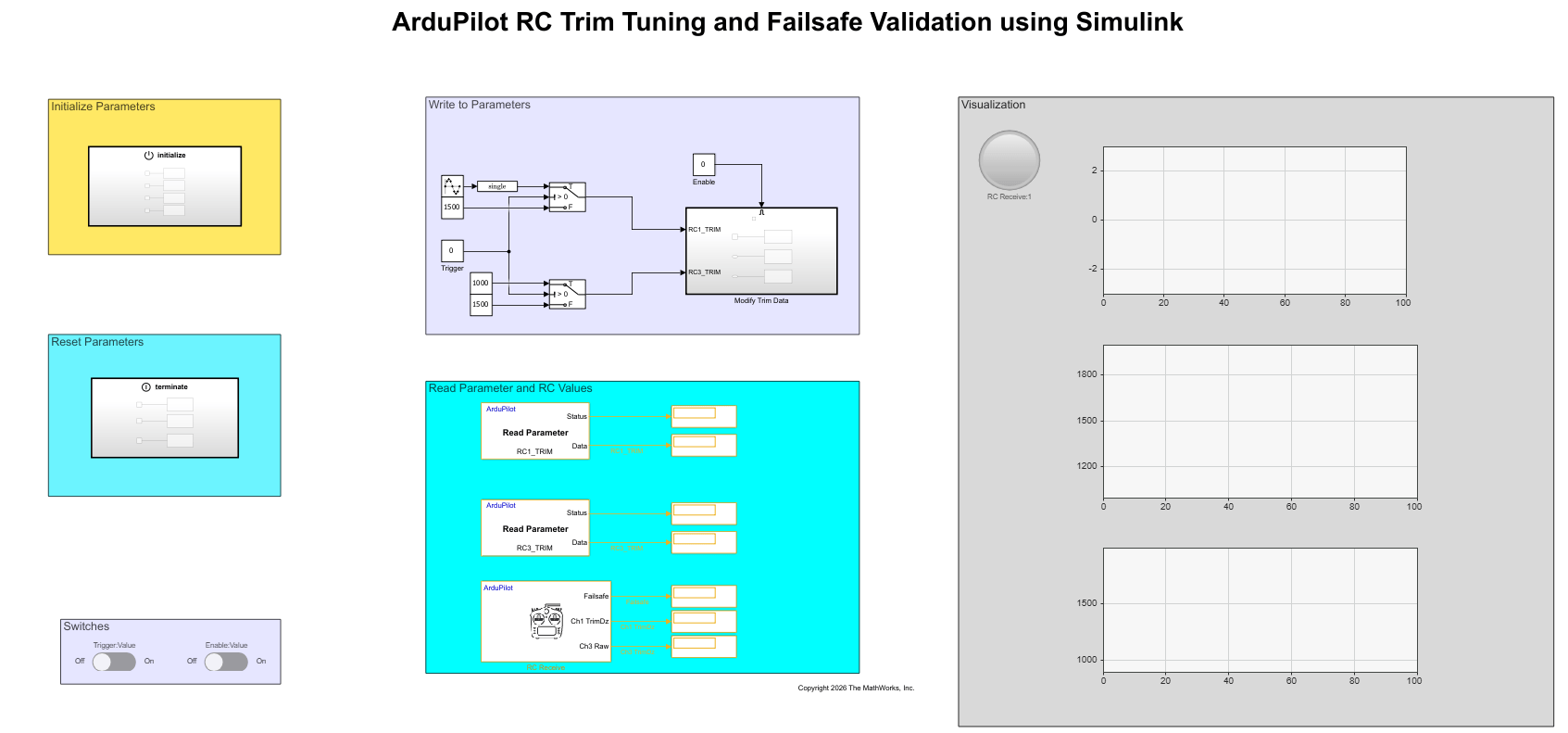
The model contains these main areas:
Initialize Parameters — Writes initial parameter values when simulation starts.
Write to Parameters — Updates RC trim parameters during simulation.
Read Parameter and RC Values — Reads parameter values and RC input data from the flight controller.
Reset Parameters — Restores selected parameter values when simulation terminates.
Switches — Provides controls to trigger parameter changes and enable writes.
Visualization — Displays RC input and parameter values.
Model Overview
The model uses these ArduPilot blocks:
Write Parameter block to write values to ArduPilot parameters.
Read Parameter block to read current ArduPilot parameter values.
RC Receive block to read RC channel values and failsafe status from the flight controller.
Initialize Parameters
The Initialize Parameters section contains an Initialize Function subsystem. The subsystem runs when the model starts and writes known values to selected ArduPilot parameters.
Based on the uploaded model image, the Initialize Function subsystem writes these parameter values:
Parameter | Value | Purpose |
|---|---|---|
|
| Disables throttle failsafe during initialization. |
|
| Sets the throttle failsafe PWM threshold. |
|
| Sets the minimum PWM value for RC channel 1. |
|
| Sets the maximum PWM value for RC channel 1. |
Write to Parameters
The Write to Parameters section updates RC trim values by using Write Parameter blocks.
The model writes values to these parameters:
Parameter | Description |
|---|---|
| Trim value for RC channel 1. |
| Trim value for RC channel 3. |
The Trigger/Value and Enable/Value switches control when the model writes the parameter values. When the write operation is enabled, the model sends updated trim values to the flight controller.
In the uploaded model, the write logic uses these values:
RC1_TRIM: switches between values such as1500and another configured trim value.RC3_TRIM: switches between values such as1000and1500.
Use this part of the model to validate that parameter updates from Simulink are written to the ArduPilot flight controller.
Read Parameter and RC Values
The Read Parameter and RC Values section reads parameter and RC input values from the flight controller.
This section contains:
A Read Parameter block for
RC1_TRIM.A Read Parameter block for
RC3_TRIM.An RC Receive block that outputs:
Failsafe status
RC channel 1 trim or raw value
RC channel 3 raw value
The Read Parameter blocks output both the parameter data and status. Use the status output to verify whether the parameter read operation completed successfully.
The RC Receive block provides live RC input data from the transmitter. Use this output to compare configured trim values with the values received from the flight controller.
Reset Parameters
The Reset Parameters section contains a Terminate Function subsystem. The subsystem runs when simulation stops and restores selected parameters to default or safe values.
Based on the uploaded model image, the Terminate Function subsystem writes these values:
Parameter | Value | Purpose |
|---|---|---|
|
| Restores RC channel 1 trim. |
|
| Restores RC channel 3 trim. |
|
| Disables throttle failsafe after validation. |
This reset step prevents the validation workflow from leaving modified trim or failsafe settings on the flight controller.
Monitor and Tune RC Parameters
Connect the Pixhawk flight controller to your computer using a USB cable.
Power on the RC transmitter and confirm that the receiver is bound.
In Simulink, on the Hardware tab, in the Mode section, click Run on board, click the drop-down and select Run on board (External mode). If you see Connected IO selected instead of Run on board, click on it and choose Run on board (External mode)
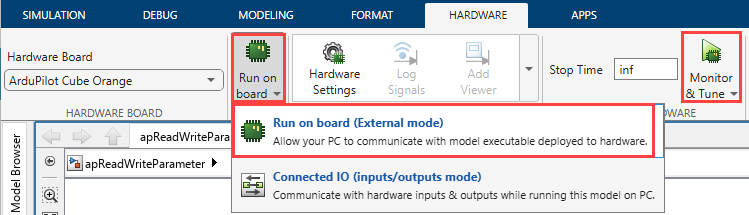
4. Click Monitor & Tune to deploy the model and start parameter communication with the flight controller.
Note: Wait for the model to initialize and for all Write Parameter blocks in the Initialize Function to complete before interacting with the switches.
5. Toggle the Enable:Value switch to On.
6. To write new trim values, toggle the Trigger:Value switch to On.
7. Observe the Visualization scopes to confirm that:
The
RC1_TRIMandRC3_TRIMRead Parameter outputs update to match the written values.The RC Receive block shows the updated channel data reflecting the new trim configuration.
8. Toggle the switches back to Off and stop the simulation. The Terminate Function automatically restores the default parameter values.
Validate the Results
Use these checks to validate the parameter configuration.Check RC Trim Parameter Readback
Verify that the displayed values for RC1_TRIM and RC3_TRIM match the values written by the model.
For example:
If the model writes
1500toRC1_TRIM, the readback display forRC1_TRIMmust show1500.If the model writes
1000toRC3_TRIM, the readback display forRC3_TRIMmust show1000.
Check RC Channel Values
Move the RC transmitter sticks and verify that the RC channel values change in the visualization area.
The displayed RC values must respond to transmitter movement. If the values do not change, verify the RC receiver connection and transmitter binding.Check Failsafe Status
Turn off the RC transmitter only if your test setup is safe and the vehicle is not armed.
Verify that the failsafe output from the RC Receive block changes when the transmitter signal is lost.
Note: Perform failsafe validation only in a safe bench-test setup. Do not arm the vehicle while validating parameter write, readback, or failsafe behavior.
Restore Parameters
When the simulation stops, the Terminate Function subsystem restores selected parameters.
To manually verify the restored values, read the parameters in Mission Planner or run the model again and observe the readback displays.
Confirm that:
RC1_TRIMis restored to1500.RC3_TRIMis restored to1000.FS_THR_ENABLEis restored to0.
Other Things to Try
Modify Trim Values for Additional Channels: Extend the model to write and validate trim parameters for other RC channels such as
RC2_TRIMorRC4_TRIM. Observe how the updated trim values affect the corresponding RC channel outputs.Enable and Test Throttle Failsafe Behavior: Set
FS_THR_ENABLEto enable failsafe and varyFS_THR_VALUE. Turn off the RC transmitter (in a safe setup) and observe changes in the failsafe output from the RC Receive block.

