Video Stabilization
R2026bThis example shows how to remove the effect of camera motion from a video stream.
Introduction
In this example we first define the target to track. In this case, it is the back of a car and the license plate. We also establish a dynamic search region, whose position is determined by the last known target location. We then search for the target only within this search region, which reduces the number of computations required to find the target. In each subsequent video frame, we determine how much the target has moved relative to the previous frame. We use this information to remove unwanted translational camera motions and generate a stabilized video.
Initialization
Create a System object™ to read video from a multimedia file. We set the output to be of intensity only video.
% Input video file which needs to be stabilized.
filename = "shaky_car.avi";

hVideoSource = VideoReader(filename);
Create a template matcher System object to compute the location of the best match of the target in the video frame. We use this location to find translation between successive video frames.
hTM = vision.TemplateMatcher("ROIInputPort", true, ...
                            "BestMatchNeighborhoodOutputPort", true);
Create a System object to display the original video and the stabilized video.
hVideoOut = vision.VideoPlayer("Name", "Video Stabilization");
hVideoOut.Position(1) = round(0.4*hVideoOut.Position(1));
hVideoOut.Position(2) = round(1.5*(hVideoOut.Position(2)));
hVideoOut.Position(3:4) = [650 350];
Here we initialize some variables used in the processing loop.
pos.template_orig = [109 100]; % [x y] upper left corner
pos.template_size = [22 18];   % [width height]
pos.search_border = [15 10];   % max horizontal and vertical displacement
pos.template_center = floor((pos.template_size-1)/2);
pos.template_center_pos = (pos.template_orig + pos.template_center - 1);
W = hVideoSource.Width; % Width in pixels
H = hVideoSource.Height; % Height in pixels
BorderCols = [1:pos.search_border(1)+4 W-pos.search_border(1)+4:W];
BorderRows = [1:pos.search_border(2)+4 H-pos.search_border(2)+4:H];
sz = [W, H];
TargetRowIndices = ...
  pos.template_orig(2)-1:pos.template_orig(2)+pos.template_size(2)-2;
TargetColIndices = ...
  pos.template_orig(1)-1:pos.template_orig(1)+pos.template_size(1)-2;
SearchRegion = pos.template_orig - pos.search_border - 1;
Offset = [0 0];
Target = zeros(18,22);
firstTime = true;
Stream Processing Loop
This is the main processing loop which uses the objects we instantiated above to stabilize the input video.
while hasFrame(hVideoSource)
    input = im2gray(im2double(readFrame(hVideoSource)));

    % Find location of Target in the input video frame
    if firstTime
      Idx = int32(pos.template_center_pos);
      MotionVector = [0 0];
      firstTime = false;
    else
      IdxPrev = Idx;

      ROI = [SearchRegion, pos.template_size+2*pos.search_border];
      Idx = hTM(input,Target,ROI);

      MotionVector = double(Idx-IdxPrev);
    end

    [Offset, SearchRegion] = updatesearch(sz, MotionVector, ...
        SearchRegion, Offset, pos);

    % Translate video frame to offset the camera motion
    Stabilized = imtranslate(input, Offset, "linear");

    Target = Stabilized(TargetRowIndices, TargetColIndices);

    % Add black border for display
    Stabilized(:, BorderCols) = 0;
    Stabilized(BorderRows, :) = 0;

    TargetRect = [pos.template_orig-Offset, pos.template_size];
    SearchRegionRect = [SearchRegion, pos.template_size + 2*pos.search_border];

    % Draw rectangles on input to show target and search region
    input = insertShape(input, "rectangle", [TargetRect; SearchRegionRect],...
                        "Color", "white");
    % Display the offset (displacement) values on the input image
    txt = sprintf("(%+05.1f,%+05.1f)", Offset);
    input = insertText(input(:,:,1),[191 215],txt,"FontSize",16, ...
                    "TextColor", "white", "BoxOpacity", 0);
    % Display video
    hVideoOut([input(:,:,1) Stabilized]);
end
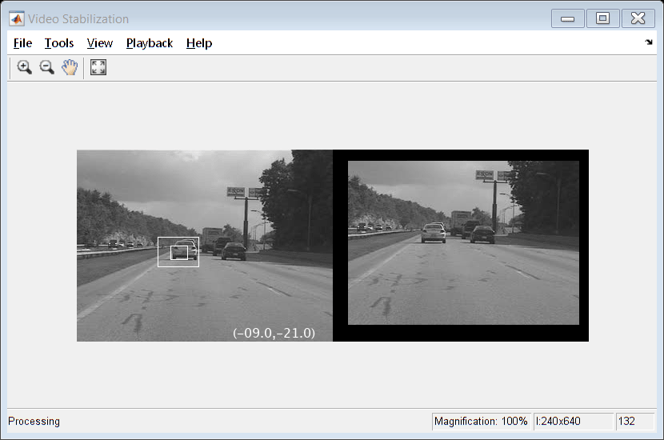
Conclusion
Using the Computer Vision Toolbox™ functionality from MATLAB® command line it is easy to implement complex systems like video stabilization.
Appendix
The following helper function is used in this example.

