YOLO Postprocessing
R2026bCalculates bounding boxes and scores from deep learning network output
Since R2026b
YOLO Postprocessing block
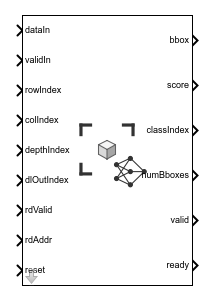
To add a block to a model, double-click the canvas and start typing the block name. Then, select the block from the list.
Libraries:
Vision HDL Toolbox /
DL Postprocessing
Description
The YOLO Postprocessing block accepts reformatted streaming input from a deep learning processor and identifies the best bounding boxes. It returns bounding box coordinates, scores, and class indexes. The block performs non-maximal suppression (NMS) to select the best results. This block supports HDL code generation and allows you to include postprocessing steps on an FPGA.
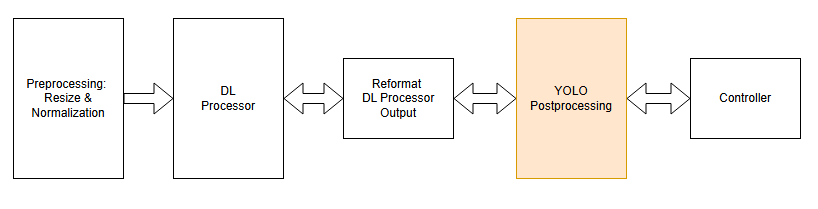
The diagram shows the postprocessing operation in context of a deep learning (DL) object detection system. First, input images are resized and normalized. Then a deep learning processor detects features. The Reformat DL Processor Output step reads the network results from memory and converts them to a stream of formatted detections. The YOLO postprocessing operation processes the output detections to select the best bounding boxes and the Controller reads the postprocessing results.
The block requires a trained deep learning network to define the protocol and expectations for the input detections. Use the network objects from the Deep Learning Toolbox™ product to provide information about your network to the block.
The input ports of this block are designed to connect to the output ports of the Deep Learning HDL Output Format block, which implements the Reformat DL Processor Output step in the diagram. For more information about this interface, see the Deep Learning HDL Output Format (Deep Learning HDL Toolbox) block reference page.
This waveform shows the output signals and reading the results of the postprocessing. The
block sets the rdReady signal to true when
postprocessing is complete. The numBboxes output indicates how many
bounding boxes met the thresholds. The controller then uses the rdAddr
and rdValid signals to read out the bounding box coordinates, and
optionally their scores and class indexes. After the results are read, the controller resets
the postprocessing block.

Examples
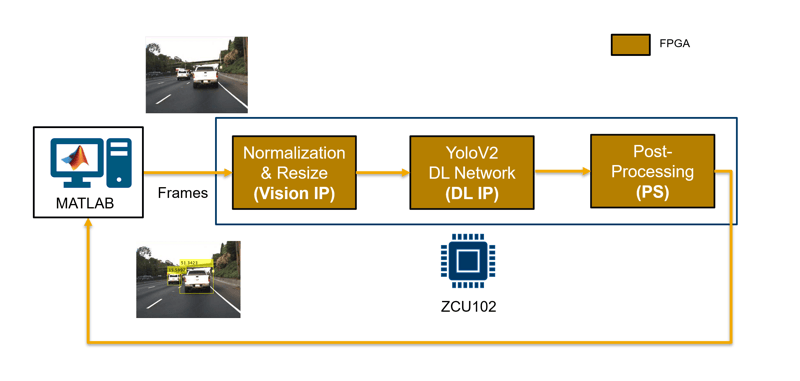
Deploy and Verify YOLO Object Detector Postprocessing on FPGA
Deploy a you-only-look-once (YOLO) object detector with preprocessing, deep learning (DL) IP, and postprocessing on an FPGA, and verify the design.
Ports
Input
Output
Parameters
Tips
When you target this block to an FPGA, in HDL Workflow Advisor step 1.2, select the
Deep Learning with Preprocessing InterfaceorRGB with DL Processorreference design. For a targeting example, see Deploy and Verify YOLO Object Detector Postprocessing on FPGA. For more information on the reference designs, see Target Deep Learning Processor and Image Preprocessing to FPGA (SoC Blockset), and Deep Learning Processing of Live Video (SoC Blockset).
Algorithms
This diagram shows a high level view of the postprocessing steps.
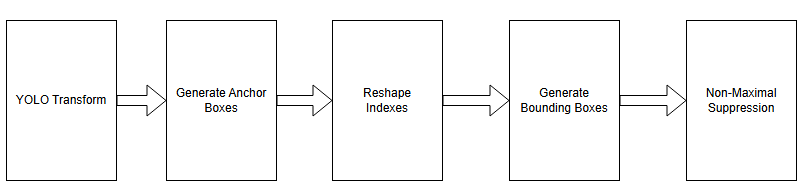
The YOLO Transform step applies sigmoid and exp
activations to convert the processor output into a confidence score, [x, y, width,
height] coordinates relative to an anchor box, and a class probability for each
detection. The Generate Anchor Boxes step converts the relative coordinates to bounding box
coordinates. The Reshape Indices step reshapes the detection metrics so the algorithm can
combine and compare detections from different detection heads. The Generate Bounding
Boxes step applies the confidence threshold to select the strongest boxes. The Non-Maximal
Suppression step calculates the intersection-over-union (IOU) for overlapping boxes.
IOU is the areaOfIntersection/areaOfUnion. To select
the strongest boxes, NMS compares the IOU against the overlap threshold, similar to the
Computer Vision Toolbox™
selectStrongestBbox (Computer Vision Toolbox) function.
Extended Capabilities
Version History
Introduced in R2026b
See Also
Deep Learning HDL Output Format (Deep Learning HDL Toolbox)

