主要内容

networkTrafficFTPModel1

R2026b

Generate FTP model 1 application traffic pattern

Since R2026b

Description

Use the networkTrafficFTPModel1 object to configure bursty, non-full buffer traffic in wireless networks. This object implements the file transfer protocol (FTP) traffic model 1, as defined in TR 36.814 Section A.2.1.3.1 [1]. This figure illustrates the FTP model 1 application traffic pattern, which represents per-cell traffic.
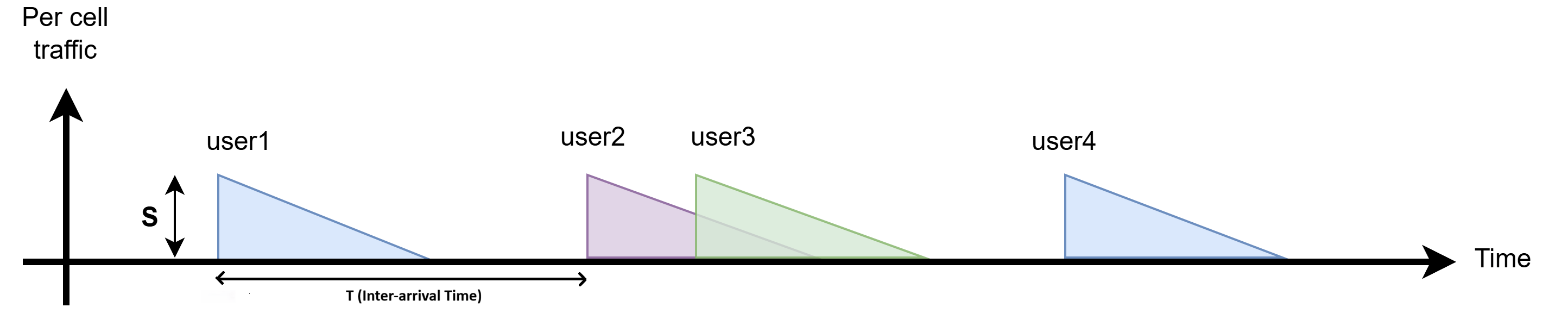
FTP Model 1 application traffic pattern

In FTP Model 1, each user handles one file transfer session at a time, though sessions for different users can overlap in time. Each session transfers a file of size S. The networkTrafficFTPModel1 object generates and distributes file transfer sessions using these steps:

  1. Generate N file transfer start times using a Poisson arrival process with rate parameter λ (UserArrivalRate).

  2. Distribute the N file transfer start times to M users (numUsersInCell).

    1. Generate a random order of M users.

    2. Assign file transfer start times to users following this random order.

    3. When N > M, repeat the assignment using the same random order from step 2a.

    4. Continue until all N file transfer start times have been assigned. In the final round, if fewer than M start times remain, assign them to the corresponding number of users.

Since the wireless network simulator (wirelessNetworkSimulator) fixes the number of users at simulation start, the networkTrafficFTPModel1 object reuses the same users across multiple file transfer sessions. To minimize overlapping sessions for the same users, the value of numUsersInCell must be greater than the value of UserArrivalRate.

For an example of how to simulate FTP Model 1, see the Simulate FTP Model 1 Traffic in 5G Network (5G Toolbox) example.

Creation

Description

ftpModels = networkTrafficFTPModel1(numUsersInCell,simulationTime) creates a 1-by-numUsersInCell vector of networkTrafficFTPModel1 objects. Each element represents an FTP traffic object associated with an individual user in the cell. The numUsersInCell argument specifies the number of users present in the cell and the simulationTime argument sets the total duration of the simulation (in seconds).

ftpModels = networkTrafficFTPModel1(numUsersInCell,simulationTime,PropertyName=Value) sets properties using one or more name-value arguments.

example

Note

networkTrafficFTPModel1 assigns file transfer sessions to each of the M (numUsersInCell) traffic objects in ftpModels from the N cell-level file transfer start times generated by a Poisson process. The generate function of each object independently generates packets for its assigned file transfers.

Input Arguments

expand all

Number of users in a cell, specified as a positive integer. This argument specifies the number of FTP traffic objects in ftpModels. Each FTP traffic object corresponds to an individual user.

A call must contain al least two users, as outlined in 3GPP R1-2507956.

Data Types: double

Simulation duration, specified as a positive scalar. This value specifies the duration over which the networkTrafficFTPModel1 object initiates file transfer sessions. Units are in seconds.

Data Types: double

Output Arguments

expand all

FTP traffic objects, returned as a 1-by-numUsersInCell vector of networkTrafficFTPModel1 objects. Each FTP traffic object is associated with an individual user in the cell.

Properties

expand all

This property is read-only after object creation.

Size of each file transfer, specified as a positive scalar. Units are in megabytes.

The default value of FileSize is the highest standard file size value listed for long term evolution (LTE) in TR 36.814 Section A.2.1.3.1

Data Types: double

This property is read-only after object creation.

User arrival rate in a cell, specified as a positive scalar. This value acts as the rate parameter (λ) of a Poisson process.

The networkTrafficFTPModel1 object generates file transfer start times such that the inter-arrival times are independent and identically distributed exponential random variables with rate parameter λ, resulting in a Poisson arrival process.

With the default UserArrivalRate of 2.5, all users in the cell collectively generate file transfers at an average rate of 2.5 files per second. The corresponding mean inter-arrival time is 400 ms (1/λ).

The default value of UserArrivalRate is the highest standard file size value listed for long term evolution (LTE) in TR 36.814 Section A.2.1.3.1

Data Types: double

This property is read-only after object creation.

Data payload for packet generation, specified as a column vector of integers in the range [0, 255]. The networkTrafficFTPModel1 object reuses the specified data payload for all packets across all file transfers for each user. It automatically truncates or zero-pads the input to exactly 1500 bytes, and uses this fixed payload to fill packet contents during file transfer. The payload remains unchanged throughout the simulation.

Note that the object uses a fixed packet size of1500 bytes, consisting of 1460 bytes of payload and 40 bytes of transmission control protocol/internet protocol (TCP/IP) overhead. The last packet of each file might be smaller, depending on the remaining file data.

Data Types: double

Object Functions

expand all

generateGenerate next application traffic packet

Examples

collapse all

Use networkTrafficFTPModel1 object to simulate file transfer protocol (FTP) traffic model 1. You can observe the packet sizes for each file transfer and the inter-arrival times between files for each user.

Define the number of users and simulation time, and create FTP traffic model 1 objects with a file size of 3 KB and a user arrival rate of 1 user per second.

rng("default")                 % Reset the random number generator
numUsers = 3;                  % Number of users in the cell
simTime = 7;                   % Simulation time
ftpModels = networkTrafficFTPModel1(numUsers,simTime, ...
    FileSize=0.003,UserArrivalRate=1);

Display the FTP traffic object that corresponds to the first user.

ftpUser1 = ftpModels(1)
ftpUser1 = 
  networkTrafficFTPModel1 with properties:

   Read-only properties:
     NumUsersInCell: 3
     SimulationTime: 7
           FileSize: 0.0030
    UserArrivalRate: 1
    ApplicationData: [1500×1 double]

Generate traffic for each user.

for userID = 1:3
    fprintf('\n------- USER %d -------\n', userID)

    % Get user model
    ftpModel = ftpModels(userID);

    % Initialize tracking variables for this user
    fileCount = 0;       % Counts how many files have been processed
    packetCount = 0;     % Counts how many packets have been processed
    inFile = false;      % Keeps track of whether you are currently inside a file transfer
    elapsedTime = 0;     % Keeps track of the time that has passed

    while true
        % Generate next packet
        [dt,packetSize,~] = generate(ftpModel,elapsedTime);

        % Check if done
        if dt == Inf && packetSize == 0
            break
        end

        % Process packet if generated
        if packetSize > 0
            packetCount = packetCount + 1;

            % Detect start of new file
            if ~inFile
                fileCount = fileCount + 1;
                fprintf("\nFile %d:\n",fileCount)
                inFile = true;
            end

            % Show packet size only
            fprintf("Pkt %d: %d bytes\n",packetCount,packetSize)

            % Detect end of file
            if dt > 0 && dt < Inf
                % Show dt as next file arrival time
                fprintf("[Next file transfer starts in %.2f sec]\n",dt/1000)
                inFile = false;
                packetCount = 0;
            elseif dt == Inf
                % Last file - no more files
                fprintf("[Last file]\n")
                inFile = false;
            end
        end

        % Update elapsed time for next iteration
        elapsedTime = dt;
    end

    fprintf('\nUser %d downloaded %d files\n',userID,fileCount)
end
------- USER 1 -------
File 1:
Pkt 1: 1500 bytes
Pkt 2: 1500 bytes
Pkt 3: 120 bytes
[Next file transfer starts in 2.61 sec]
File 2:
Pkt 1: 1500 bytes
Pkt 2: 1500 bytes
Pkt 3: 120 bytes
[Last file]
Warning: Maximum simulation time reached, no traffic will be generated.
User 1 downloaded 2 files
------- USER 2 -------
File 1:
Pkt 1: 1500 bytes
Pkt 2: 1500 bytes
Pkt 3: 120 bytes
[Next file transfer starts in 2.88 sec]
File 2:
Pkt 1: 1500 bytes
Pkt 2: 1500 bytes
Pkt 3: 120 bytes
[Last file]
Warning: Maximum simulation time reached, no traffic will be generated.
User 2 downloaded 2 files
------- USER 3 -------
File 1:
Pkt 1: 1500 bytes
Pkt 2: 1500 bytes
Pkt 3: 120 bytes
[Next file transfer starts in 2.25 sec]
File 2:
Pkt 1: 1500 bytes
Pkt 2: 1500 bytes
Pkt 3: 120 bytes
[Next file transfer starts in 4.06 sec]
File 3:
Pkt 1: 1500 bytes
Pkt 2: 1500 bytes
Pkt 3: 120 bytes
[Last file]
Warning: Maximum simulation time reached, no traffic will be generated.
User 3 downloaded 3 files

References

[1] 3GPP TR 36.814. "Evolved Universal Terrestrial Radio Access (E-UTRA). Further advancements for E-UTRA physical layer aspects". Release 15. 3rd Generation Partnership Project; Technical Specification Group Radio Access Network.

[2] 3GPP R1-143887. "Traffic Models for FD-MIMO and Elevation Beamforming". 3rd Generation Partnership Project; Technical Specification Group Radio Access Network Working Group1 Meeting #78bis R1-143887, 2014

[3] 3GPP R1-2507956. "FLS#4 on Evaluation Assumptions for 6GR Air Interface". 3rd Generation Partnership Project; Technical Specification Group Radio Access Network Working Group1 Meeting #122bis R1-2507956, 2025

Extended Capabilities

expand all

C/C++ Code Generation
Generate C and C++ code using MATLAB® Coder™.

Version History

Introduced in R2026b