measureAntennaPhase
R2026bSyntax
Description
[___] = measureAntennaPhase(
specifies options using one or more name-value arguments in addition to the input arguments
in the previous syntaxes. For example, analyzer,direction,Name=Value)Antennas={["RF0:RX2","RF1:RX2"]
["RF0:RX2","RF1:RX2"]} specifies four antennas across two radios for phase
analysis.
[___,
also plots the measured mean spectrum magnitude versus phase offset for all antennas under
test and returns the handles to the plots in the figures] = measureAntennaPhase(___,PlotResult=true)figures output
argument.
Examples
This example shows how to measure relative phase offsets between transmit antennas on a single radio using the basebandPhaseAnalyzer object. The example uses a second USRP radio to capture the monitor signal.
Create Radio Objects
Create a radio object for each radio, specifying a radio setup configuration previously saved using the Radio Setup wizard.
radio = radioConfigurations("MyRadio");
radio2 = radioConfigurations("MyRadio2");
Specify Antennas
Define the antennas under test and the monitor antenna.
antennasUnderTest = ["RF0:TX/RX" "RF1:TX/RX"];
monitorAntenna = "RF1:RX2";
Configure Baseband Transceivers
Create and configure a basebandTransceiver application object for each radio. Use the same RF properties on both radios. Specify all RF properties using the PropertyName=Value syntax and preload the FPGA image.
transmitGain = 20;
captureGain = 30;

bbtrx = basebandTransceiver(radio, ...
    Preload=true, ...
    TransmitAntennas=antennasUnderTest, ...
    TransmitRadioGain=transmitGain);

bbtrx2 = basebandTransceiver(radio2, ...
    Preload=true, ...
    CaptureAntennas=monitorAntenna, ...
    CaptureRadioGain=captureGain);
Synchronize Radio Time
Synchronize both radios to a common time using the next PPS signal.
tLastPPS = getTimeLastPPS(radio);
while tLastPPS == getTimeLastPPS(radio)
    pause(0.1)
end
setTimeNextPPS(radio,0);
setTimeNextPPS(radio2,0);
Verify that the radio time is synchronized.
pause(1.1)
tLastPPS1 = getTimeLastPPS(radio);
tLastPPS2 = getTimeLastPPS(radio2);
isequal(tLastPPS1,tLastPPS2)
ans = logical
   1
If the radio time synchronization is unsuccessful, rerun this section.
Estimate Relative Phase Offsets
Create a phase analyzer object.
bbpa = basebandPhaseAnalyzer(RadioApplication=bbtrx, ...
    MonitorApplication=bbtrx2,MonitorAntenna=monitorAntenna);
Estimate the relative phase offsets of the specified transmit antennas and plot the measurement results.
[phase,results] = measureAntennaPhase(bbpa,"transmit")phase = 1×1 cell array
{[0 -60.0394]}
results = 1×1 cell array
    {72×2 double}
This example shows how to measure relative phase offsets between capture antennas on a single radio using the basebandPhaseAnalyzer object. The example uses a second USRP radio to transmit the stimulus signal.
Create Radio Objects
Create a radio object for each radio, specifying a radio setup configuration previously saved using the Radio Setup wizard.
radio = radioConfigurations("MyRadio");
radio2 = radioConfigurations("MyRadio2");
Specify Antennas
Define the stimulus antenna and the antennas under test.
antennasUnderTest = ["RF0:RX2" "RF1:RX2"];
stimulusAntenna = "RF1:TX/RX";
Configure Baseband Transceivers
Create and configure basebandTransceiver application objects for each radio. Use the same RF properties on both radios. Specify all RF properties using the PropertyName=Value syntax and preload the FPGA image.
transmitGain = 20;
captureGain = 30;

bbtrx = basebandTransceiver(radio, ...
    Preload=true, ...
    CaptureAntennas=antennasUnderTest, ...
    CaptureRadioGain=captureGain);

bbtrx2 = basebandTransceiver(radio2, ...
    Preload=true, ...
    TransmitAntennas=stimulusAntenna, ...
    TransmitRadioGain=transmitGain);
Synchronize Radio Time
Synchronize both radios to a common time using the next PPS signal.
tLastPPS = getTimeLastPPS(radio);
while tLastPPS == getTimeLastPPS(radio)
    pause(0.1)
end
setTimeNextPPS(radio,0);
setTimeNextPPS(radio2,0);
Verify that the radio time is synchronized.
pause(1.1)
tLastPPS1 = getTimeLastPPS(radio);
tLastPPS2 = getTimeLastPPS(radio2);
isequal(tLastPPS1,tLastPPS2)
ans = logical
   1
If the radio time synchronization is unsuccessful, rerun this section.
Estimate Relative Phase Offsets
Create a phase analyzer object.
bbpa = basebandPhaseAnalyzer(RadioApplication=bbtrx, ...
    StimulusApplication=bbtrx2,StimulusAntenna=stimulusAntenna);
Estimate the relative phase offsets of the specified capture antennas and plot the measurement results.
phase = measureAntennaPhase(bbpa,"capture")phase = 1×1 cell array
{[0 171.6380]}
This example shows how to measure relative phase offsets between capture antennas using the basebandPhaseAnalyzer object. The example uses a USRP N321 and USRP N320 radio with LO sharing configured.
Create Radio Objects
Create a radio object for each radio, specifying a radio setup configuration previously saved using the Radio Setup wizard.
radio1 = radioConfigurations("MyN321");
radio2 = radioConfigurations("MyN320");
Specify Antennas
Define the stimulus antenna and the antennas under test.
stimulusAntenna = "RF1:TX/RX";
antennasUnderTest_radio1 = "RF0:RX2";
antennasUnderTest_radio2 = ["RF0:RX2" "RF1:RX2"];
Configure Baseband Transceivers
Create and configure basebandTransceiver application objects for each radio. Use the same RF properties on both radios. Specify all RF properties using the PropertyName=Value syntax and preload the FPGA image.
transmitGain = 20;
captureGain = 30;

bbtrx1 = basebandTransceiver(radio1, ...
    Preload=true, ...
    CaptureAntennas=antennasUnderTest_radio1, ...
    CaptureRadioGain=captureGain, ...
    TransmitAntennas=stimulusAntenna, ...
    TransmitRadioGain=transmitGain);

bbtrx2 = basebandTransceiver(radio2, ...
    Preload=true, ...
    CaptureAntennas=antennasUnderTest_radio2, ...
    CaptureRadioGain=captureGain);
Synchronize Radio Time
Synchronize both radios to a common time using the next PPS signal.
tLastPPS = getTimeLastPPS(radio1);
while tLastPPS == getTimeLastPPS(radio1)
    pause(0.1)
end
setTimeNextPPS(radio1,0);
setTimeNextPPS(radio2,0);
Verify that the radio time is synchronized.
pause(1.1)
tLastPPS1 = getTimeLastPPS(radio1);
tLastPPS2 = getTimeLastPPS(radio2);
isequal(tLastPPS1,tLastPPS2)
ans = logical
   1
If the radio time synchronization is unsuccessful, rerun this section.
Estimate Relative Phase Offsets
Create a phase analyzer object.
bbpa = basebandPhaseAnalyzer(RadioApplication={bbtrx1,bbtrx2}, ...
    StimulusApplication=bbtrx1,StimulusAntenna=stimulusAntenna);
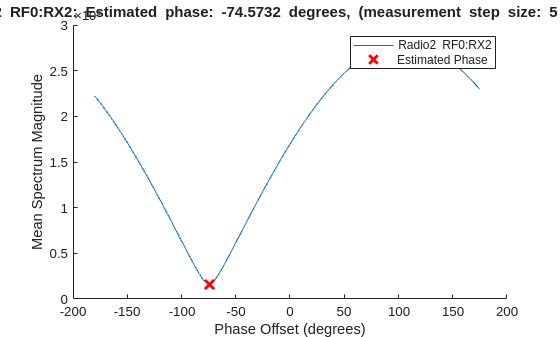
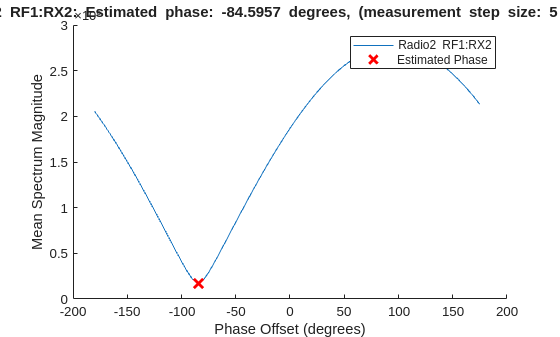
Estimate the relative phase offsets of the specified capture antennas and plot the measurement results.
phase = measureAntennaPhase(bbpa,"capture",PlotResult=true, ...
    Antennas={antennasUnderTest_radio1 antennasUnderTest_radio2});
Display Results
Display the measured phase offsets in degrees.
disp("Measured phase estimates: ["+num2str(phase{1}(1))+" " + ...
    ""+num2str(phase{2}(1))+", "+num2str(phase{2}(2))+"]")
Measured phase estimates: [0 -74.5732, -84.5957]
Input Arguments
Name-Value Arguments
Output Arguments
Version History
Introduced in R2026a

