欢迎参与!
"讨论" 版块是您认识同行、共同应对更大挑战并享受其中乐趣的地方。
更新的讨论

Let's continue the conversation from our MATLAB EXPO Online talk...
Here are the key highlights from our talk to get you started:
- Automated execution of hundreds of real-time test scenarios in just a few hours, down from days, cutting validation time by 70% to 85%.
- Achieved end-to-end traceability across requirements, architecture, models, and test results essential for evidence-driven decision-making.
- Engineered an extensible framework to future-proof autonomy capabilities across various vehicle platforms and operational design domains.
- Supercharged the digital thread with agentic AI capabilities, while preserving the structure, traceability, and credibility of digital engineering.

When the agent tunes the controller, what stops it from passing the specs on the nominal model but failing on delay, saturation, or parameter variation? Do you make it run a robustness sweep, not just one simulation?

Hello everyone, I hope you all had a fantastic MATLAB EXPO! I wanted to create a forum for people to ask follow-up questions or start discussions related to the workshop Hands-On Agentic AI for Engineered Systems with MATLAB and Simulink. We ran this workshop nine (!) times over the two days of MATLAB EXPO, and heard some incredibly insightful comments and questions in each session, so I wanted to make a central bulletin board for people to share their thoughts and hear insights. A few ideas:
- What did you most enjoy about the workshop?
- Are there any topics/exercises that weren't clear, or maybe an area you want to explore more?
- Do you have an idea for how you'd like to apply agentic AI in your work?
MATLAB EXPO may be over, but that doesn't mean the conversation has to end!

I'm interested in chatting with anyone who is using Bionic or another agent to write MATLAB code. I have puny 6GB PC GPU RAM but large 64GB McMini RAM. What model are you using, what joys and woes have you had?

Ready to explore the latest advancements in engineering and science with MATLAB and Simulink?
MATLAB EXPO Online 2026 is taking place November 4-5, 2026, and registration is now open. Join engineers, researchers, educators, and industry leaders from around the world for two days of technical presentations, hands-on workshops, customer success stories, and live Q&A sessions.
What to Expect
✅ 40+ interactive sessions featuring MathWorks experts and industry leaders
✅ 5 technical tracks, including AI and Agentic AI, Digital Engineering and Model-Based Design, Electrification and Energy Systems, Robotics and Autonomous Systems, and Cloud, CI/CD and DevOps
✅ 9 live, 90-minute hands-on workshops using MATLAB Online and Simulink Online
✅ Keynotes on emerging engineering trends and the latest MATLAB and Simulink capabilities
✅ Opportunities to connect with experts and peers from around the globe through live Q&A and networking activities
Whether you're just getting started or are an experienced MATLAB and Simulink user, you'll find content tailored to a range of experience levels and application areas.
Participation is free, but registration is required. Reserve your spot and start building your personalized agenda today.
What session or topic are you most excited to explore this year? Let us know in the comments!
This Week's Quiz
215 responses

My entry for the one-button game mini hack, GOING UP, makes you the lift attendant. The lift never stops on its own: one tap stops it, the next tap sends it on. Every passenger wears the colour of the floor they want.

How to play
- Stop level with a floor and the gate opens. Riders for that floor get off (1 point each), and waiting people get on until the lift holds four.
- Stop more than 12 px off a floor and you get a CLUNK. Nobody moves, and everyone waiting loses 1.5 s of patience.
- Stop within 4 px while someone gets on or off: PERFECT, +1 point.
- Waiting passengers have a patience bar. Three walk-outs and your shift is over.
- The lift speeds up and people arrive faster as the shift goes on.
Tips for a high score
- Skip floors with nothing to do. Every stop costs time.
- The lift only turns around at the top and bottom. Pick up people whose floor is ahead of you; anyone else rides to the end and back.
- Don't mash. In my bot tests random tapping lost in about 21 s, and never tapping in about 29 s.
MATLAB tricks inside
- The lift has no direction flag. Its height is a triangle wave of the distance travelled, cy = 460 - abs(mod(ride, 840) - 420), so stopping just pauses ride.
- Queue order without loops or sorting: ahead = sum(w' & s.pf' == s.pf & s.side' == s.side & s.pt' < s.pt, 2) counts, for every passenger at once, who arrived earlier at the same spot.
- Timers store when something happened (s.stopAt = s.t) instead of counting up every frame. Elapsed time is just s.t - s.stopAt.
- All 20 passengers are one patch of 6-vertex bodies plus one scatter of heads. Empty slots are NaN, so nothing is created after init.
What's your best shift?

Hi there,
Is there a change in the json response when I do http write to a channel ?
I send:
POST /update.json HTTP/1.1
Content-Type: application/x-www-form-urlencoded
Host: api.thingspeak.com
Connection: close
Content-Length: 102
apikey=xxxxxxxxxxxx&field1=-4.803&field3=18&field4=91&field5=109&field6=56&field7=0&field8=7
and I don't receive the normal response
I get sth like:
'unsafe-eval'; style-src 'self' https: 'unsafe-inline'; connect-src 'self' https: https://*.mathworks.com https://*.thingspeak.com https://*.omtrdc.net https://*.demdex.net; frame-src 'self' https: https://*.mathworks.com

Once you've uploaded your one-button game, it doesn't seem like there's a way to edit/update it. That's led me to fall into a couple of traps. One has a simple solution, so I'll share it. The other has me still scratching my head, so I'll open it up for discussion.
- Restarting. While you're developing and testing in MATLAB, it's easy enough to close the window and rerun your game. But the process is clunkier in the online gallery, so make sure your game includes a clean way to restart. If you're using an agent, it's easy enough to instruct it to modify the spacebar/click callback when the game ends so that it now calls the start/initialization function. This is a nice job for an agent (standard coding pattern it will probably do right, while I'll mess up and get annoyed).
- Timing. I can't figure out how to translate frame rate on my slow desktop MATLAB to the online running framework. Things that seem very sedate while testing suddenly get very exciting when I upload. Anyone know a good way to emulate just how zippy the real game will be?

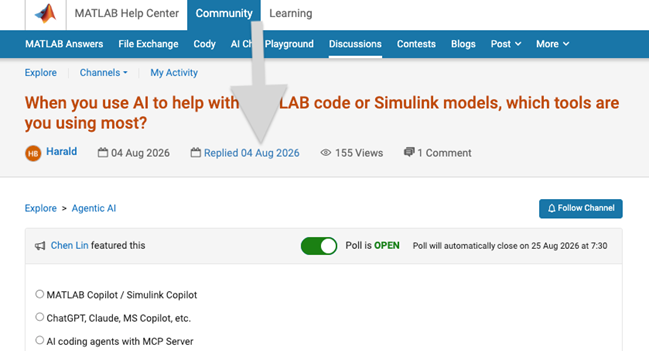
We heard your feedback that it can be difficult to find the latest comment or reply in long threads. To make this easier, you can now jump directly to the latest activity by clicking the latest activity date link at the top of the leaf page. See the screenshot below for an example. This is similar to the experience of MATLAB Answers today.
Thanks again for sharing your feedback and helping us improve the experience.

What does the participation matrix represent - from the Modern Grid Stability with IBRs: Leveraging Simulation and Control Design session.

Many of us have someone in our lives whose hearing has gradually changed with age. Maybe it's a grandparent who leans in a little closer at the dinner table, or a friend who enjoys a chat more in a quiet cafe than a busy one. For many people, hearing loss over the years becomes part of everyday life.
Behind every hearing instrument is an engineering team trying to help people keep enjoying those conversations.
We'd love to hear from you:
- Has hearing changed the way someone you know enjoys music, conversations or learning?
- If you've worked on audio, hearing aids or wearables, what inspired you, and what made it hard?
Join us at MATLAB Expo Online for the hands-on workshop Designing For Every Ear. Together we will explore the technologies right in MATLAB.

It was a great experience learning about various cutting-edge technologies. Thank you MathWorks, for this valuable learning opportunity!
My entry for the one-button game mini hack, LIGHTKEEPER, puts you in a lighthouse on a reef. Ships sail in blind from the dark. The beam sweeps on its own, and one tap reverses its spin. Any ship the light touches turns for home.

How to play
- A tap reverses the beam. It has inertia, so a reversal takes about a third of a second.
- Boats are rescued the moment the light touches them: 1 point.
- Freighters need 0.6 s of light: 3 points. The arc around the ship shows progress.
- A lantern blinking red means that ship is close to the reef. Three wrecks and the lamp goes out.
Tips for a high score
- Tap fast to make the beam hover. Quick reversals cancel out, and a slow beam lights freighters three times faster.
- Swing toward the ship closest to the reef, not the one closest to the beam.
- Don't mash. In my bot tests, random tapping lost in about 19 s, and never tapping in about 39 s.
MATLAB tricks inside
- Every position is a complex number, so z.' + outline.*exp(1i*heading.') turns and places the whole fleet at once. Use .', because ' also conjugates.
- All ships are one patch with a face per ship. NaN vertices hide the ones not sailing. The whole game is 24 graphics objects.
- The beam is a patch with per-vertex alpha ('FaceAlpha','interp'), built once and turned with an hgtransform.
- Setting the axes limits every frame, even to the same values, added about 5 ms to each frame. The screen shake now touches the axes only while it's running.
How long can you keep the lamp lit?
We got wonderful questions from the Design For Every Ear workshop session and we did not have chance to respond to them. We use this thread to share some more resources and references to continue the discussion.
- Concepts, tools and examples: https://www.mathworks.com/solutions/medical-devices/hearing-aids.html
- Example references used in the workshop:
- The Hearing Loss Simulation Plugin by Angeliki Mourgela (Queen Mary University of London and BBC R&D), MATLAB File Exchange 79541.
- MathWorks shipping example: Cochlear Implant Speech Processor.
- MathWorks shipping examples, including Speaker Recognition Using x-vectors.
- Embedded AI technology and workflow: https://www.mathworks.com/solutions/embedded-ai.html
- Set up the AI tutor in your own MATLAB: MATLAB MCP Core Server (https://github.com/matlab/matlab-mcp-core-server), MATLAB Agentic Toolkit (https://github.com/matlab/matlab-agentic-toolkit) and Simulink Agentic Toolkit (https://github.com/matlab/simulink-agentic-toolkit)
Thanks!

Exploring various cutting-edge technologies was an inspiring experience. Thank you, MathWorks, for this invaluable opportunity!

I have been using MATLAB on a daily basis for more than 30 years. For the past few months, I have been working with version 2026, and the problems I have encountered are staggering, especially when debugging functions.
The issues started to appear gradually with R2026a. Suddenly, the cursor would disappear, copy and paste would stop working, and MATLAB often had to be restarted because of these issues. In addition, the new figure UI is painfully slow, and entering debug mode has become frustrating. When stepping through code, MATLAB can take several seconds to respond to a debugging command such as Step.
Today, I finally got fed up and reinstalled R2024b. It works perfectly fine.

I will appreciate you If you send me URL connecting MATLAB EXPO 2026.

Hi everyone! I made PULSE // PALS - Lumi & Afterglow for the One-Button Game Mini Hack.
Play the published game:
https://www.mathworks.com/matlabcentral/communitycontests/contests/10/entries/16481
Press SPACE or click when a diamond reaches the small ring beneath Lumi. Release between taps. There is no aiming or dragging. The game has 64 authored notes across eight visual phrases, with a tempo that gradually rises from 96 to 136 BPM.
The submitted version passed minihackContest.validate at 9,778 characters, with no banned functions reported. Here are the most useful lessons from building it. The short code examples below use descriptive names for explanation; they are not additional files required to play.
1. Make the moving target and the notes share one beat coordinate
The target drifts and the rail bends, but the input is still about timing. A note must meet the ring at its scheduled beat, wherever the ring has moved.
For a note at noteBeat and a current beat b, define d = noteBeat - b. This simplified example uses the same rail formula as the game:
rail = @(d,b) 22*(sin(.72*d+.22*b)-sin(.22*b)) ...
+ 26*sin(pi*b/12).*tanh(d/2);
b = 12.5;
noteBeat = 14;
targetX = 218 + 58*sin(pi*b/8);
targetY = 306 + 37*sin(pi*b/6);
spacing = 91*(1+.09*sin(pi*b/4));
d = noteBeat - b;
noteX = targetX + spacing*d;
noteY = targetY + rail(d,b);
The useful invariant is rail(0,b) = 0. At d = 0, the note and target coincide. The hit test uses beat distance, rather than mouse position or a pixel collision. That keeps the animation and timing rule connected while leaving room to change the path.
2. Animate a character's parts, then batch the drawing
Lumi is procedural geometry, not an imported sprite. The ears, hands, blinking eyes, star pin, and two scarf tails have separate motion. A shared transform adds tilt and squash-and-stretch.
All 22 colored character polygons are held in one patch object; the mouth uses one additional line. Independent animation does not require an independent graphics object for every body part.
Complex coordinates are a convenient way to express 2-D transforms. For local points z, rotation angle theta, and a position x0,y0:
zWorld = (x0 + 1i*y0) + z*exp(1i*theta);
set(h,'XData',real(zWorld),'YData',imag(zWorld));
The game creates its graphics objects during initialization and reuses them. It also avoids setting text when the string has not changed:
if ~strcmp(label.String,newText)
label.String = newText;
end
The main waveform uses 177 on-screen samples instead of storing a whole song-length curve in the scene. Background geometry has a separate update gate. These reduce unnecessary work; they are not a promise of a particular frame rate in MATLAB Online.
One testing lesson: check the effective face colors, not only one expected CData array shape. With flat shading, per-face colors and per-vertex colors need to be interpreted correctly; for the latter, the first vertex determines the face color.
3. Make the strongest effects something the player earns
A catch makes Lumi rebound and produces a ring around the target. Eight consecutive catches outside Afterglow fill the constellation and start an eight-beat double-scoring interval for subsequent notes. The palette warms, the scarf extends, and the surrounding shapes become stronger.
I wanted the visual changes to explain what the player had achieved. The background stays comparatively restrained between these moments so that the next diamond remains readable. The chart is fixed rather than randomized, so replaying also means learning its pauses and short runs of notes.
4. A slow frame is not proof that the player left
An earlier version paused whenever an update interval exceeded 0.8 seconds. During MATLAB Online playtesting, it repeatedly paused just after starting. The code was treating elapsed time as if it were a window-focus event.
I removed that automatic-pause condition. The submitted version bounds a simulation step to 0.1 seconds and marks slow sessions PRACTICE. This avoids a large catch-up jump, but intentionally allows the game to run slower than wall-clock time under sustained load. It does not fix rendering throughput or network latency.
A browser prototype helped with visual iteration, but browser smoothness is not a measurement of the MATLAB version. Testing in the official runner caught a problem that screenshots and reference simulations did not.
5. Pack data, and let the official validator decide the size
Some geometry, palette, and chart tables are stored as character arrays and decoded into numbers. For a small integer table, the principle is:
values = [0 2 4 6];
packed = char(13312 + values);
restored = double(packed) - 13312;
assert(isequal(values,restored));
Those unusual-looking characters are numerical data. They are not dynamically executed code. Keep values in a safe character range, preserve the source encoding, and verify that decoding reproduces the original table.
The distinction between character arrays and string scalars matters: double('ABC') returns character codes, while double("ABC") attempts a numeric conversion and returns NaN. My decoder receives character arrays.
Raw file size was not a reliable way to judge the contest budget. I used minihackContest.validate for the final decision and kept an expanded numeric copy for inspection. Compact data, shared drawing helpers, and fewer repeated statements were more useful than merely deleting whitespace.
Working with AI
AI assistance was used for implementation, iteration, and testing support. I playtested the game and used visible problems to steer changes: the first designs were too static, the character felt like a sticker, and the slow-frame pause rule failed in actual use. The important lesson was to keep reference-model checks, native validation, and real playtesting separate.
Useful MATLAB documentation
Graphics performance:
https://www.mathworks.com/help/matlab/creating_plots/improve-graphics-update-performance.html
Patch colors and properties:
https://www.mathworks.com/help/matlab/ref/matlab.graphics.primitive.patch-properties.html
Character codes and numeric conversion:
https://www.mathworks.com/help/matlab/matlab_prog/unicode-and-ascii-values.html
What visual cues help you anticipate a beat when there is no sound? I would be interested to hear what other Mini Hack participants have tried.

One-Button Game Mini Hack Entry: Pump-Send
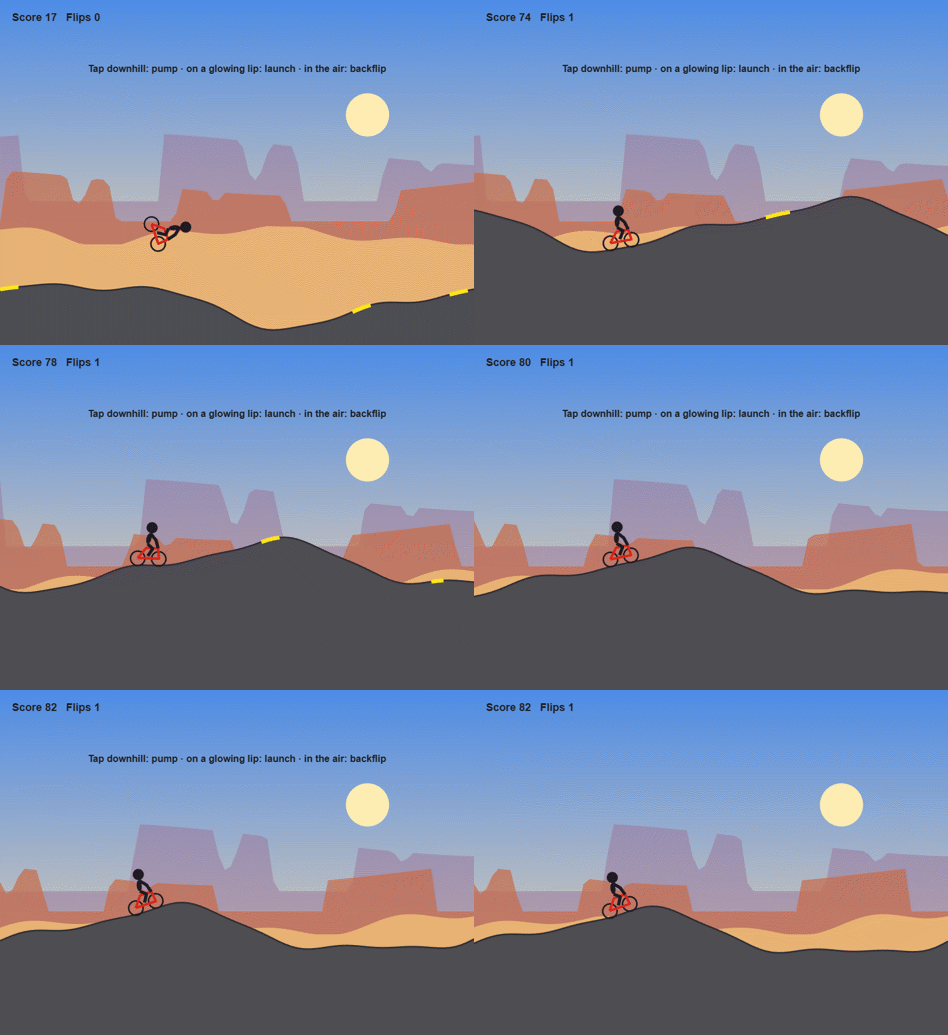
Hi everyone! Pump-Send is a side-view mountain bike game on an endless desert pump track. You never pedal: all your speed comes from pumping the rollers, and one button does everything. On the ground, a tap pumps or pops; in the air, it throws you into a backflip.
How scoring works
- You get 1 point for every meter you ride. The run ends if you run out of momentum or crash.
- Every clean backflip is worth 50 points, so one flip equals 50 meters of riding.
- Your score and flip count are shown in the top-left corner.
Definitions
- Pump: A tap while rolling downhill. You push the bike into the slope and gain speed.
- Scrub: A tap at the wrong time (going uphill, or a second tap right after a pump). It costs you a little speed.
- Lip: The rising face just before the top of a hill. It glows yellow.
- Pop: A tap on a glowing lip. It's the only way to get airborne.
- Flip: A tap in the air spins the rider backward. Each full rotation you land counts as one flip. Tap only; don't hold the button.
- Stall: Going too slow for too long. This ends the run.
Physics you'll want to know
- Steeper downhill = bigger pump. A pump on a steep drop gives you a big shove, about a third of your starting speed. On a nearly flat stretch, it does almost nothing. Aim for one good pump on each downhill.
- Scrubs add up. A badly timed tap only takes back about a third of a good pump, but a few in a row can leave you crawling.
- Watch the hills scroll. If the scenery slows down and you're barely making it over the crests, pump now or you'll stall.
- Speed is hang time. The faster you hit a glowing lip, the higher and longer you fly, and the more time you have to finish a flip.
- Spin fades in the air. Each tap adds spin, and the spin slowly dies down. More taps spin you faster, but you have to be wheels-down at the right angle when you touch the ground.
- Land matching the slope. Don't start another flip if you won't finish it in time to land at the right angle.
Quick tips
- Build speed with a few pumps before you try your first flip.
- On a big jump, one tap in the air is usually a full flip. Count, then stop tapping.
- When in doubt, skip the flip: distance points still add up.
- The game gets harder as you go, with tighter pump timing and landing requirements.
Behind the scenes
I built Pump-Send with a team of Claude Code agents: one designed the game, one wrote the tests (113 of them!), one built it, one reviewed the code, and one judged prototypes to help me choose among my four original ideas. The judging turned out to be less useful than I expected, since it was pretty obvious after playing which idea would pan out best. The most interesting lesson for me was about using bots to tune the physics.
Lesson one: the bot was too good
The first bot was simply too good at the game. It predicted where each jump would land and planned its flips accordingly, scoring hundreds of points. Then I took the wheel (err, handlebars) and crashed in seconds.
So I had the agents build a bot that plays like a person. It makes the same decisions, but each tap arrives 100 ± 60 ms late, it waits to see what one tap did before deciding again, and it taps at most 10 times per second. That bot survived a median of 8 seconds and crashed in 17 of 30 rides.
Here's what it uncovered and what I changed:
- A slightly late tap on a lip turned into a backflip spin on a tiny hop. Now you only leave the ground when you tap.
- Riders landed on the next uphill 55–68% of the time. Now a lip glows only if a pop at your current speed will land on a downhill.
- A flat dead zone at every crest turned late taps into scrubs. It's gone.
- Everything runs in gentle slow motion (0.8×), so every timing window lasts 25% longer.
- In most flips, the rider's head went through the ground. Now the rider spins around the hips.
After those fixes, the human-like bot survived a median of 53 seconds with 0 of 30 crashes. "The human-like bot survives at least 30 seconds" is now a permanent test for every new build.
Lesson two: bad players on purpose
Bots that play badly are just as useful. Every build is tested against `idle` (never taps), `spam` (taps every frame), and `masher` (8 taps per second). Each one has to die within 15 seconds or score under a fifth of what the scripted bot scores, so you can't win by ignoring or mashing the button. A `random` tapper rounds out the lineup.
Results for the current build, 20 rides of up to 60 seconds each (a different set of rides from the 30 above, so the human-like numbers differ a little):
+------------+----------------------------+-----------------+--------------+--------------+
| Bot | How it plays | Median survival | Median score | Median flips |
+------------+----------------------------+-----------------+--------------+--------------+
| idle | Never taps | 12.8 s | 40 | 0 |
| spam | Taps every frame | 2.2 s | 1 | 0 |
| masher | 8 taps per second | 2.3 s | 9 | 0 |
| random | Random taps | 6.2 s | 30 | 0 |
| human-like | Smart taps, 100 ms late | 46.3 s | 801 | 8.5 |
| scripted | Smart taps, perfect timing | 51.2 s | 1,391 | 14.5 |
+------------+----------------------------+-----------------+--------------+--------------+
Your turn
What's your high score? Did you beat the human-like bot? I'd love to hear if anyone lands three flips in one jump.
关于 Discussions
Discussions is a user-focused forum for the conversations that happen outside of any particular product or project.
Get to know your peers while sharing all the tricks you've learned, ideas you've had, or even your latest vacation photos. Discussions is where MATLAB users connect!
Get to know your peers while sharing all the tricks you've learned, ideas you've had, or even your latest vacation photos. Discussions is where MATLAB users connect!
更多社区版块

MATLAB Answers
提出和回答关于 MATLAB 和 Simulink 的问题!

File Exchange
下载或贡献用户提交的代码!

Cody
解题组,学习 MATLAB 并赢取徽章!

博客
MATLAB 和 Simulink 探秘!

AI Chat Playground
使用 AI 生成 MATLAB 代码初始草稿,并回答问题!

