
CalibMag
The Magnetometer Calibration App

The Magnetometer Calibration App is designed to help users calibrate their magnetometers by correcting for hard-iron and soft-iron distortions. This ensures accurate and reliable magnetic field measurements.
- Easy-to-use interface for uploading and processing data
- Automatic calculation of hard-iron and soft-iron offsets
- Output of calibrated magnetometer data
- Visualization of raw and calibrated data.
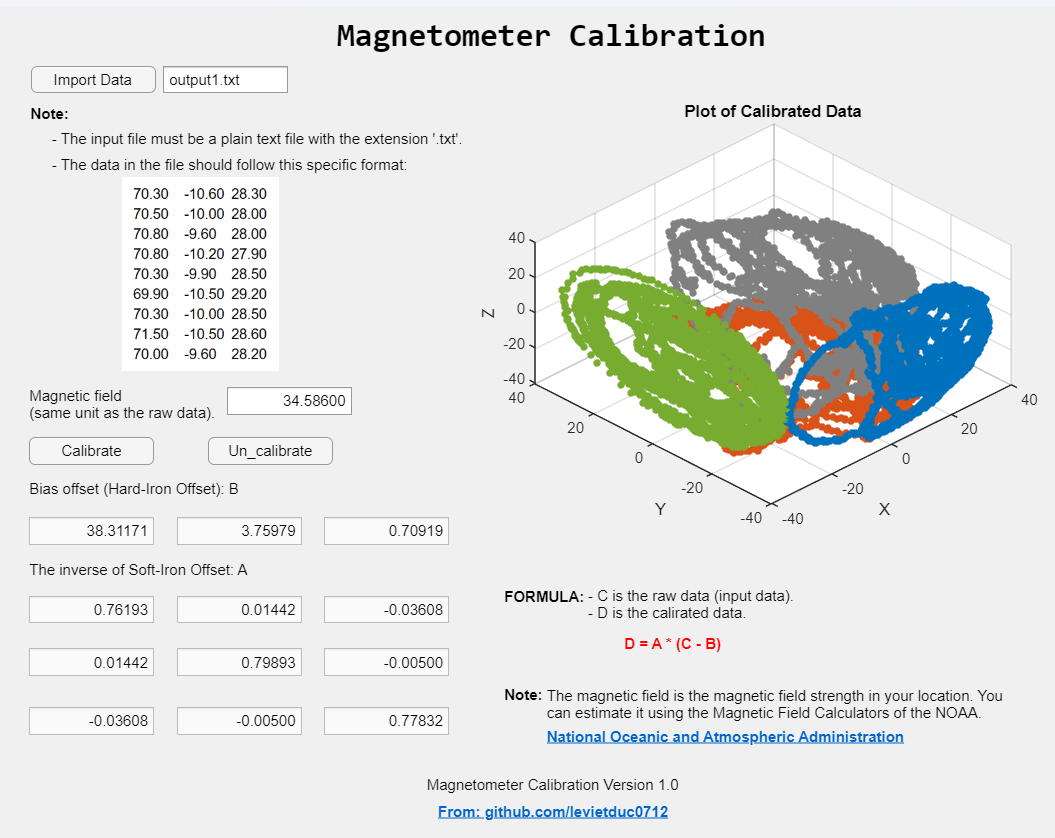
-
Prepare your data file:
- The input file must be a plain text file with the extension
.txt. - Data format: Each line should contain three floating.
- Point numbers separated by a tab (
\t), representing the X, Y, and Z values respectively. - Example:
70.30 -10.60 28.30 70.50 -10.00 28.00 70.80 -9.60 28.00 70.80 -10.20 27.90 70.30 -9.90 28.50 69.90 -10.50 29.20 70.30 -10.00 28.50 71.50 -10.50 28.60 70.00 -9.60 28.20 - The input file must be a plain text file with the extension
- Run the app:
- Follow the on-screen instructions to upload your data file and perform the calibration.
- The app will output the calibrated magnetometer data and display visualizations comparing raw and calibrated data.
This project is licensed under the GPL-3.0 license. See the LICENSE file for details.
For any questions or support, please contact levietduc0712@gmail.com.
引用格式
Le Duc (2026). CalibMag (https://github.com/levietduc0712/CalibMag), GitHub. 检索时间: .
MATLAB 版本兼容性
创建方式
R2021b
兼容任何版本
平台兼容性
Windows macOS Linux标签
Community Treasure Hunt
Find the treasures in MATLAB Central and discover how the community can help you!
Start Hunting!无法下载基于 GitHub 默认分支的版本
| 版本 | 已发布 | 发行说明 | |
|---|---|---|---|
| 1.0.0 |
|
要查看或报告此来自 GitHub 的附加功能中的问题,请访问其 GitHub 仓库。
要查看或报告此来自 GitHub 的附加功能中的问题,请访问其 GitHub 仓库。

您也可以从以下列表中选择网站:
美洲
- América Latina (Español)
- Canada (English)
- United States (English)
欧洲
- Belgium (English)
- Denmark (English)
- Deutschland (Deutsch)
- España (Español)
- Finland (English)
- France (Français)
- Ireland (English)
- Italia (Italiano)
- Luxembourg (English)
- Netherlands (English)
- Norway (English)
- Österreich (Deutsch)
- Portugal (English)
- Sweden (English)
- Switzerland
- United Kingdom(English)
亚太
- Australia (English)
- India (English)
- New Zealand (English)
- 中国
- 日本Japanese (日本語)
- 한국Korean (한국어)