StructBrowser

版本 1.1.0.0 (27.0 KB) 作者: Hassan Lahdili
StructBrowser, GUI for browsing any structure (or nested structures) and plotting its fields.

4.9K 次下载
更新 2009/6/19

查看许可证

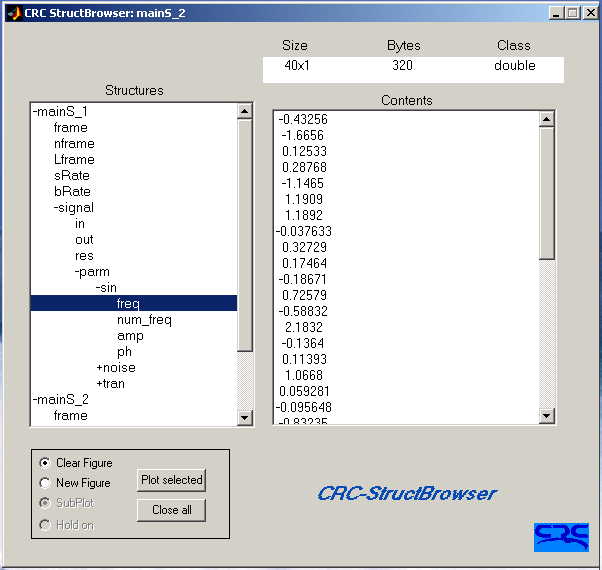
The CRC-StructBrowser is designed to expose the contents of all variables of class struct to any depth and plot any of the components. The tool is very useful especially for nested structures. It displays the structure in a tree format starting from the first level. The tree is expanded (or shrunk) to the corresponding level by double-clicking.

Syntax:
StructBrowser
StructBrowser_gui_g(cell_struct)

The easiest way of starting up the GUI is to type the command "StructBrowser" while the workspace contains some information (the same command can be used in the debug mode).

The GUI can also be launched by typing: StructBrowser_gui_g(cell_struct)
in the MatLab command. cell_struct is a cell of size (2 X N), where N is the number of structures to browse. The first row of cell_struct contains all the structures' names, and the second row contains all the corresponding values. Assuming your workspace contains the 3 structures struct_1, struct_2 and struct_3, cell_struct is described by the following:

cell_struct = ...{'struct_1', 'struct_2', 'struct_3'; ...
struct_1, struct_2, struct_3};

In the case of the base workspace, the function "copy_all_struct" is provided to copy all variables of class struct from workspace and store them in a cell array. The syntax of this function is:

cell_struct = copy_all_struct;

引用格式

Hassan Lahdili (2026). StructBrowser (https://ww2.mathworks.cn/matlabcentral/fileexchange/3523-structbrowser), MATLAB Central File Exchange. 检索时间: .

MATLAB 版本兼容性
创建方式 R13
兼容任何版本
平台兼容性
Windows macOS Linux
类别
Help CenterMATLAB Answers 中查找有关 Environment and Settings 的更多信息
版本 已发布 发行说明
1.1.0.0

BSD license

1.0.0.0

Add screenshot.