ntitle

Place a title inside a plot. Reduces title/xlabel ambiguity in figures with multiple subplots.

您现在正在关注此提交

ntitle(titlestring,varargin) places a title within the plot instead of on top. In the spirit of Edward Tufte, this is intended to keep the title close to the data it describes and minimize wasted space. The ntitle function may prove particularly useful for figures with several subplots, where titles can sometimes become confused with xlabels above them.

By default, ntitle centers the title at the top of the plot, but any of the location coordinates (e.g., north, southwest, etc.) can be used with the argument 'location'. Output h provides the handle for the ntitle.

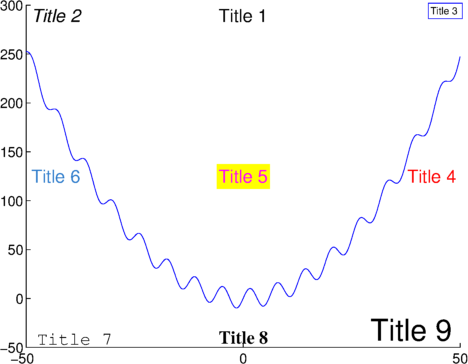
EXAMPLES:
% First make a plot:
x = -50:.1:50;
y = 10*sin(x)+.1*x.^2;
plot(x,y);
axis([-50 50 -50 300])
box off

% Here are 9 obnoxious examples of how to use ntitle:
ntitle('Title 1');
ntitle('{\it Title 2}','location','northwest');
ntitle('Title 3 ','location','northeast','fontsize',10,'edgecolor','b');
ntitle(' Title 4 ','location','east','color','r');
ntitle('Title 5','location','center','color','m','backgroundcolor','y');
ntitle(' Title 6','location','west','color',[.2 .5 .8]);
ntitle(' Title 7','location','southwest','fontname','Courier');
ntitle('Title 8','location','south','fontweight','bold','fontname','Times');
h9 = ntitle('Title 9 ','location','southeast','fontsize',30);

Consider pairing ntitle with figtitle (http://www.mathworks.com/matlabcentral/fileexchange/42667-figtitle).

引用格式

Chad Greene (2026). ntitle (https://ww2.mathworks.cn/matlabcentral/fileexchange/42114-ntitle), MATLAB Central File Exchange. 检索时间: .

一般信息

MATLAB 版本兼容性

  • 兼容任何版本

平台兼容性

  • Windows
  • macOS
  • Linux
版本 已发布 发行说明 Action
1.4.0.0

example image was lost in the last update.

1.3.0.0

Changed default font size.

1.1.0.0

A title handle is now returned only if the user requests it.

1.0.0.0