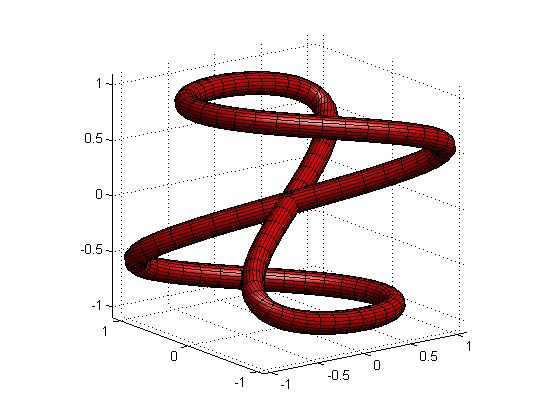
Tube Function

This function is the numerical analogy to the tube function in maple
171.0 次下载
更新 2021/9/23

查看许可证

close all
[X,Y,Z] = tubeN(@(t) t/3, 30, @(t)[ t.*sin(t), t.*cos(t), 20-t],[0,20],120);
figure; s = surf(X,Y,Z); s.FaceColor = 'r'; s.EdgeAlpha = 0.3; axis equal
camlight; lighting gouraud
[X,Y,Z] = tubeN(@(t) sin(t),20,@(t)[ t, 0*t,0*t],[0,10],40);
figure; s = surf(X,Y,Z); s.FaceColor = 'r'; s.EdgeAlpha = 0.3; axis equal
camlight; lighting gouraud
[X,Y,Z] = tubeN(@(t)sqrt(1-t.^2),20,@(t)[sin(pi*t),t,t+1],[-1,1],50);
figure; s = surf(X,Y,Z); s.FaceColor = 'r'; s.EdgeAlpha = 0.3; axis equal
camlight; lighting gouraud
[X,Y,Z] = tubeN(@(t)sqrt(1-t.^2),20,@(t)[sin(pi*t),cos(pi*t),t+1],[-1,1],50);
figure; s = surf(X,Y,Z); s.FaceColor = 'r'; s.EdgeAlpha = 0.3; axis equal
camlight; lighting gouraud
[X,Y,Z] = tubeN(@(t)0.1+0*t,20,@(t)[(4 + sin(20*t)).*cos(t),(4 + sin(20*t)).*sin(t),cos(20*t)],[0,2*pi],1000);
figure; s = surf(X,Y,Z); s.FaceColor = 'r'; s.EdgeAlpha = 0.3; axis equal
camlight; lighting gouraud
[X,Y,Z] = tubeN(@(t)0.1+0*t,20,@(t)[(2 + cos(1.5*t)).*cos(t),(2 + cos(1.5*t)).*sin(t),sin(1.5*t)],[0,4*pi],500);
figure; s = surf(X,Y,Z); s.FaceColor = 'r'; s.EdgeAlpha = 0.3; axis equal
camlight; lighting gouraud
[X,Y,Z] = tubeN(@(t)1+0*t,20,@(t)[3.*cos(t),3.*sin(t),0*t],[0,2*pi],100);
figure; s = surf(X,Y,Z); s.FaceColor = 'r'; s.EdgeAlpha = 0.3; axis equal
camlight; lighting gouraud
xfun = @(t)sign(sin(t)).*(abs(sin(t))).^0.75;
yfun = @(t)sign(cos(t)).*(abs(cos(t))).^0.75;
zfun = @(t)abs(sin(t)).^2;
[X,Y,Z] = tubeN(@(t)0.1+0*t,20,@(t)[xfun(t), yfun(t), zfun(t)],[0,2*pi],500);
figure; s = surf(X,Y,Z); s.FaceColor = 'r'; s.EdgeAlpha = 0.3; axis equal
camlight; lighting gouraud

引用格式

Lateef Adewale Kareem (2026). Tube Function (https://ww2.mathworks.cn/matlabcentral/fileexchange/53907-tube-function), MATLAB Central File Exchange. 检索时间: .

MATLAB 版本兼容性
创建方式 R2012b
兼容任何版本
平台兼容性
Windows macOS Linux
类别
Help CenterMATLAB Answers 中查找有关 Lighting, Transparency, and Shading 的更多信息
标签 添加标签
版本 已发布 发行说明
2.0.0.0

The function has been updated to now use a single 3D rotation from z dir to the direction in the path of extrusion. This eliminated the flip that occasionally occur along the path.

1.0.0.0

Just a little correction in the description