
WORKBAR

Efficient and stylish alternative to WAITBAR.

您现在正在关注此提交

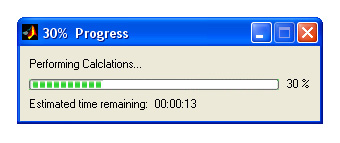
WORKBAR Graphically monitors progress of calculations
WORKBAR(X) creates and displays the workbar with the fractional length
"X". It is an alternative to the built-in matlab function WAITBAR,
Featuring:
- Doesn't slow down calculations
- Stylish progress look
- Requires only a single line of code
- Displays time remaining
- Display time complete
- Capable of title and description
- Only one workbar can exist (avoids clutter)

WORKBAR(X, MESSAGE) sets the fractional length of the workbar as well as
setting a message in the workbar window.

WORKBAR(X, MESSAGE, TITLE) sets the fractional length of the workbar,
message and title of the workbar window.

WORKBAR is typically used inside a FOR loop that performs a lengthy
computation. A sample usage is shown below:

for i = 1:10000
% Calculation
workbar(i/10000,'Performing Calclations...','Progress')
end

Another example:

for i = 1:10000
% Calculation
if i < 2000,
workbar(i/10000,'Performing Calclations (Step 1)...','Step 1')
elseif i < 4000
workbar(i/10000,'Performing Calclations (Step 2)...','Step 2')
elseif i < 6000
workbar(i/10000,'Performing Calclations (Step 3)...','Step 3')
elseif i < 8000
workbar(i/10000,'Performing Calclations (Step 4)...','Step 4')
else
workbar(i/10000,'Performing Calclations (Step 5)...','Step 5')
end
end

See also: WAITBAR, TIMEBAR, PROGRESSBAR

引用格式

Daniel Claxton (2026). WORKBAR (https://ww2.mathworks.cn/matlabcentral/fileexchange/7109-workbar), MATLAB Central File Exchange. 检索时间: .

致谢

参考作品: timebar, progressbar

启发作品: Progress Dialog

类别

Help CenterMATLAB Answers 中查找有关 App Building 的更多信息

一般信息

MATLAB 版本兼容性

  • 兼容任何版本

平台兼容性

  • Windows
  • macOS
  • Linux
版本 已发布 发行说明 Action
1.0.0.0

It's more better