acousticMaterialCatalog
R2026bDescription
Add-On Required: This feature requires the Room Acoustics Simulation add-on.
catalog = acousticMaterialCatalog
catalog = acousticMaterialCatalog(Name=Value)
Examples
Use the acousticMaterialCatalog function to view acoustic absorption coefficients for common room material types.
catalog = acousticMaterialCatalog
catalog = 99×4 table
          Material                        Description                                     AbsorptionCoefficients                        Category
    ____________________    ________________________________________    ___________________________________________________________    ___________

                                                                        125 Hz    250 Hz    500 Hz    1000 Hz    2000 Hz    4000 Hz
                                                                        ______    ______    ______    _______    _______    _______

    "Hairfelt"              "Hair felt, 2.5 cm"                          0.18      0.36      0.71      0.79       0.82       0.85      "Absorbers"
    "Woolfelt"              "Wool felt, 2.5 cm"                          0.09      0.34      0.55      0.66       0.52       0.39      "Absorbers"
    "MineralWool"           "Mineral wool, 15 cm"                        0.47      0.53       0.6      0.62       0.58       0.56      "Absorbers"
    "GlassWool9cm"          "Glass wool, 9 cm"                           0.32       0.4      0.51       0.6       0.65        0.6      "Absorbers"
    "GlassWool3cm"          "Glass wool, 3 cm"                            0.1      0.15      0.45      0.55        0.6        0.6      "Absorbers"
    "GlassFoam"             "Glass foam with unenclosed pores"            0.1      0.36      0.38      0.36       0.45       0.55      "Absorbers"
    "AcousticPlaster"       "Acoustic plaster"                            0.3      0.35       0.5       0.7        0.7        0.7      "Absorbers"
    "AcousticalTile"        "Acoustical tile, 1/2 inch thick"            0.07      0.21      0.66      0.75       0.62       0.49      "Absorbers"
    "Woodfiber25mm"         "Woodfiber tiles, 25 mm, tight to wall"      0.47      0.52       0.5      0.55       0.58       0.63      "Absorbers"
    "Woodfiber12mmTight"    "Woodfiber tiles, 12 mm, tight to wall"      0.06      0.15      0.28       0.3       0.33       0.31      "Absorbers"
    "Woodfiber12mm3cm"      "Woodfiber tiles, 12 mm, 3 cm from wall"     0.14      0.25      0.29      0.31       0.41       0.42      "Absorbers"
    "Woodfiber12mm5cm"      "Woodfiber tiles, 12 mm, 5 cm from wall"     0.22       0.3      0.34      0.32       0.41       0.42      "Absorbers"
    "Fiberglass"            "Fiberglass, 25 mm, rigid backing"           0.08      0.25      0.45      0.75       0.75       0.65      "Absorbers"
    "Melamine"              "Melamine based foam, 25 mm"                 0.09      0.22      0.54      0.76       0.88       0.93      "Absorbers"
    "RockWool"              "Rock wool, 30 mm"                            0.1       0.4       0.8       0.9        0.9        0.9      "Absorbers"
    "FiberglassBitumen"     "Fiberglass bitumen-bonded mat"               0.3      0.55       0.8      0.85       0.75        0.8      "Absorbers"
      ⋮
Restrict table values to materials classified as diffusers using the Category name-value argument.
subCatalog = acousticMaterialCatalog(Category="Diffusers")subCatalog = 5×4 table
Material Description AbsorptionCoefficients Category
______________________ _________________________________________________________________________ ___________________________________________________________ ___________
125 Hz 250 Hz 500 Hz 1000 Hz 2000 Hz 4000 Hz
______ ______ ______ _______ _______ _______
"PlywoodPanel38" "Plywood panel, 3/8-inch thick" 0.28 0.22 0.17 0.09 0.1 0.11 "Diffusers"
"PolycylindricalChord" "Polycylindrical chord, height 10 inches, filled" 0.35 0.5 0.38 0.3 0.22 0.18 "Diffusers"
"BAD" "Hybrid absorber and diffuser (BADTM panel) mounted on 2.5 cm fiberglass" 0.17 0.4 0.86 1 0.84 0.61 "Diffusers"
"QRD2D" "2D N=7 QRD, design frequency=500 Hz" 0.14 0.12 0.14 0.2 0.09 0.12 "Diffusers"
"QRD1D" "1D N=7 QRD, design frequency=500 Hz" 0.11 0.1 0.07 0.08 0.06 0.06 "Diffusers"
Synthesize the impulse response of a room using the acousticRoomResponse function. Specify the material absorption using the material ID for 3/8-inch thick plywood panels.
roomDimensions = [5, 4, 6];
rx = [2, 3.5, 2];
tx = [2, 1.5, 2];
ir = acousticRoomResponse(roomDimensions,tx,rx,MaterialAbsorption="PlywoodPanel38");Absorption coefficients from acousticMaterialCatalog can be used to improve impulse response synthesis using the acousticRoomResponse function.
Get absorption coefficients for a slate floor and a dry plaster tiled ceiling. Use the default band center frequencies of acousticRoomResponse.
bandCenters = [125, 250, 500, 1000, 2000, 4000, 8000];
floorEntry = acousticMaterialCatalog(Material="Slate",...
    BandCenterFrequencies=bandCenters);
ceilEntry = acousticMaterialCatalog(Material="DryPlasterTiles",...
    BandCenterFrequencies=bandCenters);
acousticMaterialCatalog has entries for glass wool acoustic panels with a thickness of 3 cm or 9 cm. Estimate the absorption coefficients of glass wool with a thickness of 6 cm as the mean of these entries.
glassWool3cm = acousticMaterialCatalog(Material="GlassWool3cm",...
    BandCenterFrequencies=bandCenters);
glassWool9cm = acousticMaterialCatalog(Material="GlassWool9cm",...
    BandCenterFrequencies=bandCenters);
coefs6cm = 0.5*table2array(glassWool3cm.AbsorptionCoefficients + glassWool9cm.AbsorptionCoefficients);
Synthesize a room impulse response using the absorption coefficients.
roomDimensions = [5, 4, 6];
rx = [2, 3.5, 2];
tx = [2, 1.5, 2];
absorptionCoefs = [table2array(floorEntry.AbsorptionCoefficients);...% floor
                   coefs6cm; coefs6cm; coefs6cm; coefs6cm;...% walls
                   table2array(ceilEntry.AbsorptionCoefficients)...% ceiling
    ];
ir = acousticRoomResponse(roomDimensions,tx,rx,MaterialAbsorption=absorptionCoefs);
Plot the impulse response.
fs = 16e3;
t = (0:numel(ir)-1)/fs;
plot(t,ir)
xlabel("Time (s)")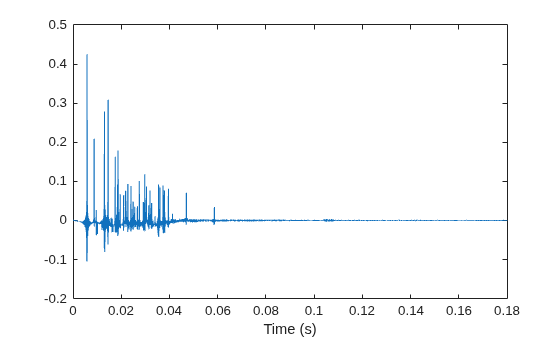
Name-Value Arguments
Output Arguments
Version History
Introduced in R2026b

