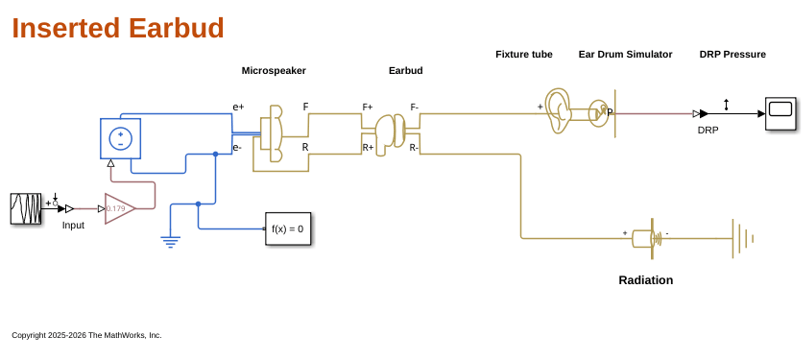
主要内容

Earbud

R2026b

Acoustic model of earbud

Since R2026b

  • Earbud block

Libraries:
Simscape Acoustics / Applications / Headphones

Description

Add-On Required: This feature requires the Simscape Acoustics add-on.

This block models an earbud-type headphone enclosure. The front of the earbud includes a front chamber with holes, followed by a front cover. The block includes a sound tube to model the pinna and ear tip cushion to model in-ear earbuds. The back of the earbud consists of a rear chamber, rear vent holes, an earphone cavity chamber, and holes in the rear of the cavity.

You can use this block to model variations of an earbud enclosure. The front cover, front cavity, rear chamber, and pinna modeling are optional. You can also model leakage caused by an imperfect fit between the earbud and ear. This block does not model the loudspeaker inside the enclosure, but you can connect the F+ and R+ ports to a Microspeaker block or a custom microspeaker model.

The Earbud block models the physical properties of an earbud by implementing an equivalent circuit, depicted in figure 4 of the reference [1], using Simscape™ blocks. The reference provides the default values [1], which were validated against measurements from an IEC-60711 coupler [2]. The figure shows the equivalent circuit that uses the following Simscape blocks:

  • The Earbud block models the compliance of air in the front chamber, pinna outer chamber cavity, rear chamber, and earphone cavity using one Acoustic Compliance block per chamber or cavity.

  • The Earbud block models the radiation impedance of each opening (front cover holes, rear vent holes, rear cavity holes, and leakage from imperfect fit) using one pair of Acoustic Inertance and Acoustic Resistance blocks per opening.

  • The Earbud block models the transmission lines of the pinna circular cavity and the ear tip using Cylindrical Tube With Thermoviscous Losses Using Foster Network blocks.

  • The Earbud block connects both the front and rear of the enclosure to an Acoustic Reference block.
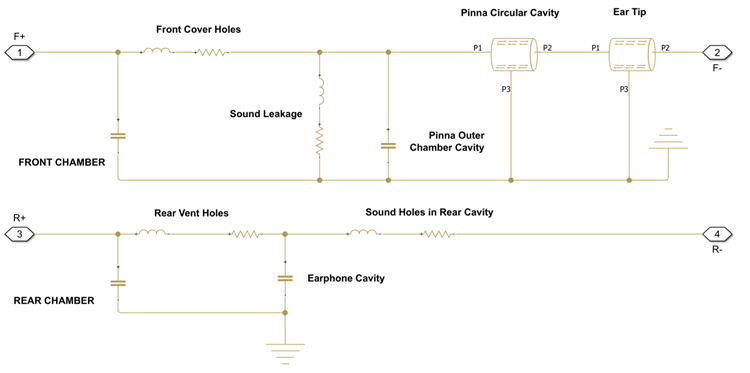
Equivalent circuit of the Earbud block as a Simscape model. All optional components are included in the circuit.

Examples

Ports

Conserving

expand all

Acoustic conserving port associated with the front of the speaker driver. Connect this port to the front of a speaker driver block.

Acoustic conserving port associated with the rear of the speaker driver. Connect this port to the rear of a speaker driver block.

Acoustic conserving port associated with the front output of the earbud toward the ear canal.

Acoustic conserving port associated with the rear output of the earbud earphone cavity.

Parameters

expand all

Front Chamber

Option to include acoustic elements related to the front cover of the earbud.

Volume of the front acoustic chamber of the earbud.

Dependencies

To enable this parameter, select the Include front cover parameter.

Radius of the holes in the front cover.

Dependencies

To enable this parameter, select the Include front cover parameter.

Thickness of the holes in the front cover.

Dependencies

To enable this parameter, select the Include front cover parameter.

Number of holes in the front cover.

Dependencies

To enable this parameter, select the Include front cover parameter.

Earphone Cavity

Volume of the earphone cavity.

Radius of the sound holes in the earphone cavity.

Thickness of the sound holes in the earphone cavity.

Number of sound holes in the earphone cavity.

Rear Chamber

Option to include acoustic elements related to the rear chamber of the earbud.

Volume of the rear acoustic chamber of the earbud.

Dependencies

To enable this parameter, select the Include rear chamber parameter.

Radius of the rear vent holes.

Dependencies

To enable this parameter, select the Include rear chamber parameter.

Thickness of the rear vent holes.

Dependencies

To enable this parameter, select the Include rear chamber parameter.

Number of rear vent holes.

Dependencies

To enable this parameter, select the Include rear chamber parameter.

Leakage

Option to include acoustic elements modeling leakage caused by imperfect fit between the earbud and the ear.

Cross-sectional area of the leakage volume between the earbud and the ear.

Dependencies

To enable this parameter, select the Include leakage parameter.

Depth of the leakage volume between the earbud and the ear.

Dependencies

To enable this parameter, select the Include leakage parameter.

Pinna/Ear Tip

Option to include acoustic elements modeling the pinna internal tube and outer chamber cavity. Some earbuds are not in-ear and do not require this model.

Radius of the pinna internal tube cavity.

Dependencies

To enable this parameter, select the Include pinna parameter.

Length of the pinna internal tube cavity.

Dependencies

To enable this parameter, select the Include pinna parameter.

Radius of the pinna outer chamber cavity.

Dependencies

To enable this parameter, select the Include pinna parameter.

Depth of the pinna outer chamber cavity.

Dependencies

To enable this parameter, select the Include pinna parameter.

References

[1] Huang, Chen-Hung, S. J. Pawar, Zih-Jyun Hong, and Jin H. Huang. “Earbud-Type Earphone Modeling and Measurement by Head and Torso Simulator.” Applied Acoustics 73, no. 5 (2012): 461–69. https://doi.org/10.1016/j.apacoust.2011.10.007.

[2] Huang, Chen-Hung, S. J. Pawar, Zih-Jyun Hong, and Jin H. Huang. “Insert Earphone Modeling and Measurement by IEC-60711 Coupler.” IEEE Transactions on Ultrasonics, Ferroelectrics and Frequency Control 58, no. 2 (2011): 461–69. https://doi.org/10.1109/TUFFC.2011.1823.

Version History

Introduced in R2026b