Generate C++ Code for MATLAB Class That Performs Acoustic Echo Cancellation (AEC)
R2026bThis example shows how to generate C++ code for a MATLAB® class that cancels the echo in an input speech signal by using adaptive filters. Acoustic echo cancellation is important for audio teleconferencing when simultaneous communication (or full-duplex transmission) of speech is necessary.
In an acoustic echo cancellation problem, a measured microphone signal contains two signals:
The near-end speech signal
The far-end echoed speech signal
The goal is to remove the far-end echoed speech signal from the microphone signal so that only the near-end speech signal is transmitted. To learn more about the algorithm this example uses, see Acoustic Echo Cancellation (AEC).
Examine MATLAB Class That Performs Acoustic Echo Cancellation
This example performs echo cancellation on a system that has a constant sample rate fs of 8000 Hz. The input consists of two data streams: the near-end speech signal and the far-end speech signal (without echo).
The process method of the AcousticEchoCanceler class (displayed below) processes these two input data streams, one frame at a time. This method:
Applies the
roomEchoAdderFIR filter to the far-end speech signal to produce the far-end echoed speech signal.Adds the near-end speech signal, the far-end echoed speech signal, and a random noise to produce the simulated microphone signal.
Applies the adaptive filter
echoCancelerto the simulated microphone signal to produce the echo-canceled signal.
type AcousticEchoCanceler.mclassdef AcousticEchoCanceler < handle
properties (Constant)
fs = 8000
end
properties (Access = private)
roomEchoAdder
echoCanceler
roomEchoAdderInitial
echoCancelerInitial
end
methods
function obj = AcousticEchoCanceler
ir = acousticRoomResponse([5 7 3],[2 2 2],[3 5 2],"SampleRate",obj.fs,"ImageSourceOrder",15,"MaxNumRayReflections",24);
obj.roomEchoAdderInitial = dsp.FIRFilter('Numerator', ir/norm(ir)*4);
obj.echoCancelerInitial = dsp.FrequencyDomainAdaptiveFilter('Length', 2048, ...
'StepSize', 0.025, ...
'InitialPower', 0.01, ...
'AveragingFactor', 0.98, ...
'Method', 'Unconstrained FDAF');
obj.roomEchoAdder = obj.roomEchoAdderInitial;
obj.echoCanceler = obj.echoCancelerInitial;
end
function [microphoneFrame,echoCanceledFrame] = process(obj,nearSpeechFrame,farSpeechFrame)
frameSize = numel(nearSpeechFrame);
farSpeechEcho = obj.roomEchoAdder(farSpeechFrame);
rng("default");
microphoneFrame = farSpeechEcho + nearSpeechFrame + 0.001*randn(frameSize,1);
[~,echoCanceledFrame] = obj.echoCanceler(farSpeechFrame, microphoneFrame);
end
function reset(obj)
obj.roomEchoAdder = obj.roomEchoAdderInitial;
obj.echoCanceler = obj.echoCancelerInitial;
end
end
end
As you process the input data streams one frame at a time, the current states of the two filters roomEchoAdder and echoCanceler are encapsulated as private properties in the AcousticEchoCanceler class instance. The class also has a constructor that initializes these filters and a reset method that resets the filters to their initial states.
Test MATLAB Code Using Example Signals
In this example, the entirety of the input data streams are provided as two column vectors of double values. Examine the MATLAB entry-point function cancelEcho that:
Accepts the frame size and two column vectors:
nearSpeechSignalandfarSpeechSignalCreates an instance of the
AcousticEchoCancelerclassPasses each input data frame to the
AcousticEchoCanceler.processmethodReturns the microphone and echo-canceled signals
type cancelEcho.mfunction [microphoneSignal,echoCanceledSignal] = cancelEcho(frameSize,nearSpeechSignal,farSpeechSignal)
rng("default");
obj = AcousticEchoCanceler;
N = numel(nearSpeechSignal);
M = frameSize - mod(N,frameSize);
numberOfFrames = (N + M)/frameSize;
nearSpeechSignalPadded = vertcat(nearSpeechSignal,zeros(M,1));
farSpeechSignalPadded = vertcat(farSpeechSignal,zeros(M,1));
microphoneSignal = zeros(N+M,1);
echoCanceledSignal = zeros(N+M,1);
for idx = 1:numberOfFrames
startIndex = (idx-1)*frameSize+1;
endIndex = idx*frameSize;
frameVector = startIndex:endIndex;
nearSpeechFrame = nearSpeechSignalPadded(frameVector);
farSpeechFrame = farSpeechSignalPadded(frameVector);
[microphoneFrame,echoCanceledFrame] = obj.process(nearSpeechFrame,farSpeechFrame);
microphoneSignal(frameVector) = microphoneFrame;
echoCanceledSignal(frameVector) = echoCanceledFrame;
end
end
To test this function, load the column vectors v and x from the two supporting MAT files nearspeech.mat and farspeech.mat respectively.
load nearspeech
load farspeech
Select a frame size of 2048. Call the cancelEcho function to generate the microphone and echo-canceled signals.
frameSize = 2048;
[microphoneSignal,echoCanceledSignal] = cancelEcho(frameSize,v,x);
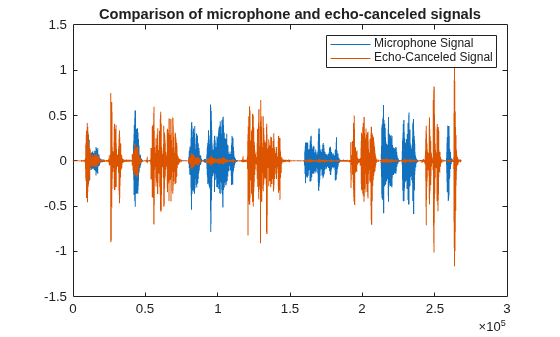
To observe the echo cancellation, plot the microphone and the echo-canceled signals.
plot(microphoneSignal)
hold on
plot(echoCanceledSignal)
hold off
title("Comparison of microphone and echo-canceled signals")
legend("Microphone Signal","Echo-Canceled Signal")
To play the generated speech signals, create an audiostreamer object.
as = audiostreamer(SampleRate=fs);
To play the microphone signal, uncomment this line.
% play(as,microphoneSignal)To play the echo-canceled signal, uncomment this line. Observe that the echo reduces significantly after the initial few seconds as the adaptive filtering algorithm converges.
% play(as,echoCanceledSignal)Prepare MATLAB Code for Code Generation
Add the %#codegen directive at the top of the AcousticEchoCanceler.m and cancelEcho.m files. This directive instructs the Code Analyzer to highlight MATLAB coding patterns that are not supported for C/C++ code generation.
classdef AcousticEchoCanceler < handle %#codegen

function [microphoneSignal,echoCanceledSignal] = cancelEcho(frameSize,nearSpeechSignal,farSpeechSignal) %#codegen
In this example, the Code Analyzer does not highlight any issues in these files.
Next, to identify functions and objects in your code that are not supported for code generation, call this function in the Command Window:
coder.screener("cancelEcho.m")The Code Generation Readiness report opens. The report shows that the acousticRoomResponse function, that is used to initialize the roomEchoAdder property, is not supported for code generation.
To fix this issue, you must update the AcousticEchoCanceler.m file. Use the coder.extrinsic (MATLAB Coder) and coder.const (MATLAB Coder) directives to constant-fold the acousticRoomResponse function call at code generation time. The constant folding is justified because you do not need to generate a new room response every time you simulate the microphone signal for your inputs. You just want to generate a fixed room response for all your simulations.
coder.extrinsic("acousticRoomResponse");
ir = coder.const(@acousticRoomResponse,[5 7 3],[2 2 2],[3 5 2],"SampleRate",obj.fs,"ImageSourceOrder",15,"MaxNumRayReflections",24);
The updated class file AcousticEchoCancelerModified.m is attached with this example. The class in this file is named AcousticEchoCancelerModified to match the file name. The attached file canceledEchoModified.m contains the updated entry-point function that instantiates this renamed class.
Run the coder.screener command on the updated file cancelEchoModified.m:
coder.screener("cancelEchoModified.m")The code generation readiness report shows no issues.
Generate and Run C++ MEX Function
Before generating standalone code, it is a best practice to generate and run a MEX function for the MATLAB entry-point function. This step enables you to detect code generation errors and run-time errors early in the development process.
Use the codegen (MATLAB Coder) command to generate a C++ MEX function for the entry-point function cancelEchoModified. Specify the frame size input to be a double scalar and the vector inputs to be unbounded column vectors of the double type. To make sure that the constant-folded function call in generated code produces the same result as MATLAB execution, reset the random number generator before calling the codegen command.
t = coder.typeof(0,[Inf 1]);
rng("default");
codegen -lang:c++ cancelEchoModified -args {0,t,t} -report
Code generation successful: View report
Run the generated MEX function cancelEchoModified_mex. You get a run-time error.
% [microphoneSignal_mex,echoCanceledSignal_mex] = cancelEchoModified_mex(frameSize,v,x); % ERRORS OUTThe orientations of the vectors supplied at run time are incompatible with the variable-size inputs that were specified at code generation time. To perform this indexing operation, either force the run-time input vectors to have the same orientation or regenerate the code specifying fixed-sized inputs.
To investigate the cause of this error, examine the code generation report.

In the process method, the code generator determines the type of the expression obj.roomEchoAdder(farSpeechFrame) as a :Inf x :1 matrix whose both dimensions are variable-size. To force the type of this expression to be a column vector with dimensions :Inf x 1, convert farSpeechEcho to a column vector explicitly:
farSpeechEcho = farSpeechEcho(:);
The updated class file AcousticEchoCancelerCodegenCompatible.m is attached with this example. The class in this file is named AcousticEchoCancelerCodegenCompatible to match the file name. The attached file cancelEchoCodegenCompatible.m contains the updated entry-point function that instantiates this renamed class.
Generate code again for the updated MATLAB code.
rng("default");
codegen -lang:c++ cancelEchoCodegenCompatible -args {0,t,t} -report
Code generation successful: View report
Run the generated MEX function cancelEchoModified_mex.
[microphoneSignal_mex,echoCanceledSignal_mex] = cancelEchoCodegenCompatible_mex(frameSize,v,x);
Check that outputs of the generated MEX function and the MATLAB function agree within the default tolerance for double-precision values.
tf_microphoneSignal = all(ismembertol(microphoneSignal,microphoneSignal_mex));
tf_echoCanceledSignal = all(ismembertol(echoCanceledSignal,echoCanceledSignal_mex));

disp("The microphone signal outputs for MATLAB and MEX agree: " + tf_microphoneSignal)
The microphone signal outputs for MATLAB and MEX agree: true
disp("The echo-canceled signal outputs for MATLAB and MEX agree: " + tf_echoCanceledSignal)The echo-canceled signal outputs for MATLAB and MEX agree: true
Generate C++ Static Library and Verify Execution Using SIL Interface
To generate a C++ static library and an associated software-in-the-loop (SIL) interface, create a coder.EmbeddedCodeConfig (MATLAB Coder) object. Specify the target language as C++ and the verification mode as SIL.
cfg = coder.config("lib");
cfg.VerificationMode = "SIL";
cfg.TargetLang = "C++";
rng("default");
codegen -config cfg cancelEchoCodegenCompatible -args {0,t,t} -report
Code generation successful: View report
Run the generated SIL MEX function cancelEcho1_sil.
[microphoneSignal_sil,echoCanceledSignal_sil] = cancelEchoCodegenCompatible_sil(frameSize,v,x);
### Starting SIL execution for 'cancelEchoCodegenCompatible'
    To terminate execution: clear cancelEchoCodegenCompatible_sil
Check that outputs of the generated SIL MEX function and the MATLAB function agree within the default tolerance for double-precision values.
tf_microphoneSignal = all(ismembertol(microphoneSignal,microphoneSignal_sil));
tf_echoCanceledSignal = all(ismembertol(echoCanceledSignal,echoCanceledSignal_sil));

disp("The microphone signal outputs for MATLAB and SIL MEX agree: " + tf_microphoneSignal)
The microphone signal outputs for MATLAB and SIL MEX agree: true
disp("The echo-canceled signal outputs for MATLAB and SIL MEX agree: " + tf_echoCanceledSignal)The echo-canceled signal outputs for MATLAB and SIL MEX agree: true
Finally, clear the loaded SIL MEX function from memory.
clear cancelEcho_silSee Also
acousticRoomResponse | dsp.FIRFilter | dsp.FrequencyDomainAdaptiveFilter | codegen (MATLAB Coder) | coder.const (MATLAB Coder) | coder.extrinsic (MATLAB Coder) | coder.EmbeddedCodeConfig (MATLAB Coder)

